CyberPanel Community

Upgrading MariaDB manually

RM
Rana Muhammad Usman Nasir #1

Note: These instructions seem to be out of date/incomplete. Before we update the official doc, it would be good to have extra input. Please see the comments below for more information and post any issues/changes that you discover.


MariaDB 10.1 is depreciating in the upcoming weeks so Cyberpanel 2.0.3 will come with MariDB 10.5. New installation will be automatically based on that version and older version will be upgraded.

If you don’t see the latest version after upgrade or mariadb doesn’t work for you any more, here are the steps to fix that

  1. Make sure that the repo has been updated

cat /etc/yum.repos.d/mariadb.repo

If the output has 10.5 in the string you are okay to continue, if not, please edit the file and update it to 10.5

  1. Backup MariaDB’s configuration files

Run the following commands to backup the current configuration

cp /etc/my.cnf /etc/my.cnf.bak 
mkdir /etc/cnfbackup 
cp -R /etc/my.cnf.d/ /etc/cnfbackup/
  1. Remove the current version

Run these commands to remove MariaDB
For Centos

yum remove MariaDB-server MariaDB-client galera MariaDB-devel MariaDB-shared -y

For Ubuntu

apt remove MariaDB-server MariaDB-client galera MariaDB-devel MariaDB-shared -y

  1. Install MariaDB 10.5

For Centos

yum --enablerepo=mariadb -y install MariaDB-server MariaDB-client MariaDB-devel MariaDB-shared -y

For Ubuntu

apt install MariaDB-server MariaDB-client MariaDB-devel MariaDB-shared -y

  1. Restore the backed up files
cp -f /etc/my.cnf.bak /etc/my.cnf 
rm -rf /etc/my.cnf.d/ 
mv /etc/cnfbackup/my.cnf.d /etc/
  1. Enable and start MariaDB 10.5
systemctl enable mariadb
systemctl start mariadb
53 replies
Ni
Nick #2

@usmannasir As I detailed in this thread on the facebook group, MariaDB 10.3 is still installed with all versions of linux. The problem is that the distros haven’t updated their packages beyond 10.3, so the instructions you’ve provided here don’t help. You need to change the packages manually.

Ni
Nick #3

I think have finally properly upgraded to MariaDB v10.6 on Ubuntu 20.04. Here is what I did. The process should be similar for other OSs, but please be careful and post any variations that you discover below.

Note: there’s a lot of extra steps included here just to be extra thorough. For instance, it isn’t absolutely necessary to check the packages installed/uninstalled, check status of mariadb etc…

1. Review Official MariaDB Instructions

2. Backup

I didn’t take any backups, but the method written above by Usman or ones listed in the articles should work. Instead, I just made a snapshot of my entire server, which I DID end up needing once because something broke.

3. Config mariadb for proper shutdown

  • run cat /etc/cyberpanel/mysqlPassword to get your mariadb root password
  • run mysql -u root -p
  • enter password

Run these commands within mariadb cli

SET GLOBAL innodb_fast_shutdown = 1;
XA RECOVER;
exit;

4. Remove MariaDB

  • run systemctl stop mariadb
  • confirm it is stopped with systemctl status mariadb. The output is convoluted, but look for following lines
Active: inactive (dead) since Wed 2022-03-16 14:13:25 CST; 1s ago
Status: "MariaDB server is down"
  • run apt list --installed | grep -i -E "mariadb|galera" to confirm which packages will be removed
  • run apt remove "*mariadb*" "galera*" -y
  • run apt list --installed | grep -i -E "mariadb|galera" again to confirm all those packages were removed

5. Install New Version of MariaDB

  • run the following command, changing 10.6 for whichever version you would like to install. 10.11 is the latest LTS version.
curl -LsS https://r.mariadb.com/downloads/mariadb_repo_setup | sudo bash -s -- --mariadb-server-version="mariadb-10.6"
  • run apt update
  • run apt install mariadb-server libmariadb-dev -y
  • when prompted with this, enter N
Configuration file '/etc/mysql/mariadb.conf.d/50-server.cnf'
 ==> Modified (by you or by a script) since installation.
 ==> Package distributor has shipped an updated version.
   What would you like to do about it ?  Your options are:
    Y or I  : install the package maintainer's version
    N or O  : keep your currently-installed version
      D     : show the differences between the versions
      Z     : start a shell to examine the situation
 The default action is to keep your current version.
*** 50-server.cnf (Y/I/N/O/D/Z) [default=N] ?
  • run apt update && apt upgrade -y to update all packages again (there’s a mysql-common package that got updated from 5.8 to 10.6.7 for me)

  • run apt list --installed | grep -i -E "mariadb|galera" to confirm which packages were installed
    Note: don’t worry that libmariadbclient-dev is not installed as it was before. It appears to have been deprecated/replaced by libmariadb-dev, which was installed.

  • run systemctl enable mariadb

  • run systemctl start mariadb

  • run systemctl status mariadb to confirm version and active

  • run mysql_upgrade -u root -p.

This is CRITICAL, and not mentioned in the method above. Here are detailed investigations into what mysql_upgrade does

  • enter password from previously

Note: it might be worth upgrading CyberPanel after all of this. It is harmless, might pre-emptively fix any issues, and might even give you some minor updates that have not yet been included in an official release. Run

sh <(curl https://raw.githubusercontent.com/usmannasir/cyberpanel/stable/preUpgrade.sh || wget -O - https://raw.githubusercontent.com/usmannasir/cyberpanel/stable/preUpgrade.sh) 

as per the instructions here Upgrading CyberPanel - Docs

NK
Nitesh Kunnath #4

Great info @nick.chomey . But you missed to mention about the file /etc/mysql/mariadb.conf.d/50-server.cnf' which it will ask whether to keep the old file or the replace it with new.

Ni
Nick #5

Ah, yes. Thanks. I kept the old file (default setting) - is that correct?

What we really need to do is update Usman’s original Documentation post in this topic, as its a very important topic. But it should also include instructions for RHEL, which I don’t know anything about.

The topic is a Wiki Post, which means you/anyone can edit it. Do you think you could take what I’ve written, add what is necessary for RHEL, and make any other relevant changes?

Also, please see the comment I just made here about MariaDB errors that are ONLY occurring when CyberPanel is installed on Ubuntu (no issue when using Ubuntu without CP). MariaDB errors on Ubuntu 20.04 ONLY when using CyberPanel - Support and Discussion / General Discussion - CyberPanel Community

ho
hongson #6

Try this way on almalinux 8, but it will also remove pure-ftpd ?

Ni
Nick #7

No idea. Try it on a dummy server!

LM
Luciano Milani #8

Working and tested!!!

Requirements:

  1. A server running Ubuntu 20.04 LTS.
  2. A version of MariaDB running that is not the latest.
  3. Root access to the server.
  4. Cyber Panel in lastest version

Upgrade MariaDB in Ubuntu 20.04 LTS

First update and upgrade your system:

$ sudo apt upgrade && sudo apt upgrade -y

A MariaDB upgrade in Ubuntu requires uninstalling the old version and installing the new version. The best practice is to take a backup before changing the existing server if issues arise.

These issues may corrupt the database files, preventing you from quickly reverting to the older version. A backup allows restoration if needed and can be deleted once the upgrade is successful.

Step 1: Backup MariaDB (use your way…)

Step 2: Stop MariaDB

Stop MariaDB from running using the following command.

$ sudo systemctl stop mariadb

Step 3: Uninstall the Old Version of MariaDB

The upgrade process requires uninstalling the old version before installing the new version of MariaDB. Use the following command to uninstall the previous version.

$ sudo apt-get remove mariadb-server

Step 4: Install the Latest Version of MariaDB on Ubuntu

Install the latest version of MariaDB via the APT package manager (Debian/Ubuntu).

  1. Configure the APT package repository. This step involves adding a key for the MariaDB server repo and then updating.

$ sudo apt install wget

$ wget https://downloads.mariadb.com/MariaDB/mariadb_repo_setup

$ echo "fd3f41eefff54ce144c932100f9e0f9b1d181e0edd86a6f6b8f2a0212100c32c mariadb_repo_setup"

$ chmod +x mariadb_repo_setup

$ sudo ./mariadb_repo_setup \ --mariadb-server-version="mariadb-10.11"

$ sudo apt update

  1. Install MariaDB and package dependencies. Installing additional packages may require additional plugins.

$ sudo apt install mariadb-server

  1. Once you start the server processes, run the below utility to upgrade the data directory. MariaDB comes with the mariadb-upgrade utility, which identifies and corrects the compatibility issues in the latest version.

$ sudo mariadb-upgrade

  1. You can now enable and start MariaDB with the following command.

$ sudo systemctl enable mariadb
$ sudo systemctl start mariadb

that’s it… it worked very well in this environment

Ubuntu 20.04
Cyber Panel latest version

Je
Jestevala #9

Can someone help me.
The first option:
cat /etc/yum.repos.d/mariadb.repo

i get error: No such file or directory

p4
p4trk #12

this still works, just tested link

de
deewinc #13

Will the update takedown a website?

ha
halbertech #14

You are correct. For some reason it was failing when I tried. Must have been on my end.

ha
halbertech #15

If the website has a dependency on mariadb like WP then it will be disrupted until you can successfully upgrade. I bricked my sandbox test WP sites before I got it working smoothly using these instructions. Just perform a backup a full backup before you attempt to upgrade.

de
deewinc #16

How long does the upgrade take?

I have to find a time slot with the least traffic to perform this task.

ha
halbertech #17

I was up and running between 7 - 10 minutes. However, duration will ultimately depend on your environment & use case (#/size WP sites, other dependent apps, etc.)

de
deewinc #18

Great. I think this is okay. Cloudflare will serve the cached page during the upgrade and only a few visitors will be affected. Thanks for the info.

de
deewinc #19

It still looks like Cyberpanel still comes with an older version of MariaDB v10.3.

I have double-checked this on multiple Cyberpanel installation on Ubuntu 20 and 22 and after afresh install, MariaDB shows version 10.3.

UPDATE (December 1, 2023)
Looks like @usmannasir silently fixed this flaw. Cyberpanel now installs with MariaDB 10.6.

de
deewinc #20

I have a zero-downtime approach to upgrading MariaDB.

  1. Connect your website to Cloudflare.

  2. Enable API access on your current CyberPanel installation. Let’s call it the MAIN SERVER.

  3. Get a TEMPORARY SERVER, preferably from Hetzner (They bill based on hours. You’ll need around 3 hours or you can take your time)

  4. Install CyberPanel on your temporary server.

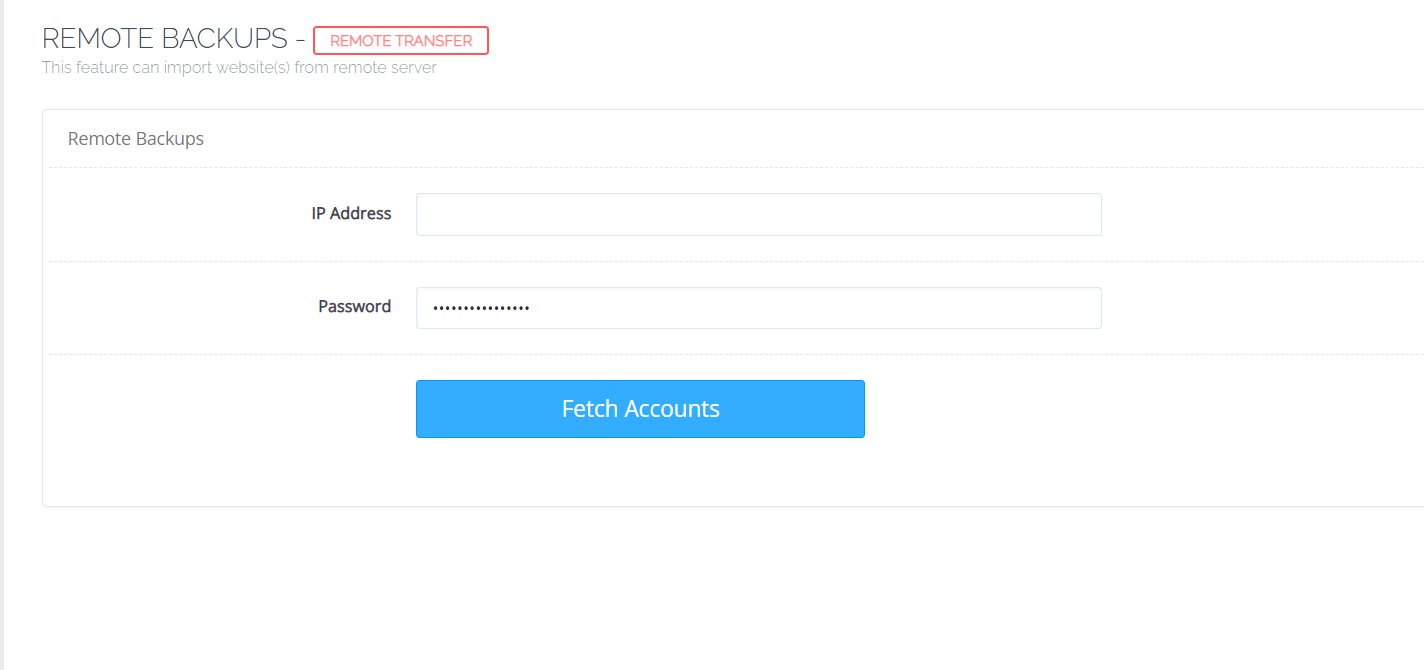
  5. Access CyberPanel on your temporary server and go Menu > Main > Backup > Remote Backup.

  6. Enter the IP Address and Admin password of your main server. This only works if your main server access to the CyberPanel port is set to 8090. If you’ve changed it to something else, switch it back to 8090.

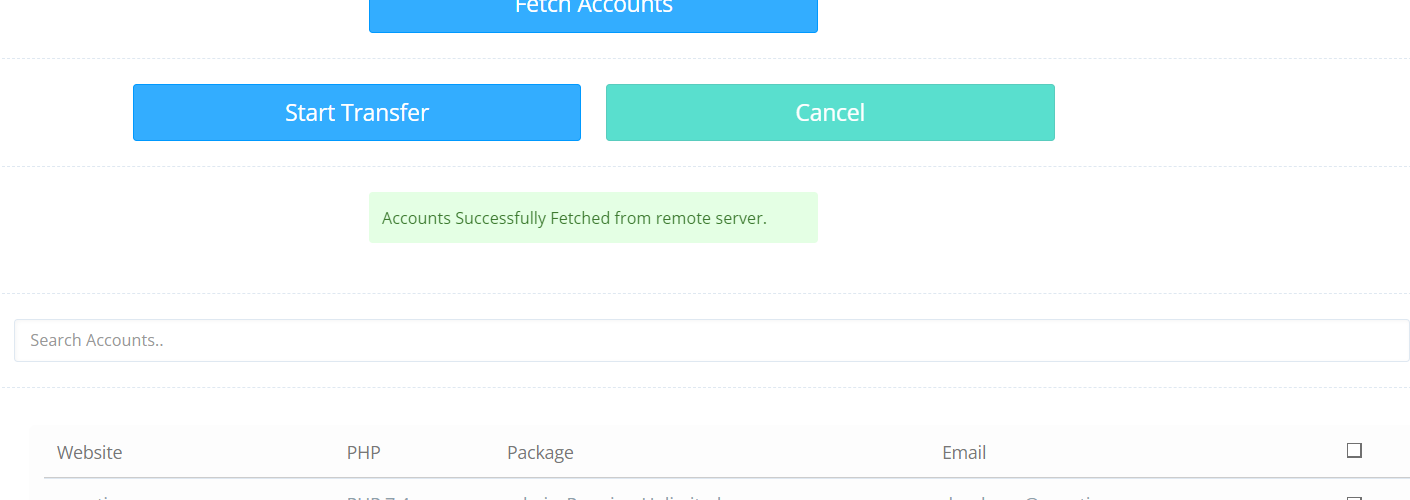
  1. Click the Fetch Accounts button that shows after entering the details in Step 6.

  2. Select the sites that show up and choose start transfer.

It may take some time, depending on the size of your website (s).

This action moves your whole site including databases, SSL certificates, mail accounts, and pretty much everything associated with the sites on your main server.

  1. The Remote Backup file for your site will be saved on your temporary server’s root folder accessible under Home > Backup > Transfer-1234 > backup-yoursite.com-date.tar.

  2. Transfer the .tar file to the Home > Backup folder. I used SFTP access. Somehow, moving/copying the file using CyberPanel’s Root File Manager didn’t work.

  3. Go back to Step 5 in CyberPanel on your temporary server, but this time select Restore Backup.

  4. Choose Select Backup and pick the .tar backup file for your website. This may take some time and CyberPanel will show you the steps being undertaken from start to finish.

  5. Once backup has been restored, confirm that your website is working internally by going to CyberPanel on your temporary server and access Menu > Main > List Websites. Choose Manage next to your website under that submenu. Then click Preview next to the domain name under Manage.

  6. Once confirmed, go to Cloudflare and change the IP address on the A Record of your domain to that of your temporary server. This switch is instant and Cloudflare will start pointing users to your website on the temporary server.

  7. Now go back to your main server and do a fresh install of the operating system.

  8. Once done, open SSH on your main server and install a current copy of MariaDB. First, check for MariaDB version using the script mariadb --version.

Ubuntu will inform you that MariaDB isn’t installed and it will suggest the script you need to run to install the latest MariaDB. Run it to install MariaDB, then use the script under Step 16 to confirm the installed version.

  1. Now repeat Steps 4 - 14 but this time you will be reverting your website from the temporary server back to your main server. And don’t forget to double-check the DNS Records on both Cloudflare and CyberPanel.

  2. Destroy the temporary server.

UPDATE: December 3, 2023

It looks like @usmannasir has silently made some changes.

From Step 8 - 12: The backup is now being automatically installed on the new server (temporary server) on OpenLiteSpeed.

Unfortunately, Usman has broken the feature for LiteSpeed Enterprise users. It’s not importing backups from the remote server nor installing them, despite showing a log of events claiming everything has been done successfully.

Sh
Shahbaaz #21

Hi,

So if I upgrade the cyber panel will the MariaDB get upgraded to 10.6? or will I need to install it afresh?

de
deewinc #22

You can try run the upgrade and let us know. As per @usmannasir , updating Cyberpanel should also upgrade MariaDB. If it doesn’t then that means that’s a bug that needs to be fixed.

Sh
Shahbaaz #23

@deewinc Hi,

So I upgraded to the latest version of cyperpanel and I can confirm that the MariaDB version did not change.

p4
p4trk #27

I have 2 but both have active websites running for other people, is that a problem? @shoaibkk

p4
p4trk #29

Send me instructions on what to do, remove sensitive data and give you access and I can do it all today or this weekend :slight_smile: whatever I can do to help! @usmannasir @shoaibkk

Happy to help!

MM
Mohamed Maher #30

I confirm i have same problem, upgrade cp doesn’t upgrade mariadb

pa
pagenet #33

So I tried the MariaDB method spelled out by @lmilani verbatim. Somehow, it installed MariaDB Version 11.2 instead of 10.11 which was specified in Step 4.

Everything seems to be working fine. In fact, everything, and I mean everything is 3x faster including Cyberpanel, Wordpress and my other PHP programs too.

Question is … Is there any real reason I should downgrade MariaDB back down to 10.11 … or should 11.2 work fine from here on in? Are there any known incompatibilities? or any other reason everyone isn’t upgrading to MariaDB version 11.2?

mo
morphinestyle #34

Hello @usmannasir, I have two servers with Cyberpanel + Add-ons, one of which with MariaDB 10.3 and the other where I installed MariaDB 10.11 LTS already before the installation of Cyberpanel (by modifying the repository).

Do you plan to include an automatic update of MariaDB in the next Cyberpanel updates?

I would feel safer if this was handled by Cyberpanel’s automatic updater rather than doing an upgrade manually.

In this case, how would it behave with my two installations of MariaDB: one at version 10.3 (standard) and one at version 10.11, do I run the risk of something going wrong on the server where I installed MariaDB10.11?

RM
Rana Muhammad Usman Nasir #35

I’ve just completed the code of following upgrades on Ubuntu 22 and working fine for our sites

10.6 -> 10.11
10.6 -> 11.2.2

But the problem is MySQL update is bit tricky and it may not work out in all use-cases.

@morphinestyle For your 10.3, maybe you can snapshot the server and give us access to see if it can safely upgrade to 10.11 or 11.2 as well.

RM
Rana Muhammad Usman Nasir #36

As per MariaDB site

This is a short term release which is maintained for one year only. The latest long-term release is MariaDB 10.11, which is maintained for five years.

Better stick to 10.11 for now.

mo
morphinestyle #37

I know how snapshot a Vps, but: how can i snapshot a dedicated server?

RM
Rana Muhammad Usman Nasir #38

Nope, in dedicated server that won’t be possible. (The providers i’ve used so far does not offer such feature)

Ni
Nick #39

@usmannasir can i suggest that you just set 10.11 to default in new Cyberpanel installations? All you have to do is add the repo for it then apt install will install it by default.

Sh
Shahbaaz #42

@usmannasir
Sadly updating Cyber Panel from an older version to the latest still does not upgrade MariaDB :frowning:

RM
Rana Muhammad Usman Nasir #43

I am sorry, it won’t.

All the updates are not yet pushed to the new stable version.

No
Nourin #44

How soon can we expect it on Stable? Mine is Ubuntu 20.04 with MaraDB 10.3 and I am getting warnings in WordPress websites.

Ni
Nick #46

Why not deploy a new server first and before installing cyberpanel, just add the mariadb repo

curl -LsS https://r.mariadb.com/downloads/mariadb_repo_setup | sudo bash -s -- --mariadb-server-version="mariadb-10.11"

Then run the normal cyberpanel install script.

Then migrate your site to the new server however you like - manually, or a plugin like duplicator.

No
Nourin #47

I only have one server and I have live websites on it. So I am kind of worried whether those website data will be effected if I upgrade by removing and adding the latest version. And I only upgraded the website from Centos 7 to Ubuntu 20.04, and I have done all the migration. So setting up the server again means lots of work. Is there anyway to make sure the data in the base will not get effected?

Thank you.

RM
Rana Muhammad Usman Nasir #48

If you don’t have sys-admin experience I would still recommend setting up a new server and transfer.

Else do a backup of your mysql data and perform the upgrade.

No
Nourin #49

Took A snapshot
Backed up all websites and downloaded them
Took mysqldump 2 times.
Then done this.
No need of the above 3. No need to restore the sql dump Tried restart and checked. This worked like a charm.
This should be like an official documentation.
Thank you.

Ni
Nick #50

@usmannasir

Perhaps you guys could consolidate all of the useful information in this thread into the main post?

I already provided detailed steps that work well, and at least a couple people more or less duplicated that information in other comments…

Ma
Master3395 #53

How to Upgrade MariaDB on Linux (AlmaLinux 8.8 and later)

Upgrade MariaDB on AlmaLinux

Step #1: Check the MariaDB and AlmaLinux Versions

You can check the current version of MariaDB and AlmaLinux by executing the following commands:

  • ~]# mysql -V
  • ~]# cat /etc/redhat-release

Here is the output:

[root@root ~]# mysql -V
mysql  Ver 15.1 Distrib 10.5.21-MariaDB, for Linux (x86_64) using readline 5.1
[root@root ~]# cat /etc/redhat-release 
AlmaLinux release 8.8 (Sapphire Caracal)

Step #2: Back Up the Database

Before performing a MariaDB upgrade, creating a backup or dump of the existing databases and database configuration file is essential.

To dump the database, use the following command:

  • ~]# mysqldump --all-databases > /tmp/all-database-backup.sql

To copy the database directory into a different folder, use the following command:

  • ~]# cp -a /var/lib/mysql /var/lib/mysql_oldbackup

To back up the configuration file, use the following command:

  • ~]# cp -a /etc/my.cnf /etc/my.cnf_oldbackup

Note that the contents of /etc/my.cnf.d/ also need to be backed up if the file exists.

Step #3: Uninstall the Current MariaDB Repository

Before installing the newest version, uninstall the older MariaDB repositories. You can use the following command to stop the MariaDB service:

  • ~]# systemctl stop mariadb

To confirm MariaDB’s current status, use the following command:

  • ~]# systemctl status mariadb

To rename or move the current repo file, use the following command:

  • ~]# mv /etc/yum.repos.d/mariadb.repo /etc/yum.repos.d/mariadb.repo_oldbackup

Step #4: Add the New MariaDB Repository (“Repo”)

Before creating a new MariaDB repository, you must update all the packages. You can use the following command to update all the packages:

  • ~]# sudo dnf update -y

You can now create a new repo file for the latest MariaDB version:

  • ~]# vi /etc/yum.repos.d/mariadb.repo

Then, add the following details to the /etc/yum.repos.d/mariadb.repo file and save the file:

[mariadb]
name = MariaDB
baseurl = http://yum.mariadb.org/10.11.6/rhel8-amd64
module_hotfixes=1
gpgkey=https://yum.mariadb.org/RPM-GPG-KEY-MariaDB
gpgcheck=1

Step #5: Uninstall the Old MariaDB Version

You can uninstall the old version of MariaDB using the following command:

  • ~]# sudo dnf remove MariaDB-server -y

To clean the repository cache on your server, use the following command:

  • ~]# sudo dnf clean all

Step #6: Install the Latest MariaDB Version

Now, you are ready to upgrade MariaDB. To install the latest MariaDB version, use the following command:

  • ~]# sudo dnf install MariaDB-server -y

Here is the output:

Output
[root@root ~]# sudo dnf install MariaDB-server -y
AlmaLinux 8 - BaseOS                                                                                                                     6.0 MB/s | 4.0 MB     00:00    
AlmaLinux 8 - AppStream                                                                                                                   16 MB/s |  11 MB     00:00    
AlmaLinux 8 - Extras                                                                                                                      32 kB/s |  18 kB     00:00    
MariaDB                                                                                                                                  1.0 MB/s | 620 kB     00:00    
Dependencies resolved.
=========================================================================================================================================================================
 Package                                          Architecture                      Version                                   Repository                            Size
=========================================================================================================================================================================
Installing:
 MariaDB-server                                   x86_64                            10.10.5-1.el8                             mariadb                               27 M

—-
—-

Installed:
  MariaDB-server-10.10.5-1.el8.x86_64  boost-program-options-1.66.0-13.el8.x86_64  galera-4-26.4.14-1.el8.x86_64  libpmem-1.6.1-1.el8.x86_64  lsof-4.93.2-1.el8.x86_64 
  socat-1.7.4.1-1.el8.x86_64          

Complete!

To install the most common MariaDB packages, as part of the overall MariaDB upgrade, use the following command:

  • ~]# sudo dnf install galera-4 MariaDB-client MariaDB-shared MariaDB-backup MariaDB-common -y

Step #7: Start MariaDB

To start the MariaDB service, use the following command:

  • ~]# sudo systemctl start mariadb

Step #8: Set MariaDB to Start at Boot-Time

To set MariaDB to start at boot time, use the following command:

  • ~]# sudo systemctl enable mariadb

Here is the output:

[root@root ~]# sudo systemctl enable mariadb 
Created symlink /etc/systemd/system/multi-user.target.wants/mariadb.service → /usr/lib/systemd/system/mariadb.service.

Step #9: Upgrade MariaDB

To upgrade MariaDB, use the following command:

  • ~]# mysql_upgrade

Here is the output:

Output
[root@root ~]# mysql_upgrade 
Major version upgrade detected from 10.5.21-MariaDB to 10.10.5-MariaDB. Check required!
Phase 1/7: Checking and upgrading mysql database
Processing databases
mysql
mysql.column_stats                                 OK
mysql.columns_priv                                 OK
mysql.db                                           OK
mysql.event                                        OK
mysql.func                                         OK
mysql.gtid_slave_pos                               OK
mysql.help_category                                OK
mysql.help_keyword                                 OK
mysql.help_relation                                OK
mysql.help_topic                                   OK
mysql.host                                         OK
mysql.index_stats                                  OK
mysql.innodb_index_stats                           OK
mysql.innodb_table_stats                           OK
mysql.plugin                                       OK
mysql.proc                                         OK
mysql.procs_priv                                   OK
mysql.proxies_priv                                 OK
mysql.roles_mapping                                OK
mysql.servers                                      OK
mysql.table_stats                                  OK
mysql.tables_priv                                  OK
mysql.time_zone                                    OK
mysql.time_zone_leap_second                        OK
mysql.time_zone_name                               OK
mysql.time_zone_transition                         OK
mysql.time_zone_transition_type                    OK
mysql.transaction_registry                         OK
mysql.user                                         OK
Phase 2/7: Installing used storage engines... Skipped
Phase 3/7: Fixing views
Phase 4/7: Running 'mysql_fix_privilege_tables'
Phase 5/7: Fixing table and database names
Phase 6/7: Checking and upgrading tables
Processing databases
information_schema
performance_schema
Phase 7/7: Running 'FLUSH PRIVILEGES'
OK

Step #10: Check the Current MariaDB Version

Use the following command to check and verify the currently installed MariaDB version:

  • ~]# mysql -V

Here is the output:

[root@root ~]# mysql -V
mysql  Ver 15.1 Distrib 10.10.5-MariaDB, for Linux (x86_64) using readline 5.1
[root@root ~]# 

Congratulations on completing a successful MariaDB upgrade!

Secure the MariaDB Database

The most recent version of MariaDB has been set up on AlmaLinux 8. You can now secure the MariaDB Database by using the following command:

  • ~]# sudo mysql_secure_installation

Here is the output:

Output
[root@root ~]# sudo mysql_secure_installation

NOTE: RUNNING ALL PARTS OF THIS SCRIPT IS RECOMMENDED FOR ALL MariaDB
      SERVERS IN PRODUCTION USE!  PLEASE READ EACH STEP CAREFULLY!

To log into MariaDB to secure it, we'll need the current
password for the root user.  If you've just installed MariaDB, and
you haven't set the root password yet, the password will be blank,
so you should just press enter here.

Enter current password for root (enter for none): 
OK, I successfully used the password, moving on...

Setting the root password ensures that nobody can log into the MariaDB
root user without the proper authorization.

Set root password? [Y/n] Y
New password: 
Re-enter new password: 
Password updated successfully!
Reloading privilege tables..
 ... Success!


By default, a MariaDB installation has an anonymous user, allowing anyone
to log into MariaDB without having to have a user account created for
them.  This is intended only for testing, and to make the installation
go a bit smoother.  You should remove them before moving into a
production environment.

Remove anonymous users? [Y/n] Y
 ... Success!

Normally, root should only be allowed to connect from 'localhost'.  This
ensures that someone cannot guess at the root password from the network.

Disallow root login remotely? [Y/n] Y
 ... Success!

By default, MariaDB comes with a database named 'test' that anyone can
access.  This is also intended only for testing and should be removed
before moving into a production environment.

Remove the test database and access to it? [Y/n] Y
 - Dropping test database...
 ... Success!
 - Removing privileges on test database...
 ... Success!

Reloading the privilege tables will ensure that all changes made so far
will take effect immediately.

Reload privilege tables now? [Y/n] Y
 ... Success!

Cleaning up...

All done!  If you've completed all of the above steps, your MariaDB
installation should now be secure.

Thanks for using MariaDB!
Ca
CaptainMorgan #54

So what’s the latest advice to upgrade MariaDB on Ubuntu? Will Cyberpanel do this automatically?

Sign in to reply