CyberPanel Community

Important Announcement for people with Upgrade Issues

us
usmannasir #1

Hello Everyone.

Moving forward use upgrade from Cloud to avoid any issues during upgrade → https://cyberpanel.net/docs/how-to-upgrade-your-cyberpanel-using-cyberpanel-cloud/

For people with issues related to upgrade. (Mostly related to emails).

You can contact us through → https://cloud.cyberpanel.net/

And do mention that your email services stopped working after upgrade. We will then enable Cloud Email Debugger in your account, using which you can reset your email configurations to default. It will also check and fix all SSL related issues on your email server.

Have a good day.

24 replies
Al
AlonaG #2

The problem with upgrading to Cloud is the future Fee worth $30/month but the current CyberPanel is Free. I hope you just fix the issue in CyberPanel and not force us to Pay more than the cPanel.

us
usmannasir #5

@AlonaG

I would say again that CONNECT AND UPGRADE + MYSQL OPTIMIZATION is free from cloud.

Its not even $1.5. Go ahead and connect your server to cloud and upgrade if it even ask you for 30 cents then you can come back and complain here.

Ro
RooninStark #6

Hello @usmannasir
I made the connection and it’s successful. Upgrade has some issues. After I choose 2.1.1 and click on the upgrade now it gives me an error without any description.

What can I do to upgrade?
Thanks
Best regards
Roonin

Ro
RooninStark #7

Hi again. Well, I missed the following text out :slight_smile:
After v2.1.1 and above we‘ve added an option in the cloud to perform fail-safe upgrade. (This works only if you are on v2.1.1 or above)

I’m on 2.0.3.

Ok. How can I upgrade it to 2.1.1? Is there any tutorial for this? I couldn’t find any.

thanks again.

Ro
RooninStark #8

Hi again. Please do not ban me because of spammy comments. :slight_smile:

I find a way on how to upgrade it via ssh.

Thank you again.
Best Regards
Roonin

vo
volnei #9

Hi there!

I have connected there and tried update, but i go onli a empty pink error on the bottom of that page. I did the upgrade by myself and had some issues, like pdns, postfix and dovecot dont starting after restart. Even after enable all those services that don’t worked. So i fixed the permissions on /etc/pdns/pdns.conf and now i’m starting each time the restart is need, just will wait some hours to see if the services will keeep alive.

cj
chirag_jain #10

I have started a new machine and it’s on 2.0.3.
when i tried to upgrade with Cyberpanel cloud, it’s giving an error when I select 2.1.1 in the upgrade section. How can 2.0.3 users upgrade to 2.1.1? Please guide. TIA

us
usmannasir #11

After v2.1.1 and above we‘ve added an option in the cloud to perform fail-safe upgrade. (This works only if you are on v2.1.1 or above)

For v2.0.3, use the old upgrade method

Ah
Ahriman #12

Please add support for Ubutnu 21.04

Ma
Master3395 #13

Type your comment> @usmannasir said:

After v2.1.1 and above we‘ve added an option in the cloud to perform fail-safe upgrade. (This works only if you are on v2.1.1 or above)

For v2.0.3, use the old upgrade method

V2.1.1-dev does not work on the cloud yet from what I’ve seen.

LP
LPackman #15

@usmannasir
Just used the FREE MYSQL OPTIMIZATION… Now my server returns error 500 and unable tp start Maria DB. WTF!!!

@RandomFandomOfficial yes this explains why I never get a reply to any of my support requests

we
webixes #16

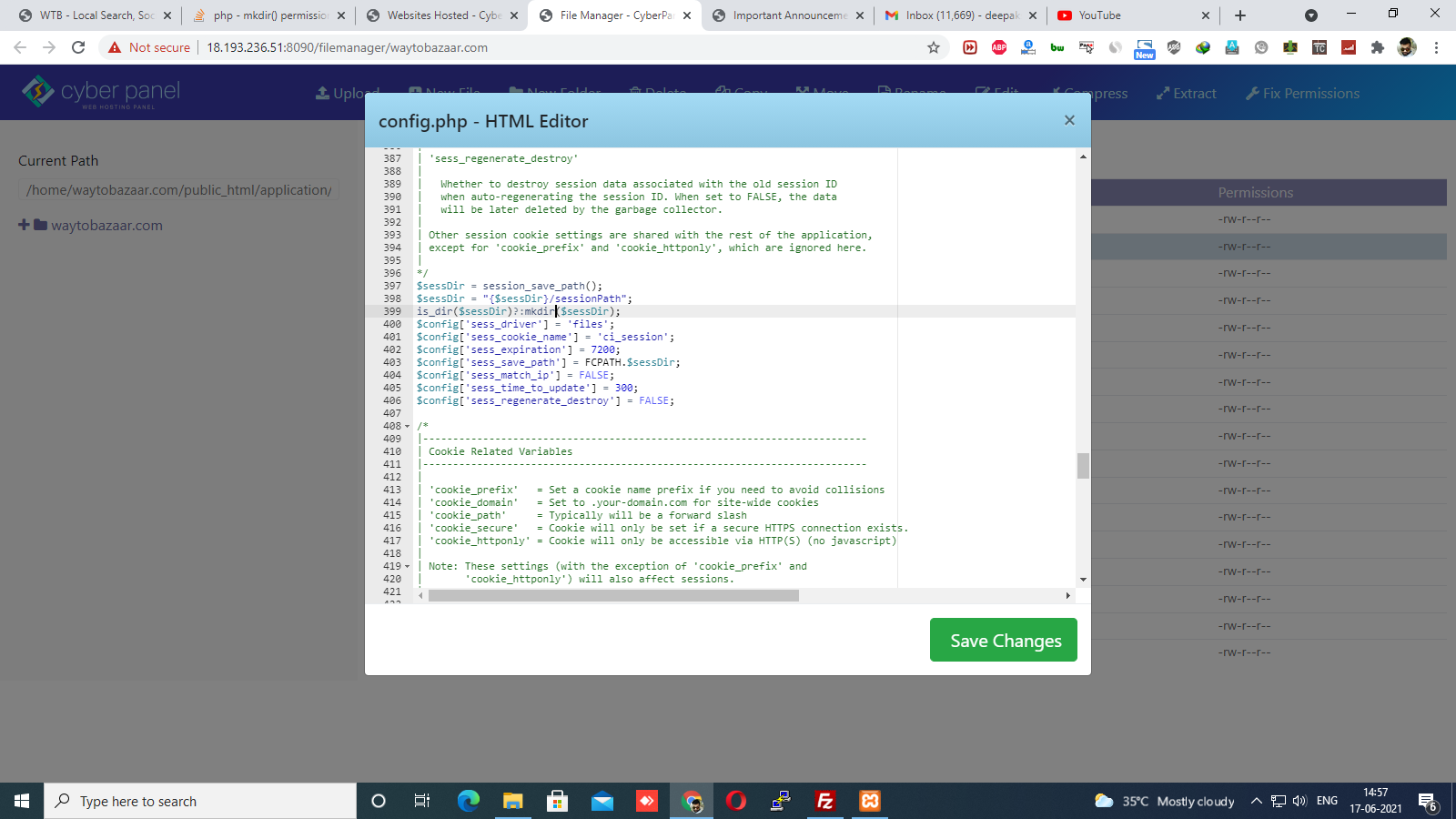
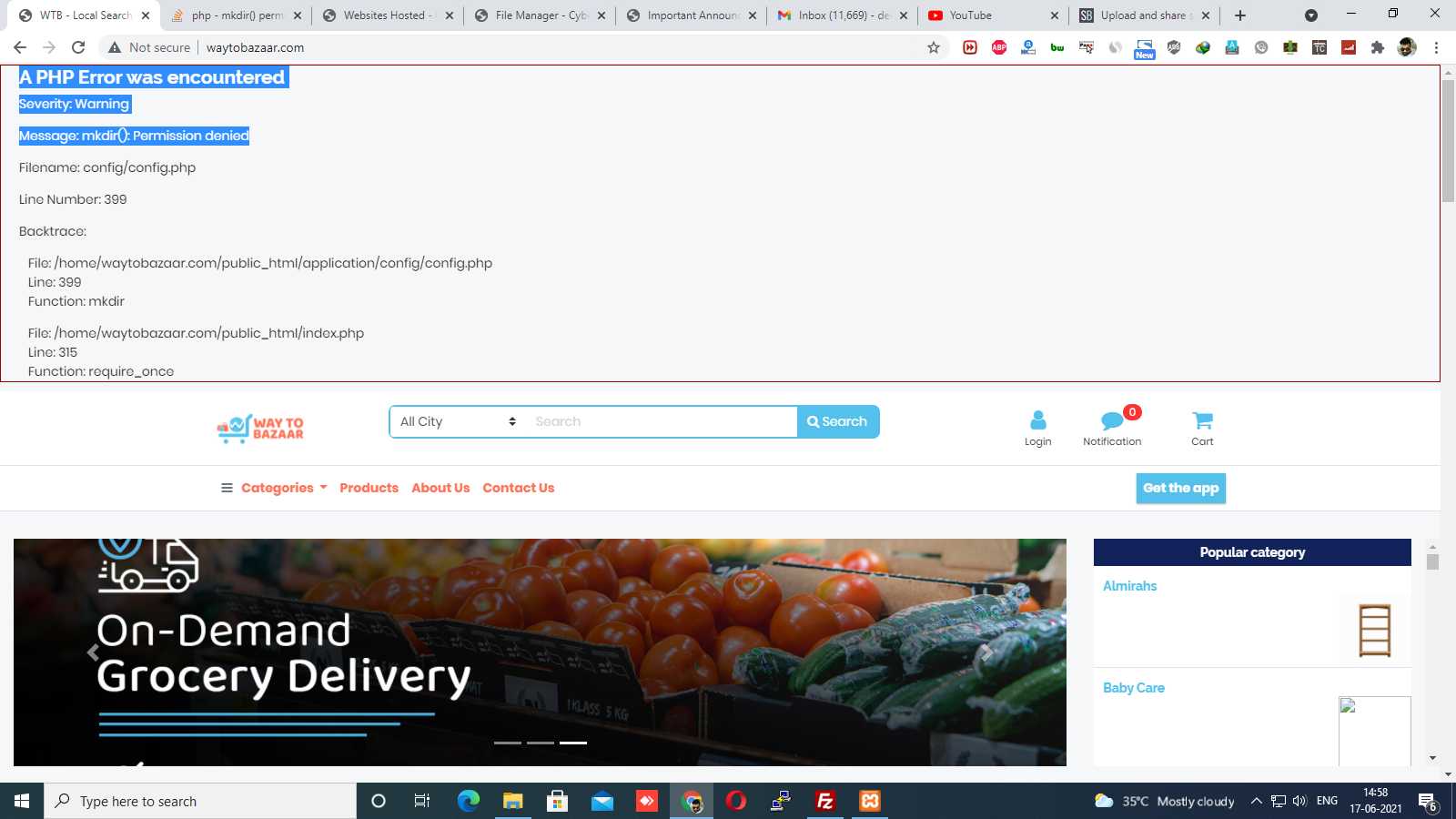
Hello Sir I need one Help My Website getting mkdr permission in Codeignator i try all things I add all permissions but same issue i get please help how to solved this issue in cyberpanel

See backend screenshot

See frontend issue

ra
rashedit #17

I can’t change cyberpanel password at lastest version.
i don’t find it

ra
rashedit #18

Sunddenly My all site not working.
Can’t new wp install
Can’t active/ deactive any plugins.
can’t add new post

Mo
Monty #19

After upgrading, you must specify when emails the Admin has stopped working. We will then add the Cloud Email Debugger to your account using the ability to convert email design backward. This checks and corrects all SSL settings for your email account.

ve
veicular #20

Type your commentCan anyone help me, site just doesn’t run.
4GB 2 core VPS with 7 cent.

I installed cloud.cyberpanel and wordpress, the site with a native theme just doesn’t run.

vp
vpsingh #21

Hello @usmannasir I have already upgraded through command line but getting issues.
Now I want to upgrade it using cyberpanel cloud as you said it will deal with upgrade issues.
I have connected the server to cloud and when I am executing upgrade from cloud, it only shows Error at the bottom right corner and nothing happens.

vp
vpsingh #22

All solutions they provide will fail unless you buy the plans and pay a hefty amount.

ma
maximo #23

I couldn’t renew SSL so I just wondering is that related to upgrade of Ubuntu 20.0 or this issues is related to CyberPanel upgrade?
I am asking because I’ve upgrade CyberPanel in May, since then I didn’t have any serious issues, but when I upgrade Ubuntu, I couldn’t renew SSL ?!
Simply I need manually to install Let’sencrypt and renew SSL. for domain and email
And yes, I had a problem to receive and send emails.

Sign in to reply