CyberPanel Community

Php zip Module isn't being installed by cyberpanel

v1
v1sh4l #1

Hello I installed cyberpanel in my server. Now I see that it doesn’t install php zip extension automatically.

I tried to enable it but it’s not being enabled. I double checked through a script.

Can anyone tell me how to enable it? Thank you.

& It’ll better if cyberpanel installs it automatically.

14 replies
wh
whattheserver #2

What does
yum list installed |grep zip

and this show?
for version in $(ls /usr/local/lsws|grep lsphp); do echo “LSPHP $version”; /usr/local/lsws/${version}/bin/php -i |grep Libzip; done

Also have you restarted LS/OLS since installing them or stopped and started it? Also restart detached php processes or “killall lsphp” as root to ensure its closed stuff

Should look something like this:
[root@wcloud:~]# for version in $(ls /usr/local/lsws|grep lsphp); do echo “LSPHP $version”; /usr/local/lsws/${version}/bin/php -i |grep Libzip; done
LSPHP lsphp70
Libzip version => 1.1.2
LSPHP lsphp71
Libzip version => 1.1.2
LSPHP lsphp72
Libzip version => 1.1.2
LSPHP lsphp73
Libzip version => 1.1.2
[root@wcloud:~]# yum list installed |grep zip
bzip2.x86_64 1.0.6-13.el7 @base
bzip2-devel.x86_64 1.0.6-13.el7 @base
bzip2-libs.x86_64 1.0.6-13.el7 @CentOS
gzip.x86_64 1.5-10.el7 @CentOS
libzip.x86_64 0.10.1-8.el7 @base
lsphp70-zip.x86_64 7.0.33-9.el7 @litespeed-update-mirror
lsphp71-zip.x86_64 7.1.33-3.el7 @litespeed-update-mirror
lsphp72-zip.x86_64 7.2.26-1.el7 @litespeed-mirror
lsphp73-zip.x86_64 7.3.13-2.el7 @litespeed-update-mirror
perl-Compress-Raw-Bzip2.x86_64 2.061-3.el7 @base
unzip.x86_64 6.0-20.el7 @base
zip.x86_64 3.0-11.el7 @base
[root@wcloud:~]#

la
layninn #3

Im having the same issue

yum list installed |grep zip
bzip2.x86_64 1.0.6-13.el7 @base
bzip2-devel.x86_64 1.0.6-13.el7 @base
bzip2-libs.x86_64 1.0.6-13.el7 @CentOS
gzip.x86_64 1.5-10.el7 @CentOS
libzip.x86_64 0.10.1-8.el7 @base
perl-Compress-Raw-Bzip2.x86_64 2.061-3.el7 @base
unzip.x86_64 6.0-20.el7 @base
zip.x86_64 3.0-11.el7 @base

in → /managephp/installExtensions
360 php74 lsphp74-zip ZIP archive management extension for PHP Not-Installed

if i try to install … it says installed…
Loaded plugins: fastestmirror
Loading mirror speeds from cached hostfile

so i have to activate it somewhere else?

wh
whattheserver #4

You know what your right. It looks like lsphp74-zip is missing from the repo and supposed to be included in that rpm but doesn’t show as available in the module when checking php modules.

for version in $(ls /usr/local/lsws|grep lsphp); do echo “LSPHP $version”; /usr/local/lsws/${version}/bin/php -m |grep -i zip;echo “”; done
LSPHP lsphp70
zip

LSPHP lsphp71
zip

LSPHP lsphp72
zip

LSPHP lsphp73
zip

LSPHP lsphp74
[root@wcloud:~]# yum list installed | grep zip
bzip2.x86_64 1.0.6-13.el7 @base
bzip2-devel.x86_64 1.0.6-13.el7 @base
bzip2-libs.x86_64 1.0.6-13.el7 @CentOS
gzip.x86_64 1.5-10.el7 @CentOS
libzip.x86_64 0.10.1-8.el7 @base
lsphp70-zip.x86_64 7.0.33-9.el7 @litespeed-update-mirror
lsphp71-zip.x86_64 7.1.33-3.el7 @litespeed-update-mirror
lsphp72-zip.x86_64 7.2.26-1.el7 @litespeed-mirror
lsphp73-zip.x86_64 7.3.13-2.el7 @litespeed-update-mirror
perl-Compress-Raw-Bzip2.x86_64 2.061-3.el7 @base
unzip.x86_64 6.0-20.el7 @base
zip.x86_64 3.0-11.el7 @base
[root@wcloud:~]# yum install lsphp7*-zip
Loaded plugins: fastestmirror
Loading mirror speeds from cached hostfile

  • base: mirrors.maine.edu
  • epel: d2lzkl7pfhq30w.cloudfront.net
  • extras: mirror.atlanticmetro.net
  • updates: mirrors.advancedhosters.com
    Package lsphp71-zip-7.1.33-3.el7.x86_64 already installed and latest version
    Package lsphp70-zip-7.0.33-9.el7.x86_64 already installed and latest version
    Package lsphp73-zip-7.3.13-2.el7.x86_64 already installed and latest version
    Package lsphp72-zip-7.2.26-1.el7.x86_64 already installed and latest version
    Nothing to do
    [root@wcloud:~]# yum install lsphp74-zip
    Loaded plugins: fastestmirror
    Loading mirror speeds from cached hostfile
  • base: mirrors.rit.edu
  • epel: d2lzkl7pfhq30w.cloudfront.net
  • extras: mirrors.rit.edu
  • updates: mirrors.advancedhosters.com
    Package lsphp74-common-7.4.1-1.el7.x86_64 already installed and latest version
    Nothing to do
    [root@wcloud:~]#

Looking at the files here can see its clearly not built into this RPM.

[root@wcloud:~]# rpm -ql lsphp74-common-7.4.1-1.el7
/usr/local/lsws/lsphp74/etc/php.d
/usr/local/lsws/lsphp74/etc/php.d/20-bz2.ini
/usr/local/lsws/lsphp74/etc/php.d/20-calendar.ini
/usr/local/lsws/lsphp74/etc/php.d/20-ctype.ini
/usr/local/lsws/lsphp74/etc/php.d/20-curl.ini
/usr/local/lsws/lsphp74/etc/php.d/20-exif.ini
/usr/local/lsws/lsphp74/etc/php.d/20-fileinfo.ini
/usr/local/lsws/lsphp74/etc/php.d/20-ftp.ini
/usr/local/lsws/lsphp74/etc/php.d/20-gettext.ini
/usr/local/lsws/lsphp74/etc/php.d/20-iconv.ini
/usr/local/lsws/lsphp74/etc/php.d/20-phar.ini
/usr/local/lsws/lsphp74/etc/php.d/20-sockets.ini
/usr/local/lsws/lsphp74/etc/php.d/20-tokenizer.ini
/usr/local/lsws/lsphp74/etc/php.ini
/usr/local/lsws/lsphp74/lib64/php
/usr/local/lsws/lsphp74/lib64/php/modules
/usr/local/lsws/lsphp74/lib64/php/modules/bz2.so
/usr/local/lsws/lsphp74/lib64/php/modules/calendar.so
/usr/local/lsws/lsphp74/lib64/php/modules/ctype.so
/usr/local/lsws/lsphp74/lib64/php/modules/curl.so
/usr/local/lsws/lsphp74/lib64/php/modules/exif.so
/usr/local/lsws/lsphp74/lib64/php/modules/fileinfo.so
/usr/local/lsws/lsphp74/lib64/php/modules/ftp.so
/usr/local/lsws/lsphp74/lib64/php/modules/gettext.so
/usr/local/lsws/lsphp74/lib64/php/modules/iconv.so
/usr/local/lsws/lsphp74/lib64/php/modules/phar.so
/usr/local/lsws/lsphp74/lib64/php/modules/sockets.so
/usr/local/lsws/lsphp74/lib64/php/modules/tokenizer.so
/usr/local/lsws/lsphp74/share/doc/lsphp74-common-7.4.1
/usr/local/lsws/lsphp74/share/doc/lsphp74-common-7.4.1/EXTENSIONS
/usr/local/lsws/lsphp74/share/doc/lsphp74-common-7.4.1/NEWS
/usr/local/lsws/lsphp74/share/doc/lsphp74-common-7.4.1/README.REDIST.BINS
/usr/local/lsws/lsphp74/share/doc/lsphp74-common-7.4.1/README.md
/usr/local/lsws/lsphp74/share/doc/lsphp74-common-7.4.1/php.ini-development
/usr/local/lsws/lsphp74/share/doc/lsphp74-common-7.4.1/php.ini-production
/usr/local/lsws/lsphp74/share/licenses/lsphp74-common-7.4.1
/usr/local/lsws/lsphp74/share/licenses/lsphp74-common-7.4.1/LICENSE
/usr/local/lsws/lsphp74/share/licenses/lsphp74-common-7.4.1/TSRM_LICENSE
/usr/local/lsws/lsphp74/share/licenses/lsphp74-common-7.4.1/ZEND_LICENSE
/usr/local/lsws/lsphp74/share/licenses/lsphp74-common-7.4.1/libmagic_LICENSE
/usr/local/lsws/lsphp74/share/php
/var/lib/lsphp
/var/lib/lsphp/session
/var/lib/lsphp/wsdlcache
[root@wcloud:~]#

@usmannasir can you see if this can be fixed upstream?

wh
whattheserver #6

Thanks to @qtwrk for the fix he provided i got this working on my C7 vps now
if [[ ! -f /usr/local/lsws/lsphp74/lib64/php/modules/zip.so ]] && [[ $SERVER_OS == “CentOS7” ]] ; then
yum install -y http://packages.psychotic.ninja/7/plus/x86_64/RPMS/libzip-0.11.2-6.el7.psychotic.x86_64.rpm
yum install -y http://packages.psychotic.ninja/7/plus/x86_64/RPMS/libzip-devel-0.11.2-6.el7.psychotic.x86_64.rpm
/usr/local/lsws/lsphp74/bin/pecl install zip
echo “extension=zip.so” > /usr/local/lsws/lsphp74/etc/php.d/20-zip.ini
fi

My version based off his for once off install.
yum install -y http://packages.psychotic.ninja/7/plus/x86_64/RPMS/libzip-0.11.2-6.el7.psychotic.x86_64.rpm;
yum install -y http://packages.psychotic.ninja/7/plus/x86_64/RPMS/libzip-devel-0.11.2-6.el7.psychotic.x86_64.rpm;
/usr/local/lsws/lsphp74/bin/pecl install zip && echo “extension=zip.so” > /usr/local/lsws/lsphp74/etc/php.d/20-zip.ini
service lsws restart;
for version in $(ls /usr/local/lsws|grep lsphp); do echo “LSPHP $version”; /usr/local/lsws/${version}/bin/php -i |grep -i zip|grep enabled ;echo “”; done

Results:
[root@wcloud:~]# for version in $(ls /usr/local/lsws|grep lsphp); do echo “LSPHP $version”; /usr/local/lsws/${version}/bin/php -i |grep -i zip|grep enabled ;echo “”; done
LSPHP lsphp7
ZIP-based phar archives => enabled
gzip compression => enabled
LSPHP lsphp70
ZIP-based phar archives => enabled
gzip compression => enabled
bzip2 compression => enabled
Zip => enabled
LSPHP lsphp71
ZIP-based phar archives => enabled
gzip compression => enabled
bzip2 compression => enabled
Zip => enabled
LSPHP lsphp72
ZIP-based phar archives => enabled
gzip compression => enabled
bzip2 compression => enabled
Zip => enabled
LSPHP lsphp73
ZIP-based phar archives => enabled
gzip compression => enabled
bzip2 compression => enabled
Zip => enabled
LSPHP lsphp74
ZIP-based phar archives => enabled
gzip compression => enabled
bzip2 compression => enabled
Zip => enabled
[root@wcloud:~]#

w3
w3services #7

Still the same error zip archives not found. LS service also restarted.

to
tomahok12 #8

I still have this issue as well for php 7.4 and php 8 any solution to this ? I have tried the solution by @Numeriku but its till the same.

to
tomahok12 #9

Also, i think the recommended OS should stop being CentOS 7 since these packages are missing from all the latest PHP versions. It doesn’t make sense.

AN
AND4KHAN #10

lsphp74 Zip Extension Issues With CentOS 7.x

If the zip extension for lsphp74 does not exist or is not working on a CentOS 7.x system, this is because CentOS 7 comes with an old libzip library that does not support PHP 7.4.

Solution:
In order to fix this issue, we need to manually compile and install the zip extension for PHP 7.4, as follows.

Install the two dependency packages:

yum install http://packages.psychotic.ninja/7/plus/x86_64/RPMS/libzip-0.11.2-6.el7.psychotic.x86_64.rpm

yum install http://packages.psychotic.ninja/7/plus/x86_64/RPMS/libzip-devel-0.11.2-6.el7.psychotic.x86_64.rpm
Use pecl to install zip:

/usr/local/lsws/lsphp74/bin/pecl install zip

echo “extension=zip.so” > /usr/local/lsws/lsphp74/etc/php.d/20-zip.ini
Kill or restart lsphp so that the changes may take effect:

pkill lsphp

of
ofm1990 #11

Is this still the best solution?

The Cyberpanel team hasn’t fixed it yet?

as
aslan #12

Any solutions for this?

I have tried everything commented above with no success!

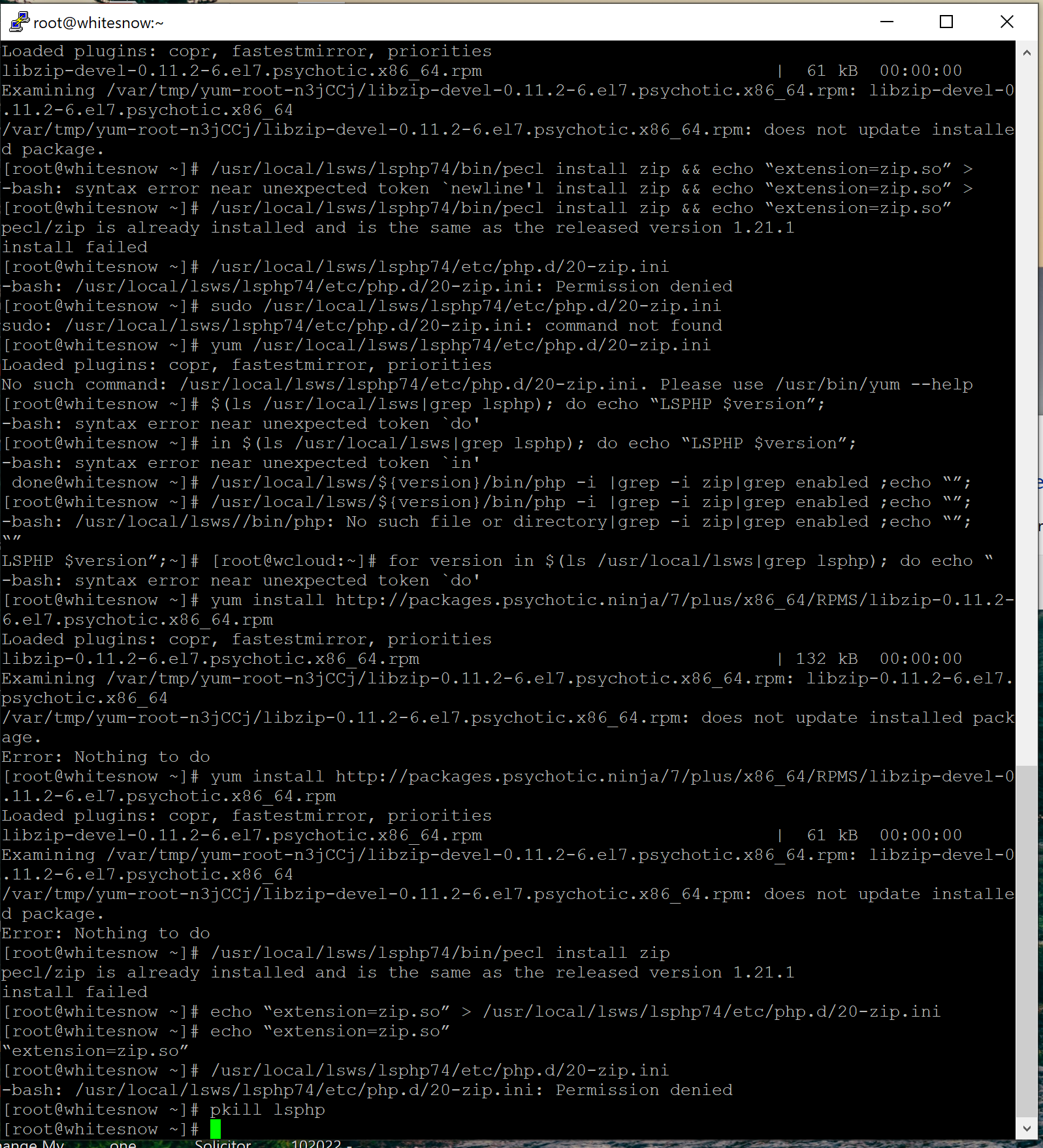
Apparently the zip extension is already installed as I received a response
I have PHP8.0.
I have copied a screenshot of the results from entering the above:

jo
josephgodwinke #13

Welcome @aslan Happy you are here

as
aslan #15

Thank you for the comment! Unfortunately I had some issues.

When I entered the following:

# install latest version of zip
$ /usr/local/lsws/lsphp74/bin/pecl install zip
# install specific version of zip
$ /usr/local/lsws/lsphp74/bin/pecl install zip-1.21.1

I receive an error that the extension is already installed and is the same as the release version 1.21.1 install failed.

Also I added the info.php file and tried to access from the url but it goes to a 403 forbidden error page.
I checked permissions for info.php using file manager and enabled read and execute for User, Group and World but it still goes to the error page.

Sign in to reply