
CyberPanel Community

Cyberpanel not work after reboot Vps

ho
hosteko #1

I just installed vps with OS centos 7, and installed cyberpanel. after the installation process is complete, I successfully login to cyberpanel. however, after I restarted the VPS. cyberpanel cannot function. I can’t even log in to Putty or ping the server.

what is the problem?
30 replies
Cy
CyberPanel #2

It it OpenVZ? Can’t you login via console and check where the boot process is stuck?

ho
hosteko #3

yes, i use openVZ. I try to log in via the console smoothly. but I can’t log in via SSH, all ports don’t work and even mariadb doesn’t work either.

steps that I did, I had to disable the firewall. but the results remain the same. please help for this.

Cy
CyberPanel #4

@hosteko

If you login via console virtual machine is booting fine? Can you log into SSH?

Can you check if network is working?

ho
hosteko #5
@hosteko

If you login via console virtual machine is booting fine? Can you log into SSH?

Can you check if network is working?

[root@server /]# service network status
Configured devices:
lo venet0
Currently active devices:
lo
[root@server /]# service network restart
Restarting network (via systemctl): Job for network.service canceled.
[FAILED]
[root@server /]# ip route show

ho
hosteko #6

[root@216327 /]# systemctl --failed
UNIT LOAD ACTIVE SUB DESCRIPTION

  • tmp.mount loaded failed failed /tmp
  • systemd-sysctl.service loaded failed failed Apply Kernel Variables
  • systemd-vconsole-setup.service loaded failed failed Setup Virtual Console
    LOAD = Reflects whether the unit definition was properly loaded.
    ACTIVE = The high-level unit activation state, i.e. generalization of SUB.
    SUB = The low-level unit activation state, values depend on unit type.
    3 loaded units listed. Pass --all to see loaded but inactive units, too.
    To show all installed unit files use ‘systemctl list-unit-files’.
Cy
CyberPanel #7

So this is the problem, tmp failed to mount

* tmp.mount loaded failed failed /tmp

ho
hosteko #8

then what’s the solution? can you help

Cy
CyberPanel #9

After installation, remove following lines from /etc/fstab

/usr/.tempdisk /tmp ext4 loop,rw,noexec,nosuid,nodev,nofail 0 0
/tmp /var/tmp none bind 0 0
ho
hosteko #10

problem solved. thanks you for help.

if you may know, why did this happen? Is it because you use openVZ? so it must be empty /etc/fstab

bi
birapn #11

I had the same problem and almost gave up on CyberPanel. Support VPSDime identified and corrected.

aq
aqit79 #12

It works great on vmware and kvm. Does not work on opvenvz 6 7, will work when comment # / tmp / var / tmp none bind 0 0 in / etc / fstab

Link: https://dotrungquan[.]info/cyberpanel-not-working-after-reboot-vps-openvz/

RA
Rabiul AEZAZ #13

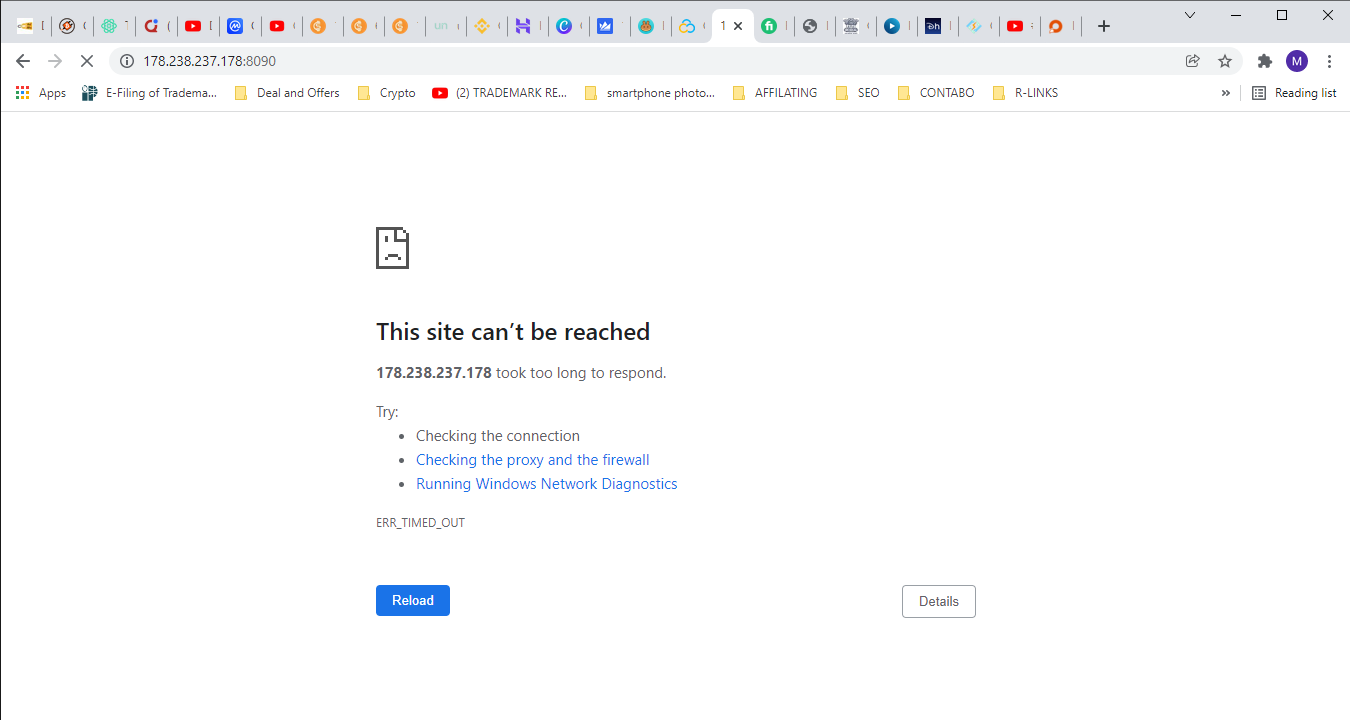
I restarted the contabo VPS. cyberpanel cannot function. I can’t even log in to Putty or ping the server.

what is the problem?
NK
Nitesh Kunnath #14

Is your server up? You should contact contabo regarding this because you mentioned that you are unable to ping your server or connect putty.

RA
Rabiul AEZAZ #15

Hi, Now my contabo server is up. What can I do for cyberpanel?

NK
Nitesh Kunnath #17

You haven’t mentioned whats wrong with your cyberpanel?

NK
Nitesh Kunnath #19

Have you changed the cyberpanel default port to something else?

RA
Rabiul AEZAZ #20

no. just restart my contabo VPS server after that it’s not opening.

NK
Nitesh Kunnath #21

Your server seems down or has network issues. Please contact Contabo to fix the network issue.

RA
Rabiul AEZAZ #22

No. I don’t have any network issues. Rest all sites are opening properly. I had a problem after restarting contabo VPS.

NK
Nitesh Kunnath #23

You aren’t really helping us by providing enough details to understand the issue.
All your sites hosted under cyberpanel are working and just the cyberpanel dashboard not working for you?
If that is so, then there is something wrong with your firewall. Try to stop the firewall using the below command and then try to connect cyberpanel

sudo systemctl stop firewalld
NK
Nitesh Kunnath #26

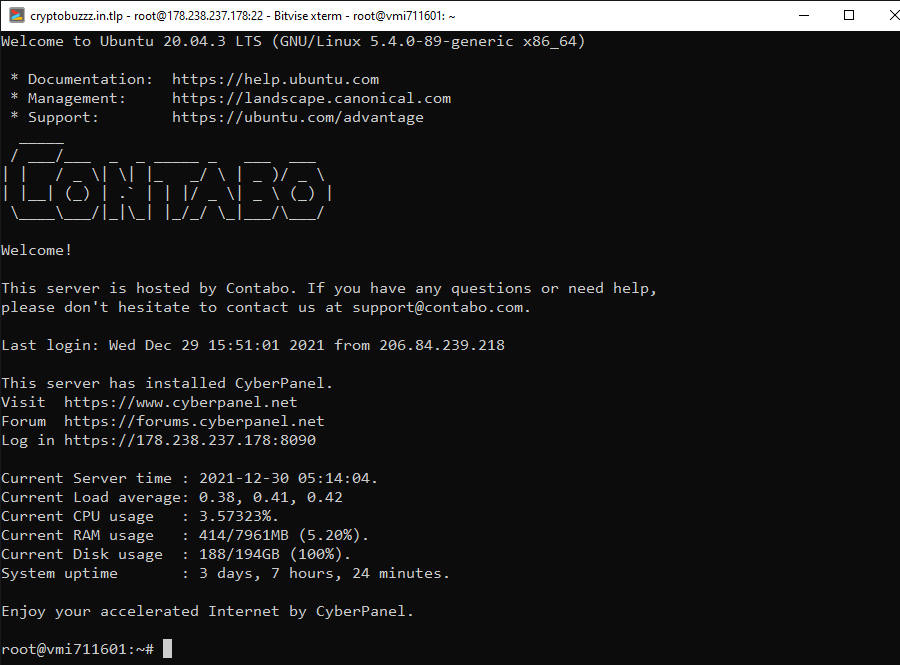
As per your SSH screenshot I can see that your server disk space is full and that’s the reason cyberpanel is not opening for you. Also your sites will be down due to disk full issue.

NK
Nitesh Kunnath #28

Do you know linux commands? If so, then find the unwanted files eating up your diskspace and delete them to make space. Or else, upgrade your storage from your hosting provider.

RA
Rabiul AEZAZ #29

Sorry Sir I don’t know Linux commands, plz let me know.

NK
Nitesh Kunnath #30

you will then have to either hire a linux administrator or the easiest way for now is to upgrade your storage space from your hosting provider.

mr
mrwebng #31

I have the same problem but i ssh to my server what do i do.

Sign in to reply