CyberPanel Community

1.9.0 backup issues

cy
cybertech #1

KVM
CentOS 7.6.1810
OLS

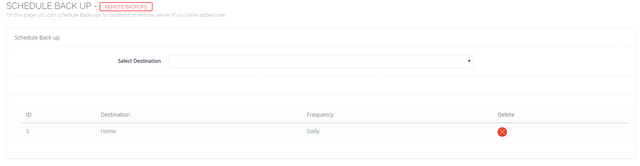
Back Up → Schedule Back Up → Select Destination (Remote Server IP) → Select Frequency (Daily) → Add Destination

Error Msg:
Cannot Add Schedule. Error message: ‘localPath’

Upon refresh, the remote IP shows in the list of scheduled backup, but it doesnt work.
39 replies
cy
cybertech #3

Thanks. Able to add schedule now. Will check if backup work

cy
cybertech #4

Scheduled remote backups working. Thanks.

cy
cybertech #5

@CyberPanel now Remote Backup (Remote Transfer) dont work. Both 1.9.0

ri
rick #7

I have a local Scheduled backup on version1.9.0

I keep getting for all sites…

cat: /home/privateurl.com/backup/backupFileName: No such file or directory

I doubled checked the path and /home/privateurl.com/backup/ looks like a valid path.

If I run a manual local backup it completes!

I can see the backup in the patch…

“/home/privateurl.com/backup/”

ri
rick #11

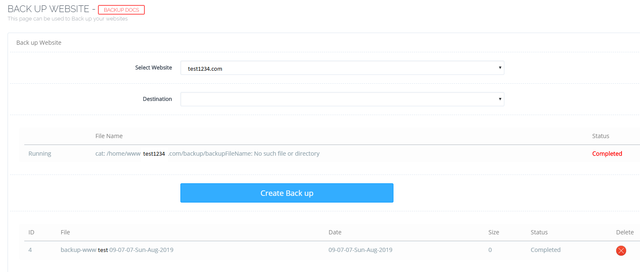
SCHEDULE-BACK-UP
upload image

backup-website

cat: /home/test123.com/backup/backupFileName: No such file or directory

SCHEDULED backup still failing.

ri
rick #12

I am running Latest Version 1.9

cy
cybertech #13
I am running Latest Version 1.9

Remote backups work now ONLY IF both panels are 1.9.0.

Scheduled backup will report back again soon.

Cy
CyberPanel #14

@cybertech

Let me know if something is not working, I was busy fixing some issues in Email Policy Server, can check if you report any issues with backups.

cy
cybertech #15

@CyberPanel said:
@cybertech

Let me know if something is not working, I was busy fixing some issues in Email Policy Server, can check if you report any issues with backups.

Remote transfers between 1.9.0 panels work , first scheduled backup was successful. Will continue to monitor. Thank you.

px
pxnji #16

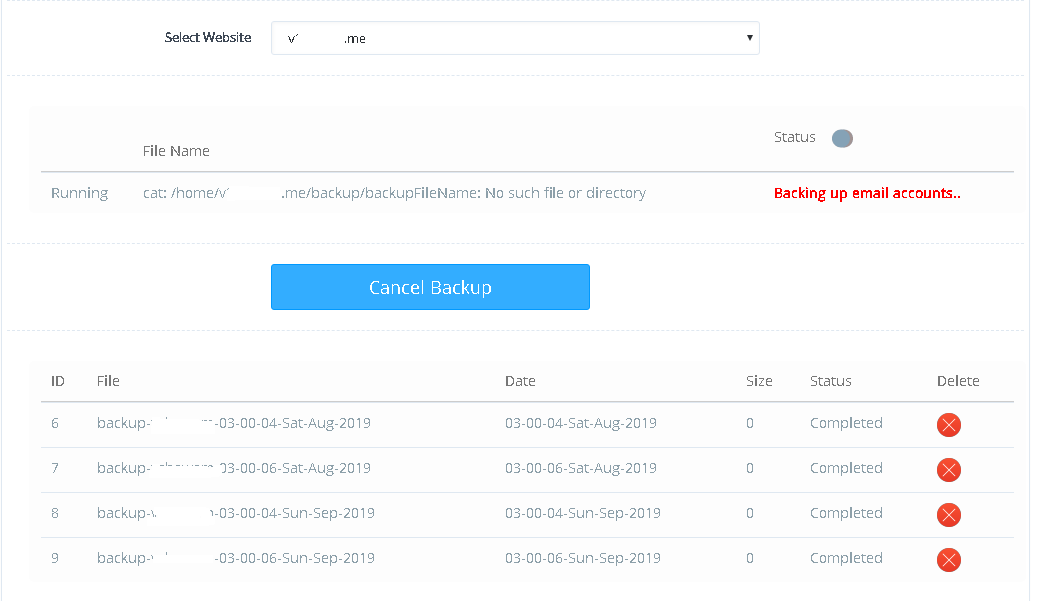
I got some issues here,


as you can see on picture, the information of created backup from schedule backup was doubled. And if i choose domain name from dropdown menu on Select Website, its automatically shows that it creating a backup but its shows like in the picture so long

ri
rick #17

My scheduled backups never run? I have no scheduled backups. On Demand backups still work great… also whats with the file name? backup-somedomain-08-34-53-Tue-Aug-2019 todays date is 9-2-2019 whats 08-34-53? The server date and time is correct.

Cy
CyberPanel #18

@pxnji

I think you can create ticket.

@rick

You can upgrade and re-setup schedule backups.

us
usmannasir #20

File does not seem OK, need to check.

cy
cybertech #21

@usmannasir said:
File does not seem OK, need to check.

Just tried again and it works well. This time took the latest backup and renamed to m.tar.gz

Does file name affect restore? Like 03_Sep.tar.gz

Another minor issue is that the MAIN panel that creates scheduled remote backup does not delete the file in /website/backup/ after sending to REMOTE panel.

Cy
CyberPanel #22

Did you rename it yourself to 03_Sep.tar.gz CyberPanel didn’t use underscores.

cy
cybertech #23

@CyberPanel said:
Did you rename it yourself to 03_Sep.tar.gz CyberPanel didn’t use underscores.

Yes I did. It didn’t work so renamed to another.

So what’s left now is that the source panel does not delete the .tar.gz in /site/backup/ after successfully sending to remote panel.

w3
w3services #24

Not all account backups going on remote server only 30% backup completing.

cy
cybertech #25

@CyberPanel scheduled backup does not restore well on remote panel. Database empty even though successfully restored.

Both 1.9.0

fa
fadosolrelamisi #26

I have the same problem, I can not have a backup. panel says it is ready but the file is empty size. On the other hand, there is no .gz file in my ftp. how can I fix it? thank you.

cy
cybertech #27

@CyberPanel i can confirm the scheduled backups are not able to be restored (CRC fail, or restores incompletely), and after backup the source panel does not delete the .tar.gz so it accumulates.

please do check the backup issues again.

Cy
CyberPanel #28

Later today or tomorrow I am going to look into this, sorry for any inconvenience caused.

Cy
CyberPanel #29

Strange. I tried both Remote Transfers and scheduled backups.

I restored the scheduled backup and it also worked fine (also on my end it was deleted from the source server).

Maybe I can check specifically on your server? Create ticket and mention ticket number here @cybertech

w3
w3services #30

@CyberPanel @usmannasir

Remote Backup not working it’s more than a week now. Every day, I check my backup count and its only 20-30 % completing.

Hope will get it done urgently.

cy
cybertech #31
Strange. I tried both Remote Transfers and scheduled backups.

I restored the scheduled backup and it also worked fine (also on my end it was deleted from the source server).

Maybe I can check specifically on your server? Create ticket and mention ticket number here @cybertech

#N9GCT4

ma
manualsnow #33

It’s still “back up” everywhere in the UI, not “backup”? I guess it only affects grammar Nazis, but still. “Back up” = to move backwards, especially for a vehicle to do so.
Ex. that beeping sound indicates that the truck is backing up. “Backup” = a copy of a file or record, stored separately from the original, that can be used to recover the original if it is destroyed or damaged. :slight_smile:

ri
rick #34

So far it creates the folders but the folders are empty.

Is this a permissions issue with the location?

cy
cybertech #35

@w3services said:
@cybertech , I too confirm. Remote Transfer Backup not working. Today, tested and found no public_html folder on the server.

@usmannasir @CyberPanel

set up a new panel to remote transfer over so I can leave 2 x vps free to get it checked, again similar issue like before. It’s always the same few issues with scheduled backup + remote transfers that keep rotating around.

Current remote transfer workaround is to create backup to home (/home/www/backup/) and then scp over to new vps (/home/backup/) and then restore.

No longer have the luxury of time to repeat these tests.

Will be on a hiatus to learn about cronjobs from scratch.

w3
w3services #37

Any solution to take full server backup daily. Inbuild feature not working and break in between even shifted remote backup to local disk.

Forum ---- > User please share/participate so that we help the product to improve. Do anyone else facing issue ??

Cy
CyberPanel #38

@w3services

I recently did remote transfer for a user and it went fine and no other reports except you. I am not sure if CloudLinux is interfering with the backup process on your server.

cy
cybertech #39

@CyberPanel replied to a few days old ticket as i was preparing to shift production out. would you mind taking a look at it for a better idea of backup issues or is access not needed any more?

oh and SSL cert has expired

Sign in to reply