CyberPanel Community

[Tutorial] How to block XMLPRC.php in OLS

qt
qtwrk #1

Hi,

In Apache , we used to use deny from all directive to deny access to xmlrpc.php , but this directive doesn’t work in OLS, so there is an alternative way to do

In your .htaccess file , add following code

RewriteRule xmlrpc - [F,L]

And then restart OLS, then when you access /xmlrpc.php , you will have a 403 forbidden result :slight_smile:

Best regards,

36 replies
sa
sailorrr #3

Yes, I found this, thanks. But when I tried to use context for that - it doesn’t works for some reason. Will appreciate any advice or direction.

qt
qtwrk #4

then you need to enable debug log for it

or try rewrite rule way

sa
sailorrr #5

Allow only server IP to run wp-cron.php and deny the rest of the world

RewriteCond %{REMOTE_ADDR} !^123\.123\.123\.123
RewriteRule wp-cron.php$ - [F,L]

This doesn’t work, can you give me the right direction please? I think it would be nice to add in your tutorial above.

qt
qtwrk #6

if only

RewriteRule wp-cron.php$ - [F,L]

does it work ?

then create a phpinfo page, to check the actual value of remote_addr , sometimes if behind proxy , the IP might be different

sa
sailorrr #7

Just:

RewriteRule wp-cron.php$ - [F,L]

Doesn’t work as well… Still loads white page instead of 403

While this:

RewriteCond %{REQUEST_URI} error_log|wp-config-sample.php|readme.html|readme.txt|license.txt|wp-trackback.php|wp-config.php|php.ini|xmlrpc.php [NC]
RewriteRule .* - [F,L]

Works just fine and shows 403. What is the problem it can be?

qt
qtwrk #8

what was the URI you entered ? was this placed at top of your htaccess ? did you restart OLS ?

sa
sailorrr #9

Initially I placed this at the bottom, but now just moved it at the top. No difference. I’m editing Rewrite Rules in Cyberpanel, so it should automatically restart OLS when Rewrite Rules changed isn’t it? And also I pressed Reboot Litesspeed button as well. It doesn’t help. But I didn’t really understand your question about URI.

And this works just perfect right after saving rules:

RewriteCond %{REQUEST_URI} error_log|wp-config-sample.php|readme.html|readme.txt|license.txt|wp-trackback.php|wp-config.php|php.ini|xmlrpc.php [NC]
RewriteRule .* - [F,L]

qt
qtwrk #10

did you access it by “wp-cron.php” only ? or like “wp-cron.php?doing_cron…” ?

this is more like rewrite rule didn’t match the pattern

you can enable OLS debug log , to see what exactly OLS understood that regex and fix on it

qt
qtwrk #12

you need to enable debug log

see how OLS responded to the rewritecond and rewriterule

it will something like

RewriteCond : value XXXXX check against XXXXX : match X

where after match it will show a number , negative number means no match , positive number means matched

so is same to RewriteRule

it will say something like

rewrite rule : URI xxxx , check against pattern xxxxx , match X

this will help you to debug rewrite rule

sa
sailorrr #13

Debug log in OLS panel or somewhere in Cyberpanel?

sa
sailorrr #14

Just one moment - when I add wp-cron.php to this sentention:

RewriteCond %{REQUEST_URI} xmlrpc.php|wp-cron.php [NC]
RewriteRule .* - [F,L]

It works. But doesn’t works in:

RewriteRule wp-cron.php$ - [F,L]

qt
qtwrk #15

that one actually works on me

2021-03-05 19:14:09.446991 [INFO] [29812] [xxx:51931-Q:49B5225303773A50-3#xxx] [REWRITE] strip base: '/' from URI: '/wp-cron.php'
2021-03-05 19:14:09.447071 [INFO] [29812] [xxx:51931-Q:49B5225303773A50-3#xxx] [REWRITE] Rule: Match 'wp-cron.php' with pattern 'wp-cron.php$', result: 1

like I said , enable debug log for rewrite rule , it will log each steps for how it checks

qt
qtwrk #17

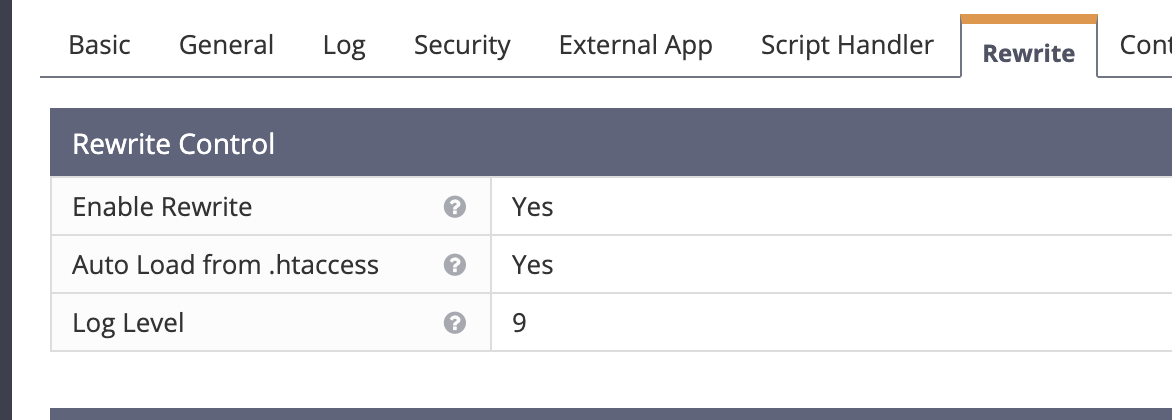
you need to go to webadmin console → vhost → your domain → rewrite → rewrite log , set to 9

restart it

then check on /usr/local/lsws/logs/error.log

sa
sailorrr #18

Yes, did it exactly as you said. No such (REWRITE) records…

qt
qtwrk #19

then you got weirder issue

can try enable full debug log on OLS , that will tell every single action from start up

sa
sailorrr #20

Yes, did it, and still have only Info/Notice records without a single rewrite record…

qt
qtwrk #21

go to server conf → log

set Log Level to DEBUG

set Debug Level to HIGH

sa
sailorrr #22

and this moment is confusing:

RewriteCond %{SERVER_ADDR} !^123\.123\.123\.123
RewriteRule wp-cron.php$ - [F,L]

Why it gives 403 if I request /wp-cron.php?doing_cron
But it doesn’t restrict access if I request just /wp-cron.php

sa
sailorrr #23

Yes, yes. Exactly like this:

go to server conf → log
set Log Level to DEBUG
set Debug Level to HIGH

qt
qtwrk #24

you can combine the server add with request uri in rewrite cond , so you can get rid of wp-cron.php in rewrite rule

sa
sailorrr #25

Please can you show an example? And thanks for your time and patience :slight_smile:

qt
qtwrk #26

RewriteCond %{REMOTE_ADDR} !^123\.123\.123\.123
RewriteCond %{REQUEST_URI} xmlrpc.php|wp-cron.php [NC]
RewriteRule .* - [F,L]

somethign like this

this means , if request url is wp-cron or xmlrpc , and client ip is not 123.123.123.123 , then 403

sa
sailorrr #27

is {SERVER_ADDR} possible here instead of {REMOTE_ADDR} ?

qt
qtwrk #29

server addr is the server itself

when request to a page, it is always a remote addr , even it is from 127.0.0.1 or server itself’s public/private ip

sa
sailorrr #30

Ok, you tired of me )) I will try to recognize these admin’s hieroglyphs :slight_smile:
Thanks for your help!

sa
sailorrr #31

Ok, got it. Thanks you.

qt
qtwrk #32

not sure what do you mean by tired of you or hieroglyphs ? so far I have been typing/writing on Standard English alphabet, maybe not perfect in grammar as it’s not my native language .

basically when you want to do some condition check on rewritecond , you need to understand what is it to check against

qt
qtwrk #34

yeah well , first time I read it is also like “hieroglyphs”

you just need to slow it down , read it line by line , it will sink in : )

sa
sailorrr #35

Oh, things got weirder:

RewriteCond %{REMOTE_ADDR} !^127\.0\.0\.1
RewriteCond %{REQUEST_URI} wp-cron.php|xmlrpc.php [NC]
RewriteRule .* - [F,L]

xmlrpc.php - shows 403
wp-cron.php - white page, as usual

al
alinabeen #36

And why do this? After all, sooner or later hackers will discover another vulnerability that can be exploited.

qt
qtwrk #37

Type your comment> @alinabeen said:

And why do this? After all, sooner or later hackers will discover another vulnerability that can be exploited.

yeah , why use any software ? sooner or later , hackers will discover another vul that can be exploited

Sign in to reply