CyberPanel Community

Disk Usage - 97% on VPS With 80GB

ca
camilosan #1

Hello everyone.

Firstly I’m a beginner using VPS with Linux.

I chose Cyberpanel because of its ease of setup and usability. It’s really very good!

But this time I found a problem that I can not solve.

I have around 10 sites installed on my VPS (Vultr 20USD) and noticed that there was suddenly a huge increase in disk usage.

Looking for the problem (with my technical limitations), I found something that caught my attention.

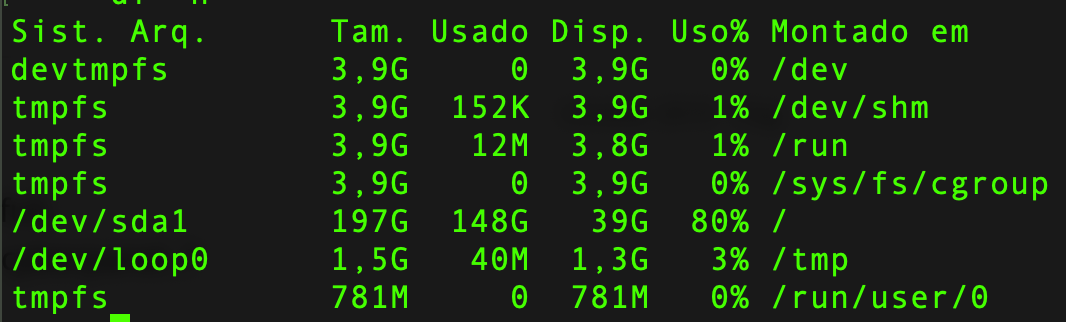
I have a / tmp / folder that is consuming 55GB, I do not know what its exactly is, however it seems a bit out of the ordinary.

Could anyone help me identify what may have caused this huge increase in disk usage and how can I prevent this from happening again?

Thanks in advance for any help.

Thank you.
14 replies
Cy
CyberPanel #2

What is the output of ls -la /tmp

Also, try to find out which files and folders are using more space in /tmp.

fa
fadosolrelamisi #3

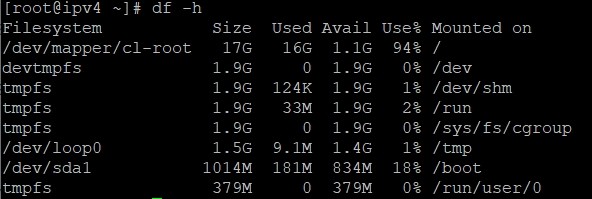
I have the same problem. I only have one website, it consumes nearly 500mb but my disk space is 90/100 of 17gb. I delete all my backups by using ftp but nothing changed. I restart my server, I still have the problem. How can I solve the problem? should I delete tmp files, where are they? Sorry I am a beginner, please tell me as simple you can. thank you.

Cy
CyberPanel #7

This page gives 403 error on my end

403 Forbidden
nginx
Cy
CyberPanel #9

I can see that your root mount point is only 17GB and it is indeed 97% full.

ar
ardan7779 #10

I Have same problem. My space will full.
How to clean the temp / trash file in cyberpanel…?

fr
franko #11

I had similar problem with full disk.
Error log was spamming every second.

Sign in to reply