Community

Cron job does not show

Cy
CyberPanel #4

The demo is not fully functional, some features are limited in a demo. And the demo is using an old version, we fixed some cron issues in a recent version which is why you need to upgrade if you are not on 1.7.6.

ya
yaoruisheng #5
The demo is not fully functional, some features are limited in a demo. And the demo is using an old version, we fixed some cron issues in a recent version which is why you need to upgrade if you are not on 1.7.6.

I am running ver 1.7.5.

The issue is same as demo site.

I have read the changelog of ver 1.7.6, nothing newer about cron jobs.

But Maybe you can try to create a cron job with command “wget -N http://geolite.maxmind.com/download/geoip/database/GeoLiteCountry/GeoIP.dat.gz -O /home/GeoIP.dat.gz && gunzip --force /home/GeoIP.dat.gz”

Cy
CyberPanel #6

Cron runs as an actual user of the website, and the user does not have access outside its docroot, which means you can’t access /home from cron job. You need to add this cron job in /etc/crontab

ya
yaoruisheng #7
Cron runs as an actual user of the website, and the user does not have access outside its docroot, which means you can't access /home from cron job. You need to add this cron job in `/etc/crontab`

But why the page said that cron saved?
where to save?

anything doesn’t change?

Cy
CyberPanel #8

Cronjob must have been saved, but it will not run due to permission error. You can manually save in /etc/crontab

ya
yaoruisheng #9
Cron runs as an actual user of the website, and the user does not have access outside its docroot, which means you can't access /home from cron job. You need to add this cron job in `/etc/crontab`

In fact, the command I used was "“wget -N http://geolite.maxmind.com/download/geoip/database/GeoLiteCountry/GeoIP.dat.gz -O /home/xxx.xxx/public_html/GeoIP.dat.gz && gunzip --force /home/xxx.xxx/public_html/GeoIP.dat.gz”

ya
yaoruisheng #10
Cronjob must have been saved, but it will not run due to permission error. You can manually save in `/etc/crontab`

Saved but why Cron list doesn’t show it?

Cy
CyberPanel #11

I think it is due to && character in your cron job. For security reason this character is prohibited, can you create a ticket so we can be sure and do a hotfix for this.

ya
yaoruisheng #12
Cronjob must have been saved, but it will not run due to permission error. You can manually save in `/etc/crontab`

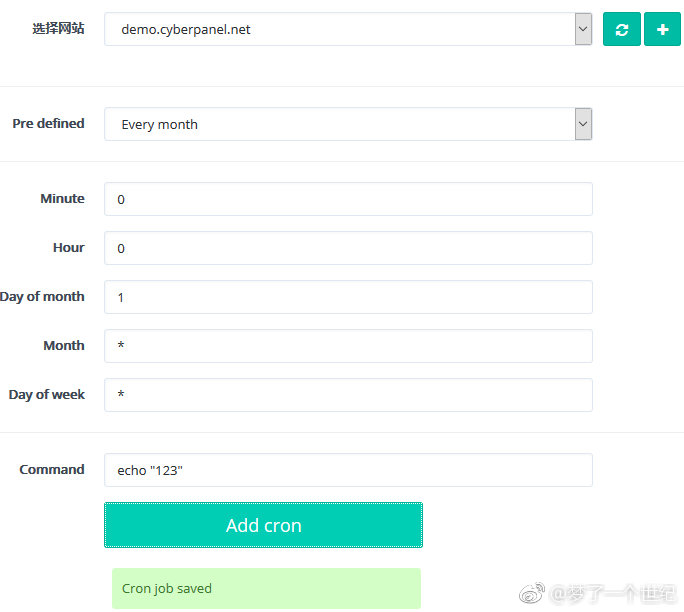
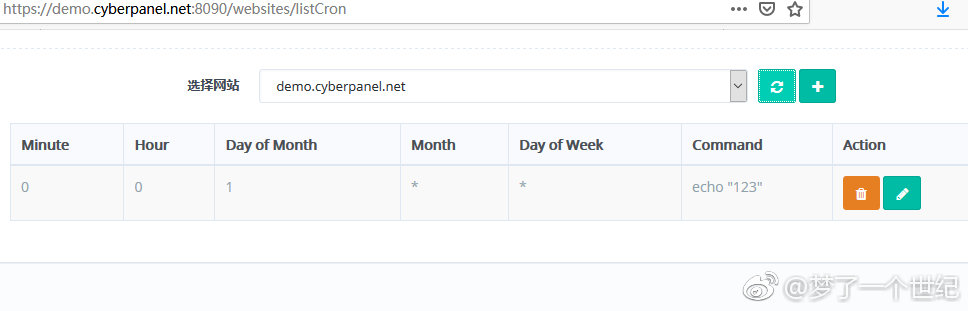
you see command <echo “123” > saved correct and it was shown in cron list.

ya
yaoruisheng #13
I think it is due to `&&` character in your cron job. For security reason this character is prohibited, can you create a ticket so we can be sure and do a hotfix for this.

OK, But how can we restore it to the previous state? I am worried that it may affect the normal operation of the system.

Cy
CyberPanel #14

On your server will just reproduce, will not push any changes.

ya
yaoruisheng #15
I think it is due to `&&` character in your cron job. For security reason this character is prohibited, can you create a ticket so we can be sure and do a hotfix for this.

eeeeeeeeee, How to create a ticket?

ya
yaoruisheng #17
https://platform.cyberpanel.net/, you don't need to provide server logins. Just provide exact cron command you are using.

OK, I had created a ticket.

Thank you.

Cy
CyberPanel #18

{"errorMessage": "Data supplied is not accepted.", "error_message": "Data supplied is not accepted."}

I get this error in console, means for now you can’t use && in your cron job. This will be taken care in next release.

Sign in to reply