Am
Amney
#1
how to use your php.ini for each domain?
 Community
how to use your php.ini for each domain?
For CyberPanel Ent, you can use custom php.ini the similar way as Apache. For OpenLiteSpeed you can use phpIniOverride, such as
phpIniOverride  {
php_value display_errors "Off"
php_value upload_max_filesize "200M"
php_value post_max_size "250M"
}
You can put this in vHost conf of your website/child-domain.
For CyberPanel Ent, you can use custom php.ini the similar way as Apache. For OpenLiteSpeed you can use `phpIniOverride`, such asphpIniOverride { php_value display_errors "Off" php_value upload_max_filesize "200M" php_value post_max_size "250M" }You can put this in vHost conf of your website/child-domain.
Great thanks
Please tell me how to enable the Directive short_open_tag on a specific domain via vHost conf?
Adding php_value short_open_tag=On to vHost conf does not produce the same results as its other variants
Make sure your vHost conf for OpenLiteSpeed looks like
docRoot $VH_ROOT/public_html
vhDomain $VH_NAME
vhAliases www.$VH_NAME
adminEmails cyberpanel@example.com
enableGzip 1
enableIpGeo 1
index {
useServer 0
indexFiles index.php, index.html
}
errorlog $VH_ROOT/logs/$VH_NAME.error_log {
useServer 0
logLevel ERROR
rollingSize 10M
}
accesslog $VH_ROOT/logs/$VH_NAME.access_log {
useServer 0
logFormat "%v %h %l %u %t "%r" %>s %b"
logHeaders 5
rollingSize 10M
keepDays 10 compressArchive 1
}
scripthandler {
add lsapi:talksho php
}
extprocessor talksho {
type lsapi
address UDS://tmp/lshttpd/talksho.sock
maxConns 10
env LSAPI_CHILDREN=10
initTimeout 600
retryTimeout 0
persistConn 1
pcKeepAliveTimeout 1
respBuffer 0
autoStart 1
path /usr/local/lsws/lsphp71/bin/lsphp
extUser talksho
extGroup talksho
memSoftLimit 2047M
memHardLimit 2047M
procSoftLimit 400
procHardLimit 500
}
context /.filemanager {
location /usr/local/lsws/Example/html/FileManager
allowBrowse 1
autoIndex 1
accessControl {
allow 127.0.0.1, localhost
deny 0.0.0.0/0
}
rewrite {
inherit 0
}
phpIniOverride  {
php_value display_errors "Off"
php_value upload_max_filesize "200M"
php_value post_max_size "250M"
}
addDefaultCharset off
}
phpIniOverride {
php_value short_open_tag 1
}
rewrite {
enable 1
autoLoadHtaccess 1
}
Make sure your vHost conf for OpenLiteSpeed looks likedocRoot $VH_ROOT/public_html vhDomain $VH_NAME vhAliases www.$VH_NAME adminEmails cyberpanel@example.com enableGzip 1 enableIpGeo 1 index { useServer 0 indexFiles index.php, index.html } errorlog $VH_ROOT/logs/$VH_NAME.error_log { useServer 0 logLevel ERROR rollingSize 10M } accesslog $VH_ROOT/logs/$VH_NAME.access_log { useServer 0 logFormat "%v %h %l %u %t "%r" %>s %b" logHeaders 5 rollingSize 10M keepDays 10 compressArchive 1 } scripthandler { add lsapi:talksho php } extprocessor talksho { type lsapi address UDS://tmp/lshttpd/talksho.sock maxConns 10 env LSAPI_CHILDREN=10 initTimeout 600 retryTimeout 0 persistConn 1 pcKeepAliveTimeout 1 respBuffer 0 autoStart 1 path /usr/local/lsws/lsphp71/bin/lsphp extUser talksho extGroup talksho memSoftLimit 2047M memHardLimit 2047M procSoftLimit 400 procHardLimit 500 } context /.filemanager { location /usr/local/lsws/Example/html/FileManager allowBrowse 1 autoIndex 1 accessControl { allow 127.0.0.1, localhost deny 0.0.0.0/0 } rewrite { inherit 0 } phpIniOverride { php_value display_errors "Off" php_value upload_max_filesize "200M" php_value post_max_size "250M" } addDefaultCharset off } phpIniOverride { php_value short_open_tag 1 } rewrite { enable 1 autoLoadHtaccess 1 }
The greatest thanks!
Now works great
writemyessaytoday said: Adding php_value short_open_tag=On to vHost conf does not produce the same results as its other variants
When I go to Server > PHP > Edit PHP Configs, I cannot do basic editing for each php version. I wanted to do advance configurations, but when I restart the Litespeed, nothing is changed. What can be the issue?
Try add this
PHPRC=/home/domain.com/public_html
in ext app env , like so:
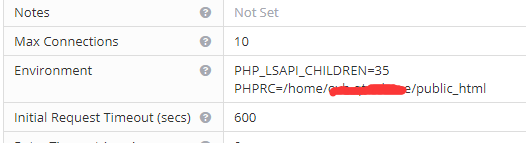
then copy everything in /usr/local/lsws/lsphpXX/etc/php.ini into /public_html/php.ini
after that , customize your values in public_html/php.ini
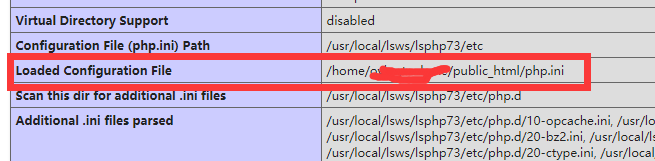
thnx
Hello,
how can you set a custom PHP session save path for each domain on cyberpanel ent?
Make sure to run the following so the configuration is live.
lswsctrl fullrestart;skill -9 lsphp