
CyberPanel Community

[v1.7-dev] Attach Git to your CyberPanel sites!

us
usmannasir #1

Hello all!

This article is about the GIT (version control system) and CyberPanel websites. People who use CyberPanel for development will be happy to know that they can attach Git repositories (GitHub and Gitlab) to CyberPanel websites, CyberPanel will use Git webhooks to deploy your apps directly from your repositories.

GIT Deployment

GIT is a modern version control system, we are not going to get into what GIT is and what it does, because if you are here I assume you are already using GIT in your development environments.

Today we will see how we can attach a remote GIT repo to your CyberPanel website.

Step 1: Create Github Repository!

With CyberPanel you can either attach repo from Github or Gitlab, but we are going to use GitHub in this article. If you already have a GitHub repo, you can skip this step.

Go to: Sign in to GitHub · GitHub
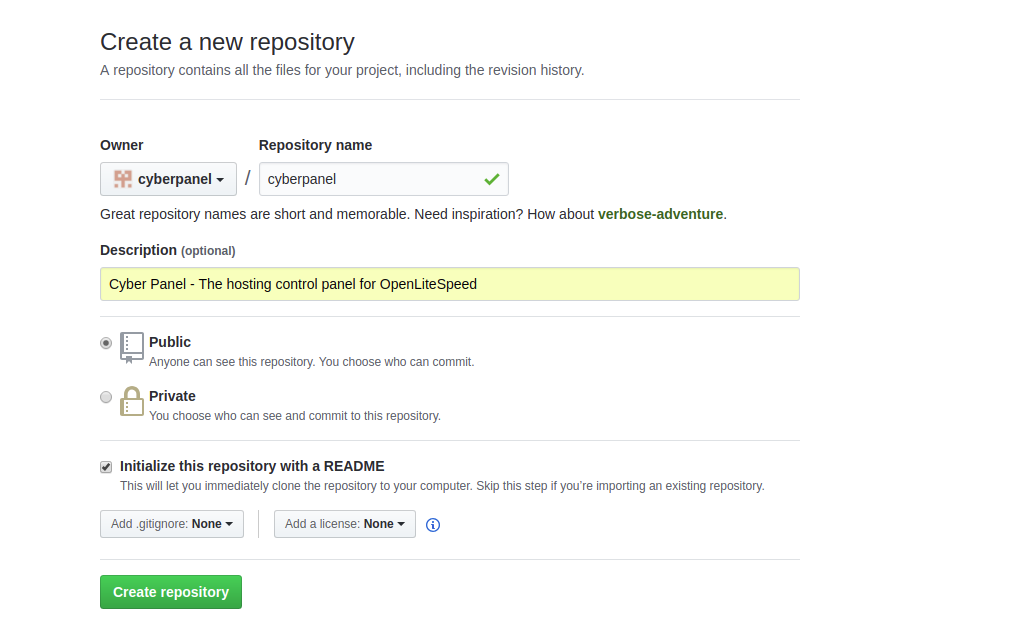
Simply fill in all the details and click Create Repository. This will create an empty repository and initialize it with README file.

Step 2: Deploy keys to your Repo!

Before moving any further, you need to deploy your server keys to your GitHub repository (GitLab have account level keys, whereas in GitHub you can add keys at repo level).

I assume you have already installed CyberPanel and created your first website.

After doing that navigate to:

https://IP Address:8090/websites/domain.com/setupGit

Replace domain.com with your website you want to attach repo to.

Click on Deployment Key and copy the key from the box. Now go to your repo to deploy this key.
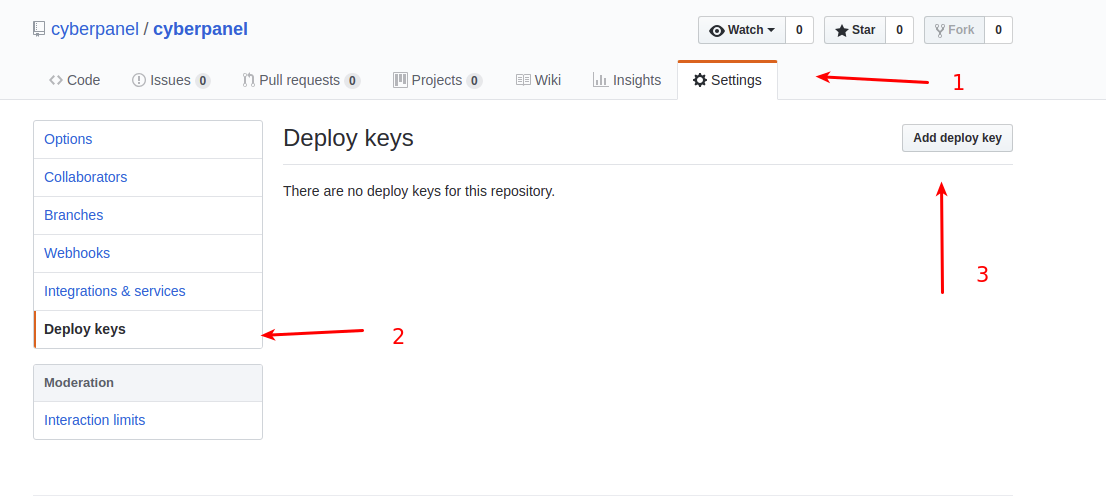
Step 3: Attach repo to your CyberPanel website!

Once your keys are deployed, its time we attach the website to our repository. Again navigate to:

https://IP Address:8090/websites/domain.com/setupGit
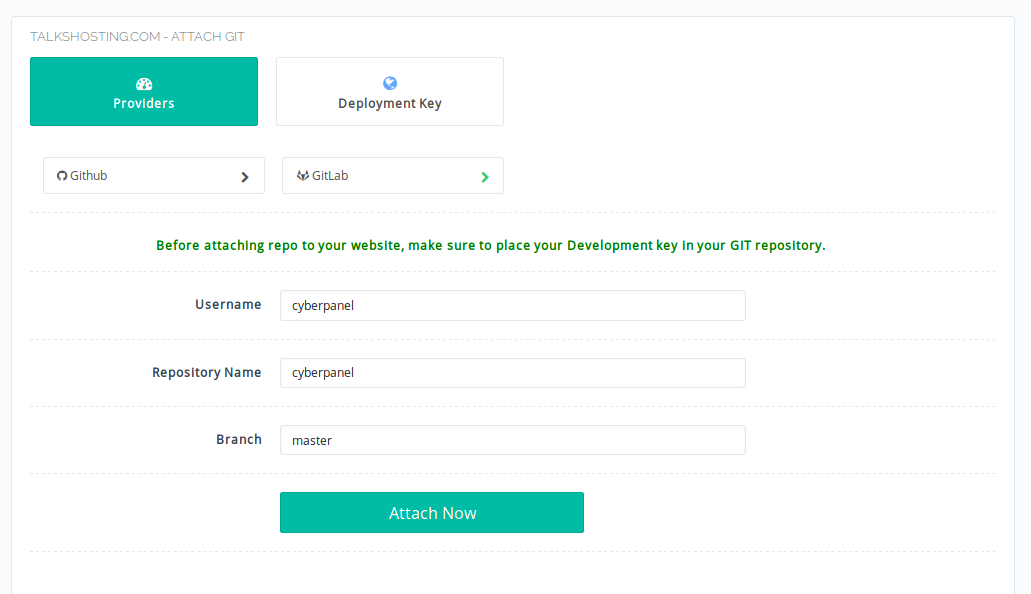
By default Github is selected, however, the procedure is almost similar for GitLab, on this page just click GitLab to attach repo from GitLab service.

Fill in your username followed by repository name and click Attach Now. If your repo URL looks like:

https://github.com/usmannasir/cyberpanel

Here username is usmannasr and repo name is cyberpanel, you can adjust accordingly.

This will take some time and after few seconds your CyberPanel website is now attached to GitHub repository, there is one last step to perform so that any commits to your repository should initiate a git pull in your server so that you are always in sync with the repo.

Step 4: Setup Git Webhook!

Once the website is successfully attached to a repo, the page will refresh and you will see:
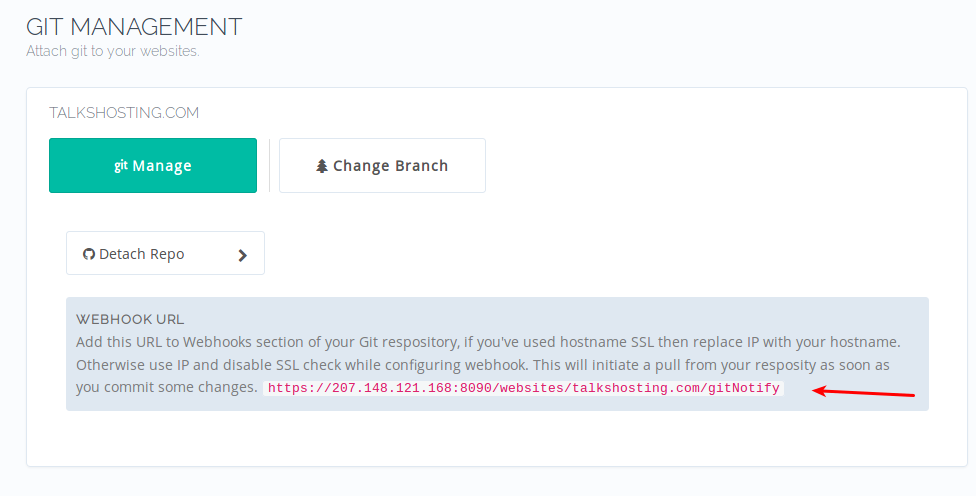
You can copy this URL (you will need to paste in Git webhooks section). Please note that you can replace IP in this URL with your hostname if you have used hostname SSL and have a valid Let’s Encrypt SSL. Otherwise, in Git webhook section, you will have to disable SSL check.
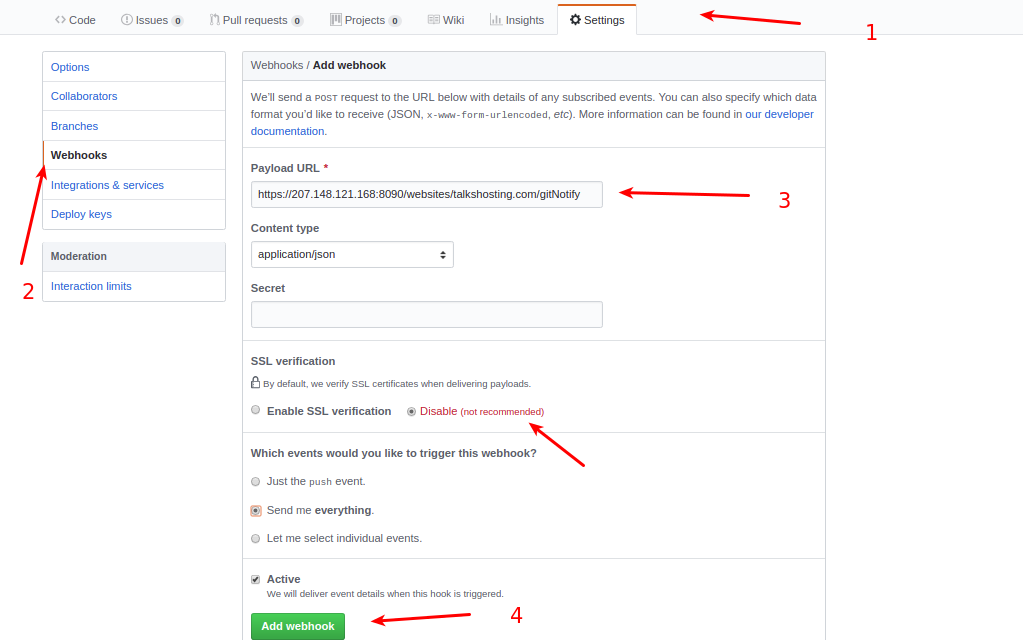
Please note here that I’ve disabled SSL check since by default CyberPanel uses self-signed SSL. Self-sign SSL will fail with SSL verification from GitHub, either disable SSL verification or setup CyberPanel on SSL and replace IP with that hostname (domain name).

This will make sure that whenever you push new code to your repo it is automatically pulled to your website.

If you have any questions, feel free to ask them below.

Installation

This branch is not pushed into production yet, so you can install via:

sh <(curl https://mirror.cyberpanel.net/install-test.sh || wget -O - https://mirror.cyberpanel.net/install-test.sh)

101 replies
ga
gacataracom #2

→ Processing Dependency: kernel-headers for package: glibc-headers-2.17-222.el7.x86_64
→ Finished Dependency Resolution
Error: Package: glibc-headers-2.17-222.el7.x86_64 (base)
Requires: kernel-headers >= 2.2.1
Error: Package: glibc-headers-2.17-222.el7.x86_64 (base)
Requires: kernel-headers
You could try using --skip-broken to work around the problem
You could try running: rpm -Va --nofiles --nodigest

[07-30-00-Sun-Aug-2018] #########################################################################

[07-30-00-Sun-Aug-2018] Unable to install GCC, trying again, try number: 2

[07-30-00-Sun-Aug-2018] #########################################################################

Loaded plugins: fastestmirror
Loading mirror speeds from cached hostfile

  • epel: mirror.kinamo.be
    Resolving Dependencies
    → Running transaction check
    —> Package gcc.x86_64 0:4.8.5-28.el7_5.1 will be installed
    → Processing Dependency: cpp = 4.8.5-28.el7_5.1 for package: gcc-4.8.5-28.el7_5.1.x86_64
    → Processing Dependency: glibc-devel >= 2.2.90-12 for package: gcc-4.8.5-28.el7_5.1.x86_64
    → Processing Dependency: libmpfr.so.4()(64bit) for package: gcc-4.8.5-28.el7_5.1.x86_64
    → Processing Dependency: libmpc.so.3()(64bit) for package: gcc-4.8.5-28.el7_5.1.x86_64
    → Running transaction check
    —> Package cpp.x86_64 0:4.8.5-28.el7_5.1 will be installed
    —> Package glibc-devel.x86_64 0:2.17-222.el7 will be installed
    → Processing Dependency: glibc-headers = 2.17-222.el7 for package: glibc-devel-2.17-222.el7.x86_64
    → Processing Dependency: glibc-headers for package: glibc-devel-2.17-222.el7.x86_64
    —> Package libmpc.x86_64 0:1.0.1-3.el7 will be installed
    —> Package mpfr.x86_64 0:3.1.1-4.el7 will be installed
    → Running transaction check
    —> Package glibc-headers.x86_64 0:2.17-222.el7 will be installed
    → Processing Dependency: kernel-headers >= 2.2.1 for package: glibc-headers-2.17-222.el7.x86_64
    → Processing Dependency: kernel-headers for package: glibc-headers-2.17-222.el7.x86_64
    → Finished Dependency Resolution
    Error: Package: glibc-headers-2.17-222.el7.x86_64 (base)
    Requires: kernel-headers >= 2.2.1
    Error: Package: glibc-headers-2.17-222.el7.x86_64 (base)
    Requires: kernel-headers
    You could try using --skip-broken to work around the problem
    You could try running: rpm -Va --nofiles --nodigest

[07-30-03-Sun-Aug-2018] #########################################################################

[07-30-03-Sun-Aug-2018] Unable to install GCC, trying again, try number: 3

[07-30-03-Sun-Aug-2018] #########################################################################

[07-30-03-Sun-Aug-2018] #########################################################################

[07-30-03-Sun-Aug-2018] Installation failed, consult: /var/log/installLogs.txt

[07-30-03-Sun-Aug-2018] #########################################################################

CyberPanel installation failed.
[root@word ~]#

ma
matheusfbraga #3

Thats a great feature! Very nice panel!

Thank you!

fa
fahriuzun #4

i’m gettin Error message: Target directory should be empty before attaching GIT, otherwise data loss could occur. [404]

even it’s a newly created an empty repo

us
usmannasir #5
i'm gettin Error message: Target directory should be empty before attaching GIT, otherwise data loss could occur. [404]

even it’s a newly created an empty repo

You need to empty the directory you are attaching your git repo too, by default it contains index.html

fa
fahriuzun #6
i'm gettin Error message: Target directory should be empty before attaching GIT, otherwise data loss could occur. [404]

even it’s a newly created an empty repo

You need to empty the directory you are attaching your git repo too, by default it contains index.html

thanks! but it gives the error of:
Error message: Failed to clone repository, make sure you deployed your key to repository. [404]
now. I’ve deployed my keys and tried both GitHub and gitlab

co
cole #7

im getting this same error, did you get it fixed
Error message: Failed to clone repository, make sure you deployed your key to repository. [404]

co
cole #9

Oct 30 14:18:57 trg gunicorn[23921]: mkdir: cannot create directory ‘/home/cyberpanel’: File exists
Oct 30 14:18:57 trg gunicorn[23921]: usage: git [–version] [–help] [-c name=value]
Oct 30 14:18:57 trg gunicorn[23921]: [–exec-path[=]] [–html-path] [–man-path] [–info-path]
Oct 30 14:18:57 trg gunicorn[23921]: [-p|–paginate|–no-pager] [–no-replace-objects] [–bare]
Oct 30 14:18:57 trg gunicorn[23921]: [–git-dir=] [–work-tree=] [–namespace=]
Oct 30 14:18:57 trg gunicorn[23921]: []
Oct 30 14:18:57 trg gunicorn[23921]: The most commonly used git commands are:
Oct 30 14:18:57 trg gunicorn[23921]: add Add file contents to the index
Oct 30 14:18:57 trg gunicorn[23921]: bisect Find by binary search the change that introduced a bug
Oct 30 14:18:57 trg gunicorn[23921]: branch List, create, or delete branches
Oct 30 14:18:57 trg gunicorn[23921]: checkout Checkout a branch or paths to the working tree
Oct 30 14:18:57 trg gunicorn[23921]: clone Clone a repository into a new directory
Oct 30 14:18:57 trg gunicorn[23921]: commit Record changes to the repository
Oct 30 14:18:57 trg gunicorn[23921]: diff Show changes between commits, commit and working tree, etc
Oct 30 14:18:57 trg gunicorn[23921]: fetch Download objects and refs from another repository
Oct 30 14:18:57 trg gunicorn[23921]: grep Print lines matching a pattern
Oct 30 14:18:57 trg gunicorn[23921]: init Create an empty Git repository or reinitialize an existing one
Oct 30 14:18:57 trg gunicorn[23921]: log Show commit logs
Oct 30 14:18:57 trg gunicorn[23921]: merge Join two or more development histories together
Oct 30 14:18:57 trg gunicorn[23921]: mv Move or rename a file, a directory, or a symlink
Oct 30 14:18:57 trg gunicorn[23921]: pull Fetch from and merge with another repository or a local branch
Oct 30 14:18:57 trg gunicorn[23921]: push Update remote refs along with associated objects
Oct 30 14:18:57 trg gunicorn[23921]: rebase Forward-port local commits to the updated upstream head
Oct 30 14:18:57 trg gunicorn[23921]: reset Reset current HEAD to the specified state
Oct 30 14:18:57 trg gunicorn[23921]: rm Remove files from the working tree and from the index
Oct 30 14:18:57 trg gunicorn[23921]: show Show various types of objects
Oct 30 14:18:57 trg gunicorn[23921]: status Show the working tree status
Oct 30 14:18:57 trg gunicorn[23921]: tag Create, list, delete or verify a tag object signed with GPG
Oct 30 14:18:57 trg gunicorn[23921]: ‘git help -a’ and ‘git help -g’ lists available subcommands and some
Oct 30 14:18:57 trg gunicorn[23921]: concept guides. See 'git help ’ or 'git help ’
Oct 30 14:18:57 trg gunicorn[23921]: to read about a specific subcommand or concept.
Oct 30 14:18:57 trg gunicorn[23921]: Host key verification failed.
Oct 30 14:18:57 trg gunicorn[23921]: fatal: Could not read from remote repository.
Oct 30 14:18:57 trg gunicorn[23921]: Please make sure you have the correct access rights
Oct 30 14:18:57 trg gunicorn[23921]: and the repository exists.

ya
yadi #10

it’s great for dev, but, can we change default dir of git?
example i’m create sub-domain : dev.myproject.com with path /home/myproject.com/public_html/dev.myproject.com

then i’m create new folder outsite : /home/myproject.com/dev.myproject.com

but when using this feature, it’s always save all file into : /home/myproject.com/public_html/dev.myproject.com

can we set to this dir?
/home/myproject.com/dev.myproject.com

pb
pb007 #11

been trying to get this working, but can’t seem to find any error code, I have tried on both GitHub and Gitlab, with webhooks and deploy keys setup, etc. does it work on the free version? or just the paid version? any ideas on how best to troubleshoot?

Cy
CyberPanel #12

Did you setup key at account level? Such as here → Sign in to GitHub · GitHub

And make sure directory is completely empty where you are trying to attach the repo if possible upgrade git from the command line.

pb
pb007 #13

when you say set the keys, that is to put the deploy key from the cyberpanel page to the github/gitlab settings? I have done that.

for the empty folder. after I have attached the git repo, the folder disappeared, can’t see it on the server again.

mi
michal #14
been trying to get this working, but can't seem to find any error code, I have tried on both GitHub and Gitlab, with webhooks and deploy keys setup, etc. does it work on the free version? or just the paid version? any ideas on how best to troubleshoot?
when you say set the keys, that is to put the deploy key from the cyberpanel page to the github/gitlab settings? I have done that.

for the empty folder. after I have attached the git repo, the folder disappeared, can’t see it on the server again.

i also have the same problem.

pb
pb007 #15

I have been doing more testing. using keys at both account and repo level. both not working. I am getting no errors with the 200 response code saying that it has been pulled. but no files was pulled to the empty directory. any hints on how best to troubleshoot this?

from GitHub webhook log

Headers
Connection: Keep-Alive
Content-Language: en
Content-Length: 38
Content-Type: text/html; charset=utf-8
Date: Mon, 29 Apr 2019 05:59:17 GMT
Server: LiteSpeed
Vary: Accept-Language, Cookie
X-Frame-Options: SAMEORIGIN

Body
{“error_message”: “None”, “pulled”: 1}

Cy
CyberPanel #16

Did you successfully attached the repo, and having issues with setting up webhook? Or the repo is not attached at all?

Is this a private or public repo? Make sure the attaching directory does not even have a single file such as index.html

pb
pb007 #17

when I click on attach, it says successful. and I see the webhook url which I copied & pasted into the GitHub repo settings. and in the after commit, that’s the log entries above, saying that {“error_message”: “None”, “pulled”: 1}.

it is a private repo.
about the directory. should I manually remove all files from the folder and repo and try again?

pb
pb007 #18

does the webhook trigger a git command on the server? if so, where can I find the log or get it to output the log? so I can see if I can troubleshoot it better.

Cy
CyberPanel #19

Just to confirm again, your repo is attached successfully and you are only having issues with webhook?

Cy
CyberPanel #20

I tried with private repo, git pull and webhooks seems to work fine on my end.

pb
pb007 #21

there was no error when attaching the repo. it was attached successfully.

pb
pb007 #22

can I test the git pull by command line? or any other ways to find the logs, etc?

Cy
CyberPanel #23

Go to the directory where repo is attached such as cd /home/yourdomain.com/public_html and do `git pull</code

pb
pb007 #24

just had another round of testing. whenever I attach a git repo successfully, it will remove the public_html folder. as in, there was an empty public_html folder before I attach it to the repo.

pb
pb007 #25

also, the public_html folder reappear when I detach the repo from the web admin page.

pb
pb007 #26

okay. I have setup the git clone manually using "git clone git@github.com:<username>/<repo_name>.git ." to public_html folder I created, and it is now working with the webhook. so I guess it is to do with the setup part of the admin site not working at the moment. when I use the admin page to attach a repo, it removes the public_html folder with no .git folder created, etc. for now, I will just use the manual way. if there is anything you need me to test more, let me know. glad to help to fix it for everyone. it’s a great feature!

pb
pb007 #28

Provider: Digital Ocean

System: CentOS 7.6, Cyberpanel 1.8 Build 2

Installation option: Plain install from https://cyberpanel.net/install.sh

OLS or Enterprise?
OLS

Installing from official server or mirror server?
Official

Replace JS/CSS files to JS Delivr?
no (standard install?)

Install Memcached extension for PHP?
no (standard install?)

Install LiteSpeed Memcached?
yes (standard install?)

Install Memcached?
no (standard install?)

Install Redis extension for PHP?
yes (standard install?)

Install Redis?
yes (standard install?)

Problem:

When I try to attach git repo, it shows successful message, but on server, the public_html folder is deleted and no .git folder.
I can manually recreate public_html folder and then do the git pull over ssh myself, then it works with the webhook setup.

sa
samcharles93 #30

seconded @pb007, I am facing the exact issue. once attach git repo the public_html folder is removed and cannot perform git pull until folder is cloned manually

Cy
CyberPanel #31

@samcharles93 create your ticket using the above link, would like to reproduce the issue on your end.

xu
xurjob #32

When i try to follow the installation steps I get
“/dev/fd/63: line 1: syntax error near unexpected token newline' /dev/fd/63: line 1: '”
in the command line.

xu
xurjob #34
@xurjob sorry?

Has attaching Git repos to CyberPanel sites been working for version 1.9? Just recently had to reinstall my entire cyberpanel instance after a bad upgrade and noticed this new feature. But it doesn’t work properly after succesfully git attachment. Constantly get the “Permission denied (public key)” error message when the use the cyberpanel provided deploy key. Only got it to work when I ssh-keygen as root but that doesn’t allow me to use the webhooks from cyberpanel.

pb
pb007 #35

it was working for me before. but recently stopped. now I can see successful webhook call from GitHub log, 200, {“error_message”: “None”, “pulled”: 1}. but it doesn’t pull. but if I do it manually (git pull) from the public_html folder, it works.

Cy
CyberPanel #36

@pb007

I just tried on Centos 7 and everything seems to work fine including web hooks.

pb
pb007 #37

I am running it on CentOS 7.6 x64. I can manually go to the public_html folder to do “git pull” and it works, so the keys are fine, etc. and there are no obvious error from calling the webhook neither. any suggestion on where I can look for other logs, etc?

pb
pb007 #38

just had a chance to setup a new website to test this again. using latest 1.9 build 1. attach git to a freshly created website will say it was successful, but it won’t set the content to the repo’s. it will still have the cyberpanel default page. then I tried to remove the public_html folder and recreate. I can do a git clone to the repo. so the keys are all fine. on the GitHub side, the webhook log, 200, {“error_message”: “None”, “pulled”: 1}, every time I commit new code. but it won’t be pulled to the server. still wanting to know where I can find the logs.

pb
pb007 #39

finally got it working. installed another vps and it all worked fine. I went back to check back on the old server, somehow the deploy keys was different. I have not reinstalled the old server at all, but the deploy keys updated itself. with the wrong deploy keys, will still get 200, {“error_message”: “None”, “pulled”: 1} from GitHub. so just detach the old git setup, check the keys and attach again.

fl
fliva #40

I’m trying to clone a Gitlab repository but Cyberpanel keeps giving me this error: “Error message: . [404]”

The repository to clone is https://gitlab.com/f_liva/statamic-alithia, then from the page https://:8090/websites//setupGit I set “f_liva” in the Username field, “statamic-alithia” in the Repository Name field and than select Gitlab (no feedback at click).

I proceed to the next page by clicking on the Attach Now button, then after a few moments appears the red box with “Error message: . [404]”

On Gitlab I have correctly set the Deploy Key from the Repository > Settings > CI / CD > Deploy Keys page.

What am I doing wrong?

us
usmannasir #41

@fliva

I’ve added an extremely improved Git Manager. Run upgrade code and upgrade to v1.9.5.

Then go to Websites → List Websites → Manage → Manage Git

Then click Attach Existing repo, most of the features are complete. I am adding a few more.

Remember to clear browser cache after upgrading, before releasing v1.9.5 officially there will be proper documentation to use each feature in the Git Manager.

fl
fliva #42

I don’t understand, can I already upgrade to 1.9.5 or should I wait for the official release? Anyway, do you have any idea why you’re showing me this error?

fl
fliva #44

Is beta usable for production currently?

us
usmannasir #45

So far no major bug reports from our internal testing. But I would not recommend to run on already running stable server with many sites for now.

However for older git integration if there are any bugs, I will not release any bug fixes because it is replaced with new Git manager.

fl
fliva #46

In case I have problems with 1.9.5 can I downgrade to 1.9.4?

us
usmannasir #47

Yes, you can downgrade using the same method I mentioned above.

fl
fliva #48

Will it be a secure method or will it cause server problems?

us
usmannasir #49

It is safe, you can upgrade or switch versions.

fl
fliva #50

Great thanks

fl
fliva #51

So, I tried to upgrade choosing the 1.9.5 at the version select but, after process, from the backend I see that I’m on version 1.9 build 4E

It seems there is no way to switch to 1.9.5. What I’m wrong?

fl
fliva #53

I’ve upgraded to 1.9.5E but can’t see the new Git Manager

fl
fliva #54

Do yo know why I can’t see the new Git manager?

fl
fliva #56

Yes the Gitlab integration now works fine.

Can’t anyway find the area where to put the automated scripts to run after each commit

fl
fliva #58

Thank you!

fl
fliva #60

I leave you some feedbacks, this is my deployment script:

git merge
/usr/local/lsws/lsphp74/bin/php /user/bin/composer install --prefer-dist -n -o
yarn install --no-progress --silent --non-interactive
npm run prod --silent

curl -X DELETE “https://api.cloudflare.com/client/v4/zones/062b88abd0d8ffe89d684a804228b8d1/purge_cache” \
-H “X-Auth-Email: mail@federicoliva.dev” \
-H “X-Auth-Key: f46411e1819b260ba358fbb8c06c7eef845ca” \
-H “Content-Type: application/json” \
–data ‘{“purge_everything”:true}’

  1. Can’t save the Repo Settings window, and that error message appears:
    Operation Failed!
    Data supplied is not accepted, following characters are not allowed in the input ` $ & ( ) { } ; : ‘ < >.

But in the commands text area I should be able to put ALL characters I want, elsewhere I can’t for example purge the CloudFlare cache (that require json data in the request)

  1. Run Commands when Webhook is fired. Currently: False still remains to False also if the checkbox is selected.

  2. Refreshing the manageGit page and reopening the Configure popup, the commands and previously set fields are RESET, blank values for all.

  3. Refreshing the manageGit page I MUST reconfigure the Git Host, Username and Repo Name clicking on View/Steup Remote button, elsewhere I got an error selecting the Branch.

fl
fliva #61
  1. The webhook is correctly configured but Cyberpanel doesn’t pull the last commit
us
usmannasir #62

I pushed a commit to address a few issues like allow all characters in command box. However, I don’t see other issues you mentioned in v2.0.0 branch

Please upgrade to v2.0.0 branch, also remember that separate your commands with commas. Otherwise, it will be considered one single command.

fl
fliva #63

How do I comma-separate such complex commands? Wouldn’t it be better to separate them with a new line, given the textarea?

fl
fliva #64

I upgraded to 2.0.0.

Now, by clicking on the Manage Git button on the site and selecting the folder to manage I get this error popup:

Operation Failed!
You are not authorized to access this resource.

us
usmannasir #65

What do you mean?

Who supply you these commands?

@fliva said:
How do I comma-separate such complex commands? Wouldn’t it be better to separate them with a new line, given the textarea?

fl
fliva #66

Actually the problem is can’t manage git. I got the not authorized error. But i’m logged in as admin

us
usmannasir #67

do

rm -rf /home/cyberpanel/git

Then try again.

fl
fliva #68

Fixed. But why it happened?

fl
fliva #69

I recorded a short video to show you the other critical bugs with git manager

us
usmannasir #70

You were using actively dev branches (v1.9.5). Now, v2.0.0 is not yet officially released but it is out of dev.

I don’t see any issue.

  1. You can’t checkout to the currently selected branch, you were already on master so you can’t switch it.

  2. When you are setting remote, you see your current remote setup in a textbox, the fields above are used in case you want to change again.

  3. The third thing is when you save git configure, I think I can add a fetch function once you save the configurations so they are reflected in real-time. But during dev, I didn’t felt necessary because on backend they are saved and loaded when details of this folder are fetched again or page is reloaded.

xu
xurjob #71

I also am experiencing the problem where webhook is correctly configured but CyberPanel does not pull the latest commit. I am on 2.0.0 on CentOS 7, removed my git repo and readded, and have cleared my cache after update. I get a Server Error 500 in GitHub when it tries to deliver the payload.

I still believe that the URL should be

https://:8090/websites//gitNotify

like it used to be. Webhook auto pull used to work this way in an earlier version of CyberPanel. If I use /gitNotify in 2.0.0 instead of /webhook it resolves to

{“pulled”: 1, “error_message”: “None”}

instead of Server Error 500 BUT the pull still does not successfully happen. Cyberpanel main error log reports

[04.01.2020_21-42-30] local variable ‘website’ referenced before assignment [ApplicationInstaller.gitPull]

@fliva said:
5) The webhook is correctly configured but Cyberpanel doesn’t pull the last commit

xu
xurjob #74

Type your comment> @usmannasir said:

@xurjob

Please use the new Git Manager from v2.0.0 → https://forums.cyberpanel.net/discussion/comment/8987/#Comment_8987

You are using old version.

I have updated my CP to v2.0.0 once again, cleared my chrome browser cache, removed the git repo from my website, reattached my repo, added the deploy key, added the recommended webhook URL, and pushed a commit to my repo.

GitHub returns a failed payload due to server error 500.
I tried tried two different push commits. No changes until I manually pulled from the 2.0.0 git manager.

CP main log reports:

[04.02.2020_07-03-00] hello world 2
[04.02.2020_07-05-43] Expecting value: line 1 column 1 (char 0)
[04.02.2020_07-07-02] Expecting value: line 1 column 1 (char 0)

Git Manager webhooks do not automatically pull correctly.

When I try with /gitNotify the CP main log reports:

[04.02.2020_07-11-26] local variable ‘website’ referenced before assignment [ApplicationInstaller.gitPull]

Same behavior as my earlier post. What is the significance of hello world 2? Leftover test?

fl
fliva #76

It is necessary that the textarea of the commands is editable and shows the commands active at that moment, so that they can be modified.

In addition, different commands should be divided by the new line characters. Commas are used in some commands, you can’t separate commands like that, look at many other well designed examples like RunCloud or Laravel Forge. Commands are separated by a carriage return.

us
usmannasir #77

ok. I will get back to you.

fl
fliva #78

Thanks

xu
xurjob #80

Type your comment> @usmannasir said:

Are you using a new or old Git Manager?

For new documentation is available at → How to use CyberPanel Git Manager For Complete Automation - Blog Posts - CyberPanel Community

The new manager does not use [ApplicationInstaller.gitPull].

I am not using old git manager. I am using the git manager in 2.0.0. I have once again updated via documentation to CP v2.0.0.
I have also removed my git repo, ran

rm -rf /home/cyberpanel/git
and reattached my repo using the new git manager in v2.0.0

Pull is not successful via webhooks using the steps mentioned in

How to use CyberPanel Git Manager For Complete Automation - Blog Posts - CyberPanel Community

GitHub payload failed delivery due to server error 500.
CP main log reports this when I pushed two different commits to my repo.

[04.02.2020_21-36-03] Expecting value: line 1 column 1 (char 0)
[04.02.2020_21-37-07] Expecting value: line 1 column 1 (char 0)

Cross posted issue to

v2.0.0 Failed pull via webhooks in new Git manager · Issue #296 · usmannasir/cyberpanel · GitHub

us
usmannasir #83

@fliva

Not sure what you are saying. Once you reload the page and select the folder, it will fetch the commands.

fl
fliva #84

Hello

I found a few other issues with the Git integration:

  1. Webhooks doesn’t work. I opened a webhook url from browser and it returns error 500 (ex. https://195.201.237.99:8090/websites/storivox.federicoliva.dev/webhook)
  2. Git deploy commands are not reloaded when I reopen the Configure tab. And all other config are not reloaded. I can’t see how I configured anything after the first save.
fl
fliva #85

Webhook works, I had to disable the SSL certificate verification.

The second bug remains open. The commands are not reloaded when the Configure tab reopens. Please, could you fix this issue?

fl
fliva #86

Any news here?

us
usmannasir #87

Going to check this out now.

fl
fliva #88

In the whiletime where the commands are stored?

us
usmannasir #89

Git conf files are available here

/home/cyberpanel/git/domain.com/

fl
fliva #91

Yes the Configure now reloads the commands, great!

One question: I can’t do a git push to the repo, I can’t figure out which key i need to add my bitbucket account to get rid of the unauthorized error message on pushing

fl
fliva #94

It worked thank you!

pb
pb007 #96

hi there. been playing around with the new git manager in 2.0, getting the following errors when I do a manual Pull.

error: Your local changes to the following files would be overwritten by merge:
index.html
Please commit your changes or stash them before you merge.
Aborting
Updating 5769293…63c6470

Even after a clean setup of a git folder. I can override the files and get the latest, so keys should be all working. but it can’t get any updates via “View Commits” or Pull.

Any ideas?

pb
pb007 #97

very odd. if I go to the server and do a git stash, then I can pull. and then the first push after that using webhook still works. but second one will get the same error. is there any reason why the pushed version will be different?

pb
pb007 #98

if I do git pull from server, I don’t have that issue. but if I do it via the web hook, it will say that error: Your local changes to the following files would be overwritten by merge:
index.html

pb
pb007 #99

been testing on 2 websites on the same server, same GitHub account and key. it works on one of them, but not another. both with the same setup, whenever I commit any change to, webhook triggered, one of the sites will just work and get updated, the other one will give the “local changes” error as above. I even tried it with a new repo on GitHub, still the same issue.

Jo
Jordan #101

Also receiving the same as @saeedj running v2.1 on two servers.

sh
shoaibkk #102

Please Update your cyberpanel to 2.1.2

Sign in to reply