Today i created some ftp user. And then i try to connect with Filezilla. But i can’t connect to the server.
This log from FIlezilla
Status:	Resolving address of xxx.blablabla.com

Status:	Connecting to xx.xx.xx.xx:21…

Status:	Connection established, waiting for welcome message…

Response:	220---------- Welcome to Pure-FTPd [privsep] [TLS] ----------

Response:	220-You are user number 1 of 50 allowed.

Response:	220-Local time is now 16:31. Server port: 21.

Response:	220-IPv6 connections are also welcome on this server.

Response:	220 You will be disconnected after 15 minutes of inactivity.

Command:	USER ftp_user

Response:	331 User ftp_user OK. Password required

Command:	PASS *********

Response:	530 Login authentication failed

Error:	Critical error: Could not connect to server

`
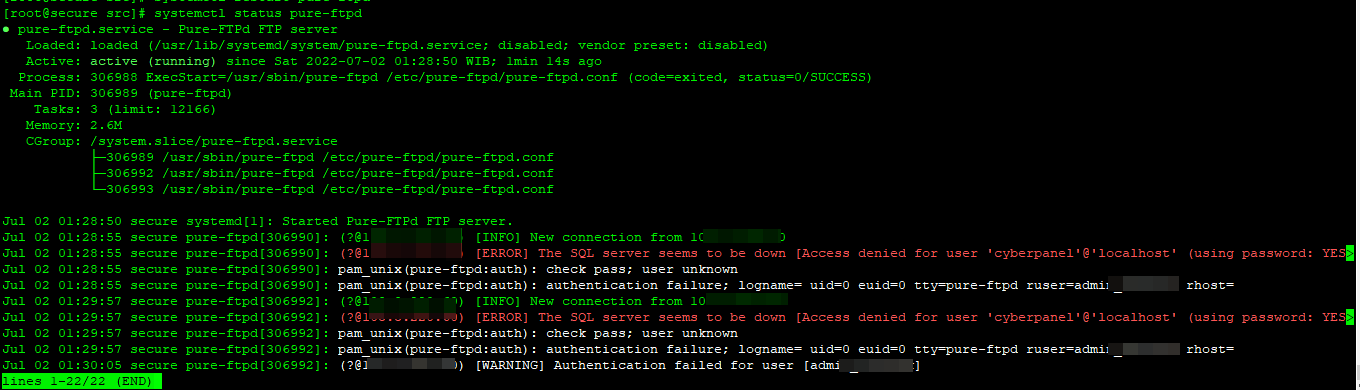
And when i login to ssh, and hit systemctl status pure-ftpd
pure-ftpd.service - Pure-FTPd FTP server

Loaded: loaded (/usr/lib/systemd/system/pure-ftpd.service; enabled; vendor preset: disabled)

Active: active (running) since Mon 2018-07-30 16:24:31 WIB; 56s ago

Process: 2850 ExecStart=/usr/sbin/pure-config.pl /etc/pure-ftpd/pure-ftpd.conf --daemonize (code=exited, status=0/SUCCESS)

Main PID: 2851 (pure-ftpd)

CGroup: /system.slice/pure-ftpd.service

├─2851 pure-ftpd (SERVER)

├─2858 pure-ftpd (IDLE)

├─2859 pure-ftpd (PRIV)

├─2870 pure-ftpd (IDLE)

└─2871 pure-ftpd (PRIV)

Jul 30 16:24:31 xxx.blablabla.com systemd[1]: Starting Pure-FTPd FTP server…

Jul 30 16:24:31 xxx.blablabla.com systemd[1]: PID file /var/run/pure-ftpd.pid not readable (yet?) after start.

Jul 30 16:24:31 xxx.blablabla.com pure-ftpd[2851]: (?@?) [DEBUG] Couldn’t load the DH parameters file /etc/ssl/private/pure-ftpd-dhparams.pem

Jul 30 16:24:31 xxx.blablabla.com systemd[1]: Started Pure-FTPd FTP server.

Jul 30 16:25:25 xxx.blablabla.com pure-ftpd[2870]: (?@xx.xx.xx.xx) [INFO] New connection from xx.xx.xx.xx

Jul 30 16:25:25 xxx.blablabla.com pure-ftpd[2870]: pam_listfile(pure-ftpd:auth): Couldn’t open /etc/ftpusers

Jul 30 16:25:25 xxx.blablabla.com pure-ftpd[2870]: pam_unix(pure-ftpd:auth): check pass; user unknown

Jul 30 16:25:25 xxx.blablabla.com pure-ftpd[2870]: pam_unix(pure-ftpd:auth): authentication failure; logname= uid=0 euid=0 tty=pure-ftpd ruser=…s rhost=

Hint: Some lines were ellipsized, use -l to show in full.

`
Pliss help me. Thank You
 everyone /lol\