se
seluoncocach
#1
 Community
Do you have anything in CyberPane main log file?
[04-58-05-Fri-Jun-2018] Trying to obtain SSL for: lonuongamtu.com and: www.lonuongamtu.com
[04-58-13-Fri-Jun-2018] Successfully obtained SSL for: lonuongamtu.com and: www.lonuongamtu.com
[09-20-54-Sun-Jul-2018] Domains matching query does not exist.
[09-30-53-Sun-Jul-2018] Domains matching query does not exist.
[10-22-27-Sun-Jul-2018] Domains matching query does not exist.
[10-58-02-Sun-Jul-2018] Could not change password for MYSQL user: lonu_test! [restoreDatabaseBackup]
[10-58-02-Sun-Jul-2018] [startRestore]
[11-00-19-Sun-Jul-2018] Could not change password for MYSQL user: lonu_test! [restoreDatabaseBackup]
[11-00-19-Sun-Jul-2018] [startRestore]
[11-06-13-Sun-Jul-2018] Could not change password for MYSQL user: lonu_test! [restoreDatabaseBackup]
[11-06-13-Sun-Jul-2018] [startRestore]
[11-09-23-Sun-Jul-2018] Could not change password for MYSQL user: lonu_test! [restoreDatabaseBackup]
[11-09-23-Sun-Jul-2018] [startRestore]
[02-30-15-Mon-Jul-2018] Could not change password for MYSQL user: lonu_test! [restoreDatabaseBackup]
[02-30-15-Mon-Jul-2018] [startRestore]
[04-58-11-Mon-Jul-2018] Could not change password for MYSQL user: lonu_test! [restoreDatabaseBackup]
[04-58-11-Mon-Jul-2018] [startRestore]
It looks like you have changed the MySQL root password, and have not updated
/etc/cyberpanel/mysqlPassword
With new password.
So how do I fix this?
If you have changed your MySQL root password then please read this guide carefully: Some Dont's After Installing CyberPanel! - Blog Posts - CyberPanel Community
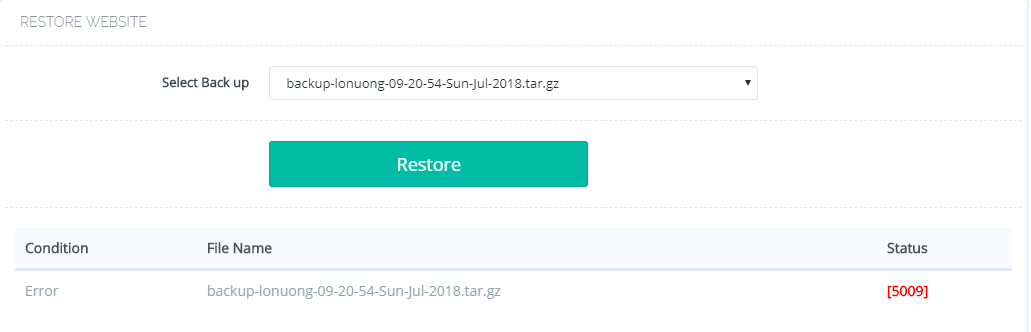
Solved?cause I have the same problems, I never change the SQL password.everything is default when installing cyberpanel, but when I try to restore, Error [5009]
Solved?cause I have the same problems, I never change the SQL password.everything is default when installing cyberpanel, but when I try to restore, Error [5009]
What procedure did you follow? I believe you have not correctly backed up your site. Please mention steps to reproduce the problem.
Hello to all 
This is my first post where I need help.
I create backup for two site, and restart server (install again Centos7 and CyberPanel), and I think my problem for unable to restore is “sql password”.
I don’t know what was my previous password, and now I think I know what is my password because I was recently change. And now I have questions, can I find in my backup files my old self password, and update with my new installed server, If someone understand me
Bdw… This panel is awesome 
@bane1986 you just need to fix MySQL root password Some Dont's After Installing CyberPanel! - Blog Posts - CyberPanel Community
Hello. I have the same issue here, I created an Admin password upon install but never changed any passwords. I have also tried to use an old backup which I have previously used before however near the end of the restoration after DNS records etc, the backup page changes to “condition” Error “status” [736][5009].
Just to clarify. This is a clean install using SSD which was previously mounted on /home I have just remounted on clean install in same mount point /home and tried to restore backups from /home/backup (which contains a number of backups previously used to install without any errors, but I just get [736][5009]. Before running restore from backup to avoid issues from previous install I renamed any old website directory to, for example /home/mywebsite-OLD.
Any ideas how to resolve this please. I understand iy has previously been advised to update the MYSQL password but I never changed this or maybe I just missunderstand why this is being said to be updated.
It seems this was the MYSQL password issue as advised in the previous post but I have never come across this issue before, previously I have never changed any Cyberpanel MYSQL passwords either, and this was a clean install, I have no idea what caused this.
I followed steps to change MYSQL password and backups are restoring again!!
Thank you and sorry for not reading everything properly as the solution is there. I guess I was having a panic moment!
I’m trying to restore my website to new cyberpanel server & getting below error. not sure about old sql root. any help ?
‘NoneType’ object has no attribute ‘text’ [736][5009]
Error Message: ‘NoneType’ object has no attribute ‘text’. Not able to create Account, Databases and DNS Records, aborting. [575][5009]
Exactly the same error
In my case:
updated and upgraded cyberpanel to the latest version
ran backups
downloaded them
Installed clean cyberpanel on ubuntu 20
uploaded backups
clicked restore and got this message when I tried to restore backups on all 3 domains
Error Message: ‘NoneType’ object has no attribute ‘text’. Not able to create Account, Databases and DNS Records, aborting. [575][5009]
very disappointing
@ldavid can you please open ticket with us and send the backup file via Gdrive.
@usmannasir I’m having the same problem.
Moreover, there is no error listing in the Main Log file.
Ubuntu 20.04, Version: v2.1.2
Error Message: ‘NoneType’ object has no attribute ‘text’. Not able to create Account, Databases and DNS Records, aborting. [575][5009]
@HeyTurko upgrade your CyberPanel installation and it should be fine.
[11.15.2021_20-31-42] Domains matching query does not exist… [179:prepMeta]
[11.15.2021_20-31-42] [Errno 13] Permission denied: ‘/home/birblog.cf/backup/status’ [statusWriter]
[11.15.2021_20-31-42] /home/mydomain.cf/backup/
[11.15.2021_20-31-42] /home/mydomain.cf/backup/backup-mydomain.cf-11.15.2021_20-31-42
@usmannasir1
Version v2.1.2 what should I do?
Hi,
Any solution to this problem?
I’m trying to use de backup-restore and it doesnt work. I have a VPS and an instance in Google Cloud. Both are fresh installed and backups not working.
Seriously, a panel with an important backup function, the most important after serving webpages, and it doesnt work.
And also the trick, to manually create /home/backup/… Seriolusy? Litespeed is awesome, but using CyberPanel is not worth today.
Please re-run the cyberpanel upgrade command and try this again. Do let us know with details if not working.