
CyberPanel Community

Gzip custom configuration?

pk
pkjindal #1

Website takes time to respond. I guess gzip compression may be a reason.

I have 2 concern regardingh gzip:

  1. Can we enable or disable gzip compression as per each website?
  2. Can we add exception to files which we do not want to compress?

Is it possible to do so??
5 replies
qt
qtwrk #2

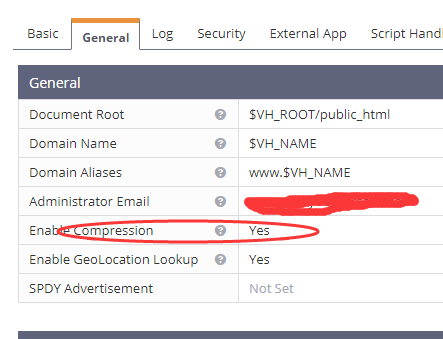
for domain level enable/disable , yes , via webadmin console ,

but for file extension , i am not sure

pk
pkjindal #3
for domain level enable/disable , yes , via webadmin console ,

but for file extension , i am not sure

What is webadmin console?

mo
moataz #4

ols= openlitespeed u can access http://yourip:7080 make sure u enable the port in cyberpanel security and default access is admin / 123456

pl
planetjoin #5

Hello

I have “Enable Compression” in “Yes” and also in Tuning (server config)

But when i test site in gtmetrix.com i get:

Enable gzip compression F(0)

What I loosing here?

Thanks
Fabian

pl
planetjoin #6

done!

Adding the lscache plugin in the site with WP, Gzip was activated
Is weird that gzip not activate in HTML sites ;(

Fabian

Sign in to reply