
CyberPanel Community

[Tutorial] How to setup Wordpress multisite network with cyberpanel/openlitespeed

qt
qtwrk #1

First of all you need to follow the Wordpress guide on how to setup multisite here
https://codex.wordpress.org/Create_A_Network

So the only change we have to make in openlitespeed is just rewrite rule

  1. for sub-folder network , you can use the following rewrite rule:
RewriteEngine On
RewriteBase /
RewriteRule ^index\\.php$ - [L]

RewriteRule ^wp-admin$ wp-admin/ [R=301,L]

RewriteCond %{REQUEST_FILENAME} -f [OR]
RewriteCond %{REQUEST_FILENAME} -d
RewriteRule ^/ - [L]
RewriteRule ^/(wp-(content|admin|includes).*) $1 [L]
RewriteRule ^/(.*\\.php)$ $1 [L]
RewriteRule . index.php [L]
  1. for sub-domain netowkr , you can use the following rewrite rule:
RewriteEngine On
RewriteBase /
RewriteRule ^index\\.php$ - [L]

RewriteRule ^([_0-9a-zA-Z-]+/)?wp-admin$ $1wp-admin/ [R=301,L]

RewriteCond %{REQUEST_FILENAME} -f [OR]
RewriteCond %{REQUEST_FILENAME} -d
RewriteRule ^/ - [L]
RewriteRule ^/([_0-9a-zA-Z-]+/)?(wp-(content|admin|includes).*) $2 [L]
RewriteRule ^/([_0-9a-zA-Z-]+/)?(.*\\.php)$ $2 [L]
RewriteRule . index.php [L]

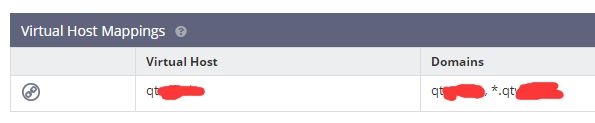
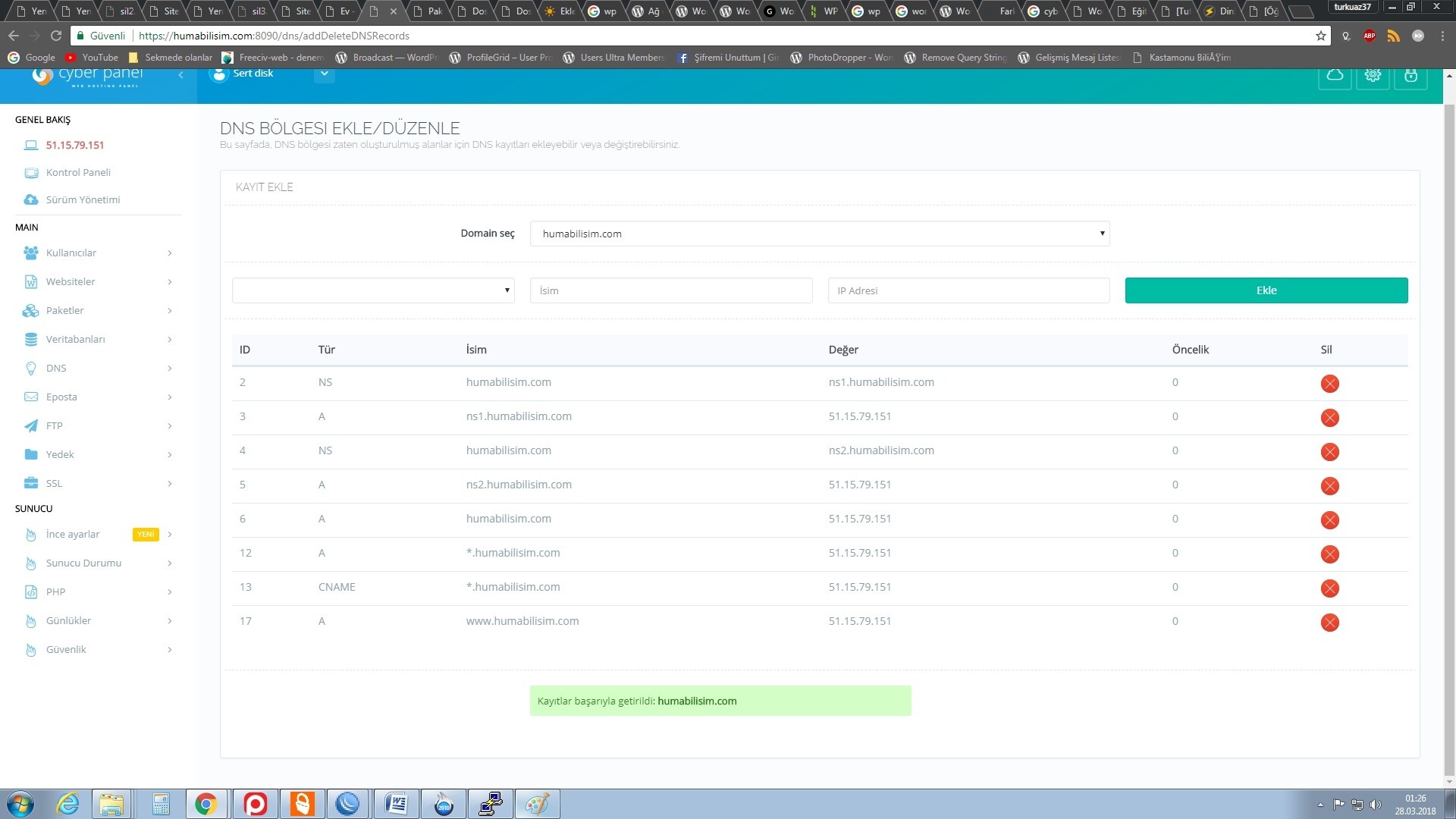
But please do remember add wildcard domain to your current listener and DNS records

for example,
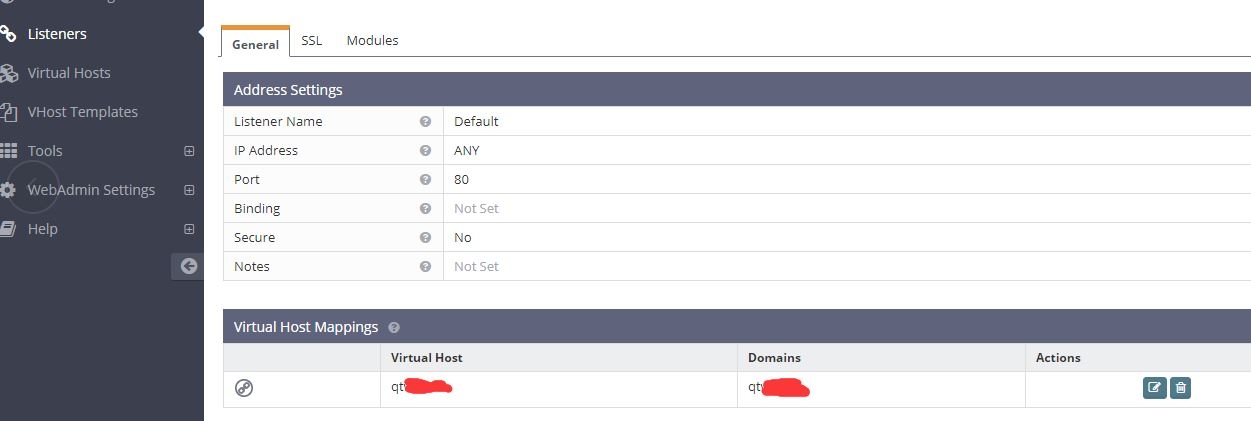
add *.your-domain , 2 domains should be separated by , (comma in english)
and also in your DNS records,
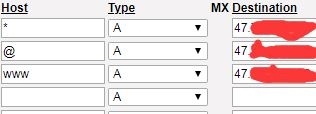
PS1. Do remember restart openlitespeed once you changed rewrite rule and/or listener setting to make change effective.

PS2. For Permalink, you will need to change to “plain” and then change back to other form you want , if you don’t do this step , category page will return 404 , I don’t know why and I couldn’t figure this out , but it just works that way …

I have tested as many pages/functions as possible on both sub-domain and sub-folder , please do let me know if you have any issue with it.
60 replies
se
sertsidk #4

thank you so much
i can add *.domain.name now

But i dont know
how i do DNS record
i cant add “*” and “@”

qt
qtwrk #5

@sertsidk said:
thank you so much
i can add *.domain.name now

But i dont know
how i do DNS record
i cant add “*” and “@”

you are using cyberpanel as DNS server , right ?

se
sertsidk #6

@qtwrk said:

you are using cyberpanel as DNS server , right ?

yes i m usingcyberpanel for DNS server
And useing same domain for name server

qt
qtwrk #7

@sertsidk said:

@qtwrk said:

you are using cyberpanel as DNS server , right ?

yes i m usingcyberpanel for DNS server
And useing same domain for name server

remove that CNAME record.

and also make sure you changed your glue record on your domain provider

se
sertsidk #8

@qtwrk said:
,

remove that CNAME record.

thank you so much

your detection is correct
problem is my CHAME record

se
sertsidk #9

i am again :slight_smile:

i have a problem on permalink now

this site is a wordpresMU . And it is not the same site as above. i have 2 wpmu site on my vps. my first site is ok. i have problem on my second wpmu site.

i m transfered files from hostgator with sftp to my server.
upload SQL with putty.
change permision and user grup
([Tutorial] How to fix permission and user/group problem on CyberPanel. - Blog Posts - CyberPanel Community)

i cant find whey,
because ; first multisite play with permalink. But second multisite not play with permalink.

first multisite instal with cyberpanel, and fiz file permision and user grub same second site
second site transfered from hostgator.

What i can do now?

excuse me for my bad english

se
sertsidk #10

fix problem now AND I witnessed a strange situation:

i changed my .htacces file with filezilla and
again changed and edit with file manager on cyberpanel but dont fix
they are useless

BUT : fix is edit with “Rewrite Rules” on cyberpanel

qt
qtwrk #11

@sertsidk said:
fix problem now AND I witnessed a strange situation:

i changed my .htacces file with filezilla and
again changed and edit with file manager on cyberpanel but dont fix
they are useless

BUT : fix is edit with “Rewrite Rules” on cyberpanel

you need to restart OLS once htaccess is modified

se
sertsidk #12

@qtwrk said:

you need to restart OLS once htaccess is modified

I am learning by your side
thank you so much

i have a problem now.
how i use ssl on my subsite (with wordpressmu)
my subsites is subdomain or domain on my wpmu

qt
qtwrk #13

@sertsidk said:

@qtwrk said:

you need to restart OLS once htaccess is modified

I am learning by your side
thank you so much

i have a problem now.
how i use ssl on my subsite (with wordpressmu)
my subsites is subdomain or domain on my wpmu

is your wordpress network comes with sub-domains ?

if so , as what i can think of , only 2 ways

  1. manually request and get a Let’s Encrypt cert

  2. buy a wildcard domain , and LE does have , but you need to manually to do it as well …

se
sertsidk #16

@qtwrk said:

you will need a wildcard SSL

How i can

i tested this but could not.

"
Obtaining a new certificate
Performing the following challenges:
Client with the currently selected authenticator does not support any combination of challenges that will satisfy the CA. You may need to use an authenticator plugin that can do challenges over DNS.

IMPORTANT NOTES:

  • Your account credentials have been saved in your Certbot
    configuration directory at /etc/letsencrypt. You should make a
    secure backup of this folder now. This configuration directory will
    also contain certificates and private keys obtained by Certbot so
    making regular backups of this folder is ideal.
    "
qt
qtwrk #17

:’( I don’t know , I think you better try on Let’s Encrypt continuity regard this wildcard issue , meanwhile I will check this out

se
sertsidk #18

@qtwrk said:
:cry: I don’t know , I think you better try on Let’s Encrypt continuity regard this wildcard issue , meanwhile I will check this out

thank you.

se
sertsidk #19

i cant do not work email on my multisite ( form or etc ).

qt
qtwrk #20

@sertsidk said:
i cant do not work email on my multisite ( form or etc ).

I’m sorry ?

se
sertsidk #21

excuse me
my english is more bad. i know a bit simple english :slight_smile:

i cant send e-mail with my sites. İ have 2 wordpres multisite on my cyberpanel.
İ traing send mail with “contact form 7” and " WP Forms" plugins.
And wordpres dont sent when new site accont

should i do something on cyberpanel or openlitespeed for email ?

qt
qtwrk #22

@sertsidk said:
excuse me
my english is more bad. i know a bit simple english :slight_smile:

i cant send e-mail with my sites. İ have 2 wordpres multisite on my cyberpanel.
İ traing send mail with “contact form 7” and " WP Forms" plugins.
And wordpres dont sent when new site accont

should i do something on cyberpanel or openlitespeed for email ?

hmmmmm , I suppose not , try /var/log/maillog , log file should tell you why failed to sent mail.

se
sertsidk #23

ohh!
I really do not know what to do now

now i really do not know what to do my linux knowledge is worse than english.
And
google helps less in this matter

I will try to it with FileZilla

se
sertsidk #24

@qtwrk said:

hmmmmm , I suppose not , try /var/log/maillog , log file should tell you why failed to sent mail.

there is 6 files:
ftpuser
rpc
cyberpanel
vmail
fileusernameisformyfirstsite
fileusernameisformysecontsite

and all is empty, (0 Kb)

qt
qtwrk #25

You sure you have postfix running ?

se
sertsidk #26

no
i m not sure anything

How i can check it?

qt
qtwrk #27

systemctl status postfix

and

netstat -lnp | grep 25

se
sertsidk #28


[root@xxxxx~]# systemctl status postfix
● postfix.service - Postfix Mail Transport Agent
Loaded: loaded (/usr/lib/systemd/system/postfix.service; enabled; vendor preset: disabled)
Active: active (running) since Thu 2018-03-29 19:52:47 UTC; 2 weeks 5 days ago
Process: 3315 ExecStart=/usr/sbin/postfix start (code=exited, status=0/SUCCESS)
Process: 3302 ExecStartPre=/usr/libexec/postfix/chroot-update (code=exited, status=0/SUCCESS)
Process: 3206 ExecStartPre=/usr/libexec/postfix/aliasesdb (code=exited, status=0/SUCCESS)
Main PID: 3819 (master)
CGroup: /system.slice/postfix.service
├─ 418 anvil -l -t unix -u
├─ 3819 /usr/libexec/postfix/master -w
├─ 3838 qmgr -l -t unix -u
├─ 4519 tlsmgr -l -t unix -u
└─30802 pickup -l -t unix -u

Apr 17 20:50:46 xxxxx postfix/smtp[32628]: connect to alt1.gmail-smtp-in.l.g…t
Apr 17 20:50:46 xxxxx postfix/smtp[32628]: connect to alt1.gmail-smtp-in.l.g…e
Apr 17 20:50:46 xxxxx postfix/smtp[32629]: connect to alt1.gmail-smtp-in.l.g…t
Apr 17 20:50:46 xxxxx postfix/smtp[32629]: connect to alt2.gmail-smtp-in.l.g…e
Apr 17 20:50:46 xxxxx postfix/smtp[32629]: B20CD1214F8: to=<sertdisk@gmail.c…)
Apr 17 20:51:16 xxxxx postfix/smtp[32628]: connect to alt2.gmail-smtp-in.l.g…t
Apr 17 20:51:16 xxxxx postfix/smtp[32628]: AD1B8121506: to=<sertdisk@gmail.c…)
Apr 17 20:54:15 xxxxx postfix/smtpd[416]: connect from unknown[184.71.152.86]
Apr 17 20:54:15 xxxxx postfix/smtpd[416]: warning: unknown[184.71.152.86]: S…m
Apr 17 20:54:16 xxxxx postfix/smtpd[416]: disconnect from unknown[184.71.152.86]
Hint: Some lines were ellipsized, use -l to show in full.
[root@xxxxx ~]# netstat -lnp | grep 25
tcp 0 0 0.0.0.0:25 0.0.0.0:* LISTEN 3819/master
tcp6 0 0 :::25 :::* LISTEN 3819/master
unix 2 [ ACC ] STREAM LISTENING 2599 1/init /run/systemd/private
unix 2 [ ACC ] STREAM LISTENING 8025 3337/dovecot /var/run/dovecot/dns-client
[root@xxxxx~]#

qt
qtwrk #29

try cat /var/log/maillog

se
sertsidk #30

I’ve realized now
Not working mail nowhere
İ tested now with rainloop

se
sertsidk #31

@qtwrk said:
try cat /var/log/maillog

unfortunately the situation is the same

qt
qtwrk #32

@sertsidk said:
@qtwrk said:
try cat /var/log/maillog

unfortunately the situation is the same

Alright… Log a ticket I will try to figure it out

mo
moataz #33

Hi ,

ive followed ur tutorial but sadly is not working with me in blogs…

i migrated from cpanel , i have 4 sites in my network + main …

only the main website front/backend and network backend opens fine …

any other gives 404…

any help with that…

qt
qtwrk #34

@moataz said:
Hi ,

ive followed ur tutorial but sadly is not working with me in blogs…

i migrated from cpanel , i have 4 sites in my network + main …

only the main website front/backend and network backend opens fine …

any other gives 404…

any help with that…

So you are on subfolder, post your htaccess content

mo
moataz #35

RewriteEngine On
RewriteBase /
RewriteRule ^index\.php$ - [L]

RewriteRule ^wp-admin$ wp-admin/ [R=301,L]

RewriteCond %{REQUEST_FILENAME} -f [OR]
RewriteCond %{REQUEST_FILENAME} -d
RewriteRule ^/ - [L]
RewriteRule ^/(wp-(content|admin|includes).) $1 [L]
RewriteRule ^/(.
\.php)$ $1 [L]
RewriteRule . index.php [L]

mo
moataz #36

ive found the solution,

u have to add it to OLS server itself not .htaccess file…

maybe there is another way to allow .htaccess but it worked with me

qt
qtwrk #37

oh yes , you will need something like this “rewriteFile /path/to/.htaccess” in conf to tell OLS to read that .htaccess

mo
moataz #38

now im facing 2 issues:

1- all websites open fine , but when i check domain dns with mxtool i get dns 500 error
so i cant test site anywhere neither in mxtool , gtmetrix , pingdom or anywhere as they reflect 500 error

i donno if that due to SOA issue “we can yet edit SOA file in cyber panel” and the primary always shows to ns1.domain.com not the dns server we created…

2- i can send emails but cant receive emails with the new addon domain i added

any ideas?

mo
moataz #39

i got solution for the 500 , in wp_config i added www in define('DOMAIN_CURRENT_SITE

and it worked

just the email receiving issue remains unsolved

qt
qtwrk #40

do you have correct MX record setup ?

mo
moataz #41

yes , its all set for email,

but i think its something related to mydestination settings in postfix main.cf

thats my configs:

postconf: warning: /etc/postfix/master.cf: undefined parameter: mua_sender_restrictions
postconf: warning: /etc/postfix/master.cf: undefined parameter: mua_client_restrictions
postconf: warning: /etc/postfix/master.cf: undefined parameter: mua_helo_restrictions
postconf: warning: /etc/postfix/master.cf: undefined parameter: mua_sender_restrictions
postconf: warning: /etc/postfix/master.cf: undefined parameter: mua_client_restrictions
postconf: warning: /etc/postfix/master.cf: undefined parameter: mua_helo_restrictions
postconf: warning: /etc/postfix/main.cf: undefined parameter: virtual_mailbox_limit_maps
alias_database = hash:/etc/aliases
alias_maps = hash:/etc/aliases
broken_sasl_auth_clients = yes
command_directory = /usr/sbin
config_directory = /etc/postfix
daemon_directory = /usr/libexec/postfix
data_directory = /var/lib/postfix
debug_peer_level = 2
debugger_command = PATH=/bin:/usr/bin:/usr/local/bin:/usr/X11R6/bin ddd $daemon_directory/$process_name $process_id & sleep 5
dovecot_destination_recipient_limit = 1
html_directory = no
inet_interfaces = all
inet_protocols = all
mail_owner = postfix
mailq_path = /usr/bin/mailq.postfix
manpage_directory = /usr/share/man
message_size_limit = 30720000
milter_default_action = accept
mydestination = localhost, localhost.localdomain
myhostname = control.freeappbuilder.info
mynetworks = 127.0.0.0/8
newaliases_path = /usr/bin/newaliases.postfix
non_smtpd_milters = $smtpd_milters
proxy_read_maps = $local_recipient_maps $mydestination $virtual_alias_maps $virtual_alias_domains $virtual_mailbox_maps $virtual_mailbox_domains $relay_recipient_maps $relay_domains $canonical_maps $sender_canonical_maps $recipient_canonical_maps $relocated_maps $transport_maps $mynetworks $virtual_mailbox_limit_maps
queue_directory = /var/spool/postfix
readme_directory = /usr/share/doc/postfix-2.10.1/README_FILES
sample_directory = /usr/share/doc/postfix-2.10.1/samples
sendmail_path = /usr/sbin/sendmail.postfix
setgid_group = postdrop
smtp_tls_security_level = may
smtpd_milters = inet:127.0.0.1:8891
smtpd_recipient_restrictions = permit_mynetworks, permit_sasl_authenticated, reject_unauth_destination
smtpd_sasl_auth_enable = yes
smtpd_sasl_authenticated_header = yes
smtpd_sasl_path = /var/spool/postfix/private/auth
smtpd_sasl_type = dovecot
smtpd_tls_cert_file = /etc/pki/dovecot/certs/dovecot.pem
smtpd_tls_key_file = /etc/pki/dovecot/private/dovecot.pem
smtpd_use_tls = yes
unknown_local_recipient_reject_code = 550
virtual_alias_domains =
virtual_alias_maps = proxy:mysql:/etc/postfix/mysql-virtual_forwardings.cf, mysql:/etc/postfix/mysql-virtual_email2email.cf
virtual_gid_maps = static:5000
virtual_mailbox_base = /home/vmail
virtual_mailbox_domains = proxy:mysql:/etc/postfix/mysql-virtual_domains.cf
virtual_mailbox_maps = proxy:mysql:/etc/postfix/mysql-virtual_mailboxes.cf
virtual_transport = dovecot
virtual_uid_maps = static:5000
postconf: warning: /etc/postfix/main.cf: unused parameter: virtual_create_maildirsize=yes
postconf: warning: /etc/postfix/main.cf: unused parameter: virtual_maildir_extended=yes

i tried adding $domain to mydestination but that affected hostname email that was working

and received postmaster saying : User unknown in virtual alias table

mo
moataz #42

@qtwrk said:
oh yes , you will need something like this “rewriteFile /path/to/.htaccess” in conf to tell OLS to read that .htaccess

u mean this one in OLS to be mentioned ?

qt
qtwrk #43

hmmmm , I am not exactly a email guy , but based on my experience, the default postfix configuration should be able to handle all the mail on different domains.

so default didn’t work out ?

what’s output log in /var/log/maillog?

se
sertsidk #44

i cant working with domains on my wordpress network.

i have a wordpress multisite. i can add with subdomain sites. but i cant add with domain.

how i can

qt
qtwrk #45
i cant working with domains on my wordpress network.

i have a wordpress multisite. i can add with subdomain sites. but i cant add with domain.

how i can

well , according wordpress’ wiki, it ONLY work for sub-domain and sub-folder

https://codex.wordpress.org/Create_A_Network

se
sertsidk #46

well , according wordpress’ wiki, it ONLY work for sub-domain and sub-folder

Create A Network « WordPress Codex

wordpress is supported domain and
In WordPress 4.5+, domain mapping is a native feature.

se
sertsidk #48
I think it's same, just need to add domain into listener

how i can add my domains into listener?

qt
qtwrk #49
I think it's same, just need to add domain into listener

how i can add my domains into listener?

same as i expained in first post , just change *.domain.com to your domain

se
sertsidk #53


i added my second domain into main domain.
but cant see secont domain on dashboard

And
wordpress codexs say:
“The additional domains should be parked upon the master domain.”

how i do it?

qt
qtwrk #54
![](upload://sdT8m2ReuQEi6fxffqDZDEB6GpK.jpeg) ![](upload://rAKtfjMnR5FSMLaK5oygsRx3opM.jpeg)

i added my second domain into main domain.
but cant see secont domain on dashboard

And
wordpress codexs say:
“The additional domains should be parked upon the master domain.”

how i do it?

hmmmmmmmm , I am not exactly sure , try add alias here?

qt
qtwrk #55

just made a quick test , try use domain aliases in panel

sa
sagarsawant #58

Directory of my Multisite network openlscheck.cf - /home/openlscheck.cf/public_html

vHost Conf openlscheck.cf shows -
docRoot $VH_ROOT/public_html

The first network site - site1.openlscheck.cf was created and mapped to openlscheck.ml and its works with domain alias.

Networksite was created on "domain1.openlschek.cf and was mapped to openlscheck.tk but gives SSL conflict, to resolve the same I have added the domain as a child domain instead of domain alias

openlscheck.tk has default path /home/openlscheck.cf/public_html/openlscheck.tk

vHost Conf (default) openlscheck.tk -
docRoot /home/openlscheck.cf/public_html/openlscheck.tk

when I changed vHost Conf to -
docRoot /home/openlscheck.cf/public_html

so that it will direct it to Multisite Network directory

Still in the list in Domains>List Domains the default path still shows
/home/openlscheck.cf/public_html/openlscheck.tk

and not the /home/openlscheck.cf/public_html

Also openlscheck.tk is giving 404 error. Kindly guide me what exactly i should do to resolve this.

@qtwrk your help will be apriciated

Fa
Fajar #59

work with domain mapping?
& can I add wildcard?

sa
sagarsawant #60

@fajr - domain mapping does not need any extra plugin now it’s a feature of WP now. just change the name of the site to the new name of domain you want and point your A record to the server ip it works well.

My issue is with the ssl issue. the ssl issued in the cyber panel has some conflict

Sign in to reply