CyberPanel Community

Some Dont's After Installing CyberPanel!

us
usmannasir #1

Hello!

After installing CyberPanel there are somethings that you don’t want to do for having a smooth experience.

Don’t upload files via SFTP

Note: Don’t use SFTP as root to upload files, you can use website level user to upload files via sftp, more details here.

When you upload files via sftp they are owned by root, and CyberPanel runs each account through its own user, so once you have uploaded content via root, you might start getting permissions errors. More details can be found here.

Even though file manager now has one-click fix permission button to get rid of this issue, but this is still not a recommended way to upload content.

The recommended way is to use File Manager and FTP. They both use the same user as which scripts are executed for a particular site.

Changing MySQL Ports

If you want to change MySQL port, kindly update following part of a settings file.

The settings file is located at /usr/local/CyberCP/CyberCP/settings.py (Update the port part)


DATABASES = {
    'default': {
        'ENGINE': 'django.db.backends.mysql',
        'NAME': 'cyberpanel',
        'USER': 'cyberpanel',
        'PASSWORD': 'cyberpanel',
        'HOST': 'localhost',
        'PORT':''
    },
    'rootdb': {
        'ENGINE': 'django.db.backends.mysql',
        'NAME': 'mysql',
        'USER': 'root',
        'PASSWORD': 'cyberpanel',
        'HOST': 'localhost',
        'PORT': '',
    }
}

Once done, run

systemctl restart lscpd

MYSQL Password

If you change MySQL root password also update this file with updated password:

/etc/cyberpanel/mysqlPassword

Then you also need to update root password in settings file /usr/local/CyberCP/CyberCP/settings.py. Insert new password at new root password here


    'rootdb': {
        'ENGINE': 'django.db.backends.mysql',
        'NAME': 'mysql',
        'USER': 'root',
        'PASSWORD': 'new root password here',
        'HOST': 'localhost',
        'PORT': '',
    }
}

Finally also update root password in /home/cyberpanel/.my.cnf. If this file does not exist, you can skip.

After doing all these steps, make sure to run systemctl restart lscpd

This article is still a work in progress.

34 replies
du
duy13 #2

I suggest removing this section:

  accessControl  {
    allow                 127.0.0.1, localhost
    deny                  0.0.0.0/0
  }
  1. Without it, the attacker still can not access the filemanager without login.

  2. If you use it, when users want to use reverse proxy will cause error filemanager

us
usmannasir #3

@duy13 said:
I suggest removing this section:

  accessControl  {
    allow                 127.0.0.1, localhost
    deny                  0.0.0.0/0
  }
  1. Without it, the attacker still can not access the filemanager without login.

  2. If you use it, when users want to use reverse proxy will cause error filemanager

It applies to .filemanager context only, without this file manager api can be accessed.

du
duy13 #4

@usmannasir said:
It applies to .filemanager context only, without this file manager api can be accessed.

I mean you should allow from all IP

accessControl  {
    allow                 127.0.0.1, localhost
    allow                  0.0.0.0/0
  }
us
usmannasir #5

@duy13 said:

@usmannasir said:
It applies to .filemanager context only, without this file manager api can be accessed.

I mean you should allow from all IP

accessControl  {
    allow                 127.0.0.1, localhost
    allow                  0.0.0.0/0
  }

File manager API will be exposed to public then.

du
duy13 #6

@usmannasir said:

accessControl {
allow 127.0.0.1, localhost
deny 0.0.0.0/0
}

It applies to .filemanager context only, without this file manager api can be accessed.

Did you mean, that is the only protection method of “file manager api”?
So if I attacked a share hosting site on the CyberPanel server, through which I could contact the “file manager api” (because I was querying from localhost), and “file manager api” did not ask me Any authentication as long as I query from localhost?
So, can I access Filemanager of any website hosting share on CyberPanel if I own one website located on the same server?
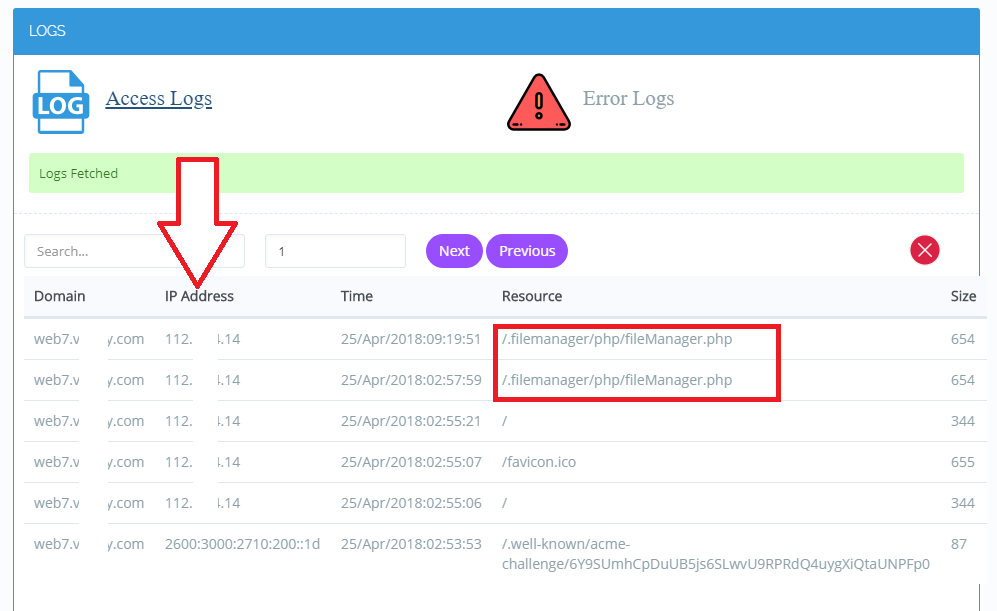
And when you enable the “Use Client IP in Header” function, you will also be prevented from accessing Filemanger
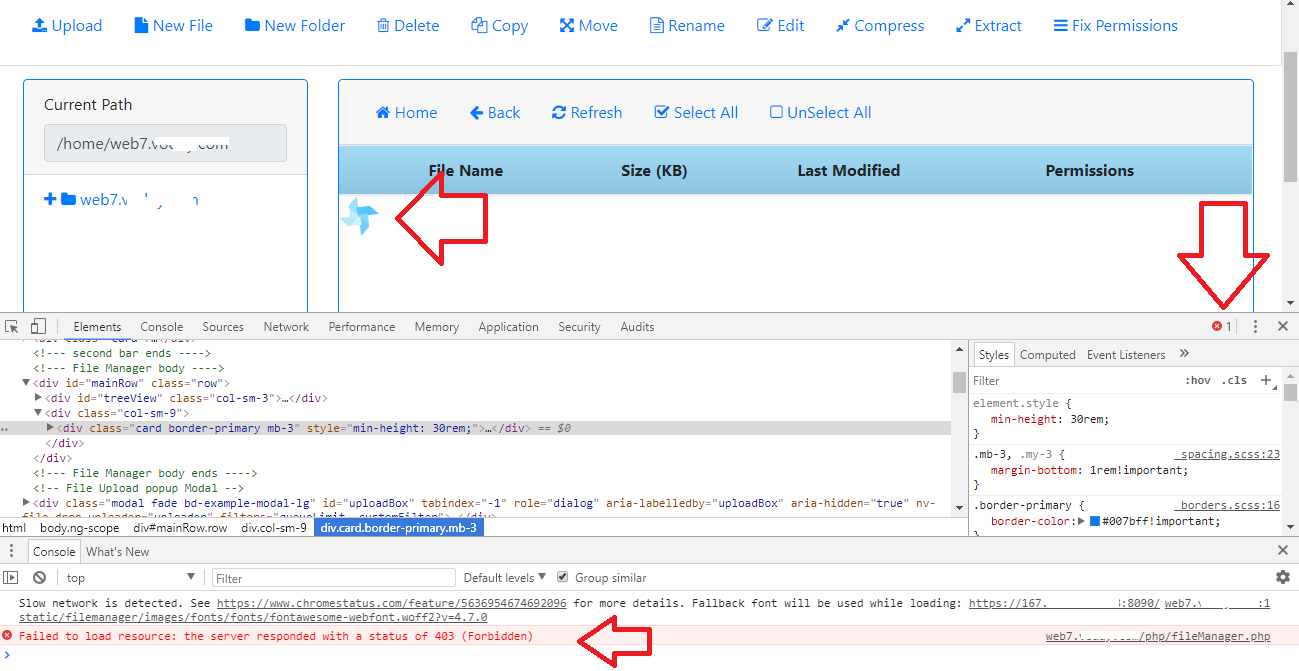
Failed to load resource: server responded with a status of 403 (Forbidden)

Cy
CyberPanel #8

@zimou13 said:
Got it running this time, tried the first time and apparently it ran out of ram even if nothing else was running and it was over the min, 512MB ram. Reinstalled and enabled a swap portion and the script ran fine. Where’s the ssl certificate stored for the control panel, want to upload my own valid ssl certificate for it. Edit: would be nice if there was a option to manage ssl after creating the website, like options to upload my own ssl certificate and for auto creation with Let’s Encrypt (which was nice that you added that). I also can’t find a option to create a admin user, only reseller or normal users, it exist in the modify option, just not during creation. One last thing that would be nice is setting up resource quota for users so users can’t take up all of it for themselves. But overall, this is a really well done panel, love how it looks.

SSL Certs are stored at

/usr/local/lsws/conf/vhosts/SSL-example.com/

We have Administrators and Normal users only, Reseller is not available now. You should be able to create administrators and normal users.

From website control panel you can also save your customs SSLs too without going into command line.

du
duy13 #9

Still can not access Filemanager if you use a reverse proxy as Cloudflare, CDN, Sucuri…

Cy
CyberPanel #10

@duy13 said:
Still can not access Filemanager if you use a reverse proxy as Cloudflare, CDN, Sucuri…

The update addresses the security issue in the File manager, I do not understand your issue?

du
duy13 #11

@CyberPanel said:

@duy13 said:
Still can not access Filemanager if you use a reverse proxy as Cloudflare, CDN, Sucuri…

The update addresses the security issue in the File manager, I do not understand your issue?

When you use a reverse proxy such as Cloudflare for a domain,

Openlitespeed blocks incoming IPs from Cloudflare or Real IPs of visitors to Filemanager because of the following configuration:

accessControl  {
    allow                 127.0.0.1, localhost
    deny                  0.0.0.0/0
  }

Because Openlitespeed recognizes the real Ip of the visitor (It is not 127.0.0.1):

I want to ask how the mechanism upload a file by Filemanager like?
You do not upload the file directly (size 100MB or more) to a direct IP of the server?
Instead, it will not upload directly to the IP of the server but via a Domain name, For example: web7.example.com/.filemanager/,
So you will upload the file through the Reverse proxy of the domain: web7.example.com, I think this is a bad idea. Because I go directly to the server’s IP https: //x.x.x.x: 8090 but when I upload a file it goes through a Reverse proxy?

The file will go from me → to the Cyberpanel Server IP → and to the Reverse Proxy Server (Because domain is using Reverse proxy) → then back to the Cyberpanel Server IP
This is disaster, I think people will always want to upload files directly from them to the IP of the server.

Cy
CyberPanel #12

accessControl  {
    allow                 127.0.0.1, localhost
    deny                  0.0.0.0/0
  }

You can remove this part if you need since File manager does additional checks now. It is supposed to work this way to follow Suexec pattern, otherwise, if we run this as root, file and folders uploaded are owned via root and there can be other security issues.

TD
Tien Dung Dao #13

Should After Installing CyberPanel bro

us
usmannasir #14
Should After Installing CyberPanel bro

I am sorry?

us
usmannasir #16
I remove the example.com vhost, how can i create it again?

If you only removed configurations from Webadmin then you can paste following at the end of: /usr/local/lsws/conf/httpd_config.conf

I assumed you have not removed Example vhost mapping from the listener.

virtualHost Example{
    vhRoot                   $SERVER_ROOT/Example/
    allowSymbolLink          1 
    enableScript             1 
    restrained               1 
    maxKeepAliveReq
    smartKeepAlive                  
    setUIDMode               0 
    chrootMode               0 
    configFile               $SERVER_ROOT/conf/vhosts/Example/vhconf.conf
}

Then restart OpenLiteSpeed

systemctl restart lsws
ro
ronin07 #17

quite a useful post there. i somehow messed up my mysql ports. followed your steps and now it’s all fine. can we use costom ports for local network?

Lu
Luke007 #20

Is it safe to auto update daily using yum-cron?

ju
juniorinvernizzi #21

After Upgrade of CyberPanel, error 503 occurs when entering the panel. Help ME?

ma
manualsnow #22

Error 503 can often be resolved by restarting the server - ex. [reboot] or [shutdown -r now]

dd
ddai00bit #23

I updated to the latest version 1.8.3 under the following sentence

cd
rm -f upgrade.py
wget http://cyberpanel.net/upgrade.py
python upgrade.py
Redirecting...
websites still work normally but I have not been able to access port 8090 and have the following error

Please support me! thank you

Ge
George #24

Since there’s a user created for every website ie /home/domain1.com that owns this folder, can’t we set a password to that user and use those credentials for SFTP? Since we’re logging in with the username that owns the folder, there will be no issue with root owned files.
Would setting a password to the user that owns the domain break anything else maybe?

Cy
CyberPanel #25

There is no issue if you set password for that user via normal linux commands and use that to login via SFTP, it is totally fine. Just for security reasons by default password is disabled.

ro
rodrigobrzoski #26

I can’t load lscpd.
The log file the error is:
/var/log/installLogs.txt
11.19.2020_23-30-54] [ERROR] We are not able to run groupadd docker return code: 9

Ma
Master3395 #27

You can upload files using SFTP, but you need to change the group and owner of the whole folder, to make sure it’s owned by the user.
If you have sudo access you can use this:
Replace User with your user and Group with your user.
sudo chown User:Group -R /home/Domain/Public_html

ra
rareskyone #28

I am facing issue in uploading files using SFTP , so if someone have solution please help me.

Thank you.

zo
zonzon #29

hello,

How I can ask mysql to use password for mysql root user when mysql starting and checking for upgrade?

localhost systemd[1]: Started MariaDB 10.3.25 database server.
localhost /etc/mysql/debian-start[1126]: Upgrading MySQL tables if necessary.
localhost systemd[1]: Started OpenLiteSpeed HTTP Server.
localhost /etc/mysql/debian-start[1131]: Looking for ‘mysql’ as: /usr/bin/mysql
localhost /etc/mysql/debian-start[1131]: Looking for ‘mysqlcheck’ as: /usr/bin/mysqlcheck
localhost /etc/mysql/debian-start[1131]: Version check failed. Got the following error when calling the ‘mysql’ command line client
localhost /etc/mysql/debian-start[1131]: ERROR 1045 (28000): Access denied for user ‘root’@‘localhost’ (using password: NO)
localhost /etc/mysql/debian-start[1131]: FATAL ERROR: Upgrade failed
localhost /etc/mysql/debian-start[1157]: Checking for insecure root accounts.

sa
samysalahgad #30

Why get 2FA enables after installation? I even cant login to admin area

ra
raysam #31

please help needed

i got this error while installing cyberpanel on ubuntu 18.04

File “/root/cyberpanel/install/installCyberPanel.py”, line 314, in fixMariaDB
conn = mariadb.connect(user=‘root’, passwd=self.mysql_Root_password)
File “/usr/local/CyberPanel/lib/python3.6/site-packages/MySQLdb/init.py”, line 130, in Connect
return Connection(*args, **kwargs)
File “/usr/local/CyberPanel/lib/python3.6/site-packages/MySQLdb/connections.py”, line 185, in init
super().init(*args, **kwargs2)
MySQLdb._exceptions.OperationalError: (1045, “Access denied for user ‘root’@‘localhost’ (using password: YES)”)
Oops, something went wrong.

please help thanks

ha
hackerbob #32

You installing from cli?

ha
hackerbob #33

THis forum Blows. You cant reply? You just keep posting repetetive shit over and over, nothing gets fixed. the newbs are in hell… Just saying… whoami ? root

ha
hackerbob #34

// modifiers have the ability to execute arbitrary code when Popper.js get inited
// such code is executed in the same order of its modifier
// they could add new properties to their options configuration
// BE AWARE: don’t add options to options.modifiers.name but to modifierOptions!

Ni
Nick #35

As you can probably see, we’re currently in the process of migrating forums, documentation and other things so that everyone can get better support as well as have more time for development. Please have patience. Also, its a free product - you are always welcome to go pay for cPanel if you have higher expectations.

Sign in to reply