CyberPanel Community

[Tutorial] How to add additional http header

qt
qtwrk #1

so , after we were able to login to webadmin console , there is a lot of new advanced options for us.

for example , how to add http header to your website.

some http header , for example like HSTS is really useful nowadays.
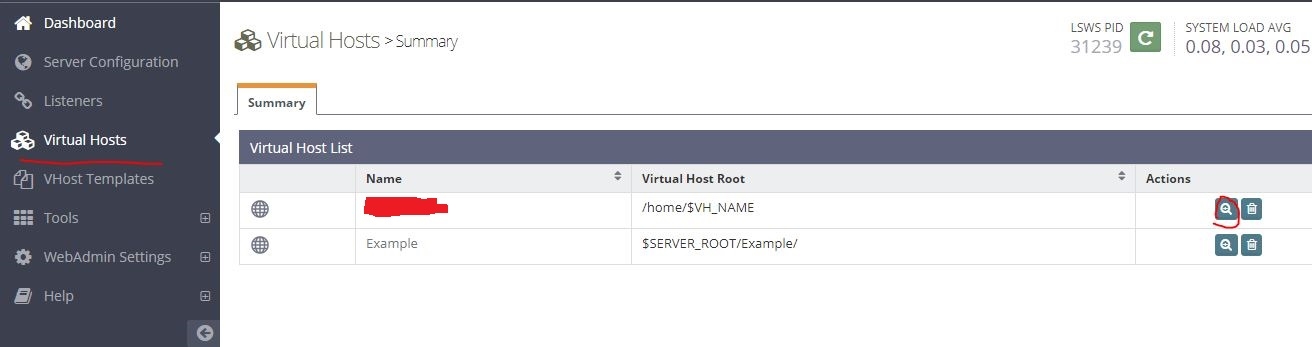
login to console , go to Virtual Hosts , and select your site, as screenshot
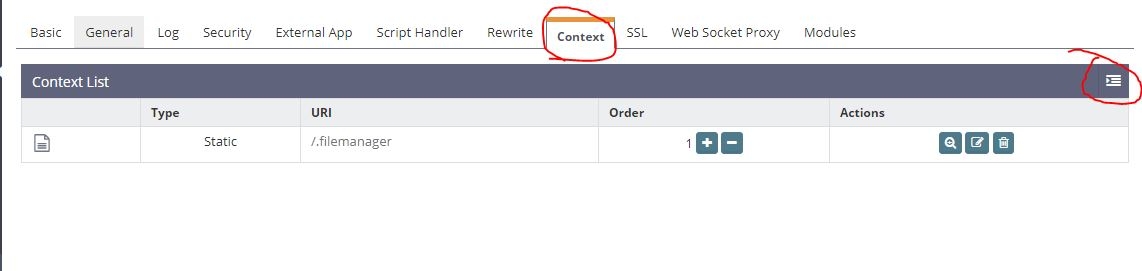
now goes to “Context” tab , click “Add” , as you can see in screenshot

Add new context , type: Static, and click “Next”
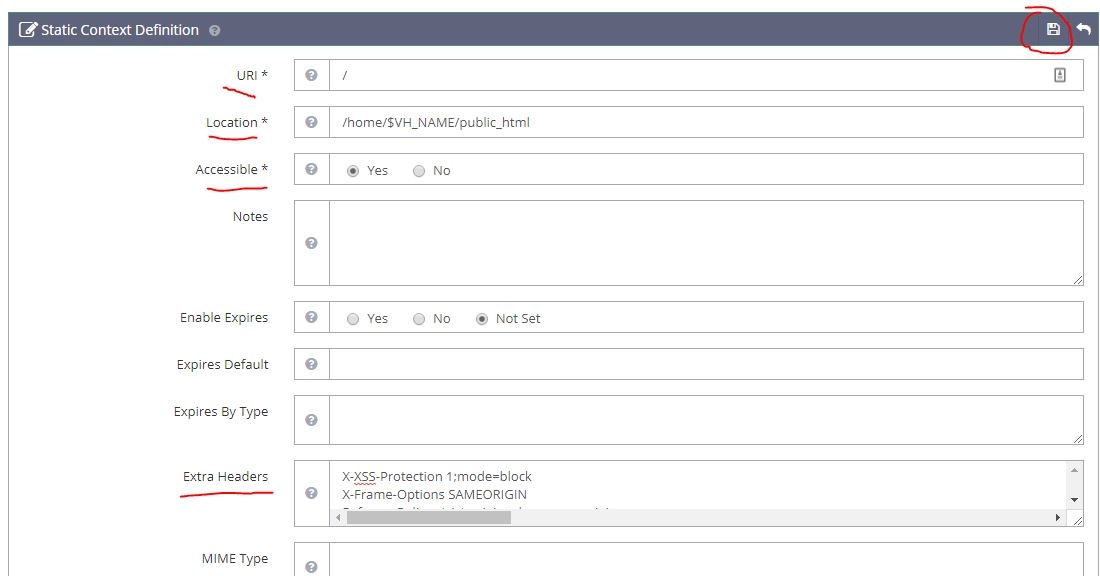
now fulfill following required options , in this case http header needs to be site-wide , so

URI: / 
Location: /home/$VH_NAME/public_html
Accessible: Yes

Extra Header:

add the header you need.

since every webserver has its own syntax , so you may got it wrong first , usually you need to tweak with ; or space by adding or removing them , I will
list out some header I have confirmed working on OLS.

after added your headers , save it , and remember to restart OLS to take effect.

Examples of http header:

Content-Security-Policy default-src 'self' data: 'unsafe-eval' 'unsafe-inline' https://www.google-analytics.com https://ajax.cloudflare.com
X-XSS-Protection 1;mode=block
X-Frame-Options SAMEORIGIN
Referrer-Policy strict-origin-when-cross-origin
Strict-Transport-Security: max-age=15552000
X-Content-Type-Options nosniff
Public-Key-Pins 'pin-sha256="pin1"; pin-sha256="pin2"; max-age=2592000'

original posted here by myself , and translated by myself :slight_smile:

11 replies
TD
Tien Dung Dao #2

Why i add in htacess it not working ?

us
usmannasir #3
Why i add in htacess it not working ?

OpenLiteSpeed does not honor these directives in .htaccess, you can set them via Webadmin.

Lu
Luke007 #4

Is there any way to add additional headers at the server level?

qt
qtwrk #5
Is there any way to add additional headers at the server level?

not from what I know

KR
KRV #6

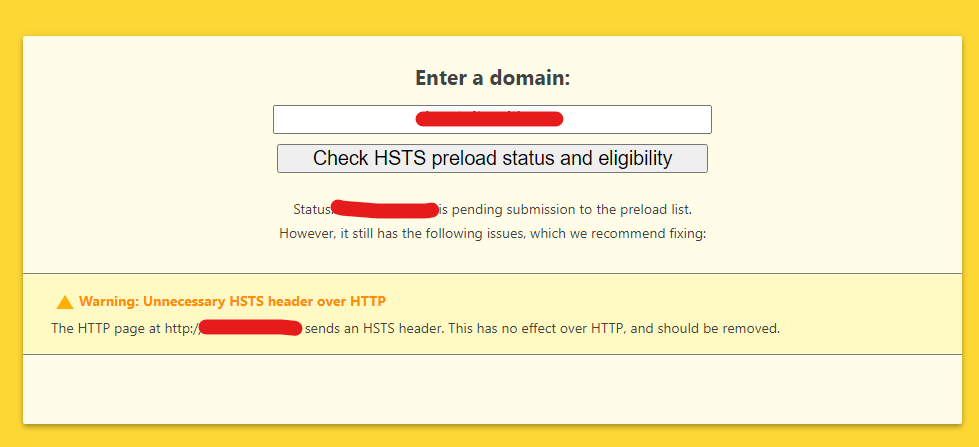
Its works. But. If check on https://hstspreload.org/ will be displaying:
Warning: Unnecessary HSTS header over HTTP

If reading OWASP Security Docs, we will be understand that:

“The Strict-Transport-Security header is ignored by the browser when your site is accessed using HTTP; this is because an attacker may intercept HTTP connections and inject the header or remove it. Remove the Strict-Transport-Security header from all HTTP responses and only send it via HTTPS connections.”

Question: how add Strict-Transport-Security only for 443?

de
deewinc #7

It doesn’t work. Did something change over the years?

ma
marc #10

I’m trying to add Header Security to improve WordPress site performance tests. I’m using LScache and QUIC.Cloud for CDN.

I added the following to vHost Conf. It’s working correctly for the following, but not the others:

  1. Strict-Transport-Security “max-age=15552000; includeSubDomains;preload”, and
  2. X-XSS-Protection 1;mode=block

context / {
allowBrowse 1
extraHeaders Strict-Transport-Security “max-age=15552000; includeSubDomains;preload”
X-XSS-Protection 1;mode=block
X-Content-Type-Options nosniff
X-Frame-Options SAMEORIGIN
Referrer-Policy: no-referrer-when-downgrade
Content-Security-Policy: script-src ‘self’

rewrite {

}
addDefaultCharset off

phpIniOverride {

}
}

ma
marc #11

Type your comment> @marc said:

I’m trying to add Header Security to improve WordPress site performance tests. I’m using LScache and QUIC.Cloud for CDN.

I added the following to vHost Conf. It’s working correctly for the following, but not the others:

  1. Strict-Transport-Security “max-age=15552000; includeSubDomains;preload”, and
  2. X-XSS-Protection 1;mode=block

context / {
allowBrowse 1
extraHeaders Strict-Transport-Security “max-age=15552000; includeSubDomains;preload”
X-XSS-Protection 1;mode=block
X-Content-Type-Options nosniff
X-Frame-Options SAMEORIGIN
Referrer-Policy: no-referrer-when-downgrade
Content-Security-Policy: script-src ‘self’

rewrite {

}
addDefaultCharset off

phpIniOverride {

}
}

Problem solved. My bad.
You cannot edit Security Headers in CyberPanel - must use OLS webadmin which I did not know about.
Next, I had a problem with the Content-Security-Policy causing the site to crash, but fixed after I changed to:
Content-Security-Policy default-src data: ‘self’ ‘unsafe-inline’ ‘unsafe-eval’ https://www.google-analytics.com

Sign in to reply