CyberPanel Community

CyberPanel - WebHosting Control Panel Based Purely On OpenLiteSpeed

us
usmannasir #1

CyberPanel is a web hosting control panel based purely on OpenLitespeed. It also comes with FTP, DNS, Email, Firewall, FileManager, MySQL, automatic SSL and all this for free.

Let see why OpenLiteSpeed.

  • High performance, event-driven architecture.
  • Super light-weight, minimal CPU and memory footprint.
  • Apache-compatible rewrite rules.
  • Also comes with User-friendly WebAdmin GUI for technical users.
  • OpenLitespeed PHP suExec also proved to be faster than php-fpm.
  • Cache. (Plugins also available for most popular CMS)

Why CyberPanel?

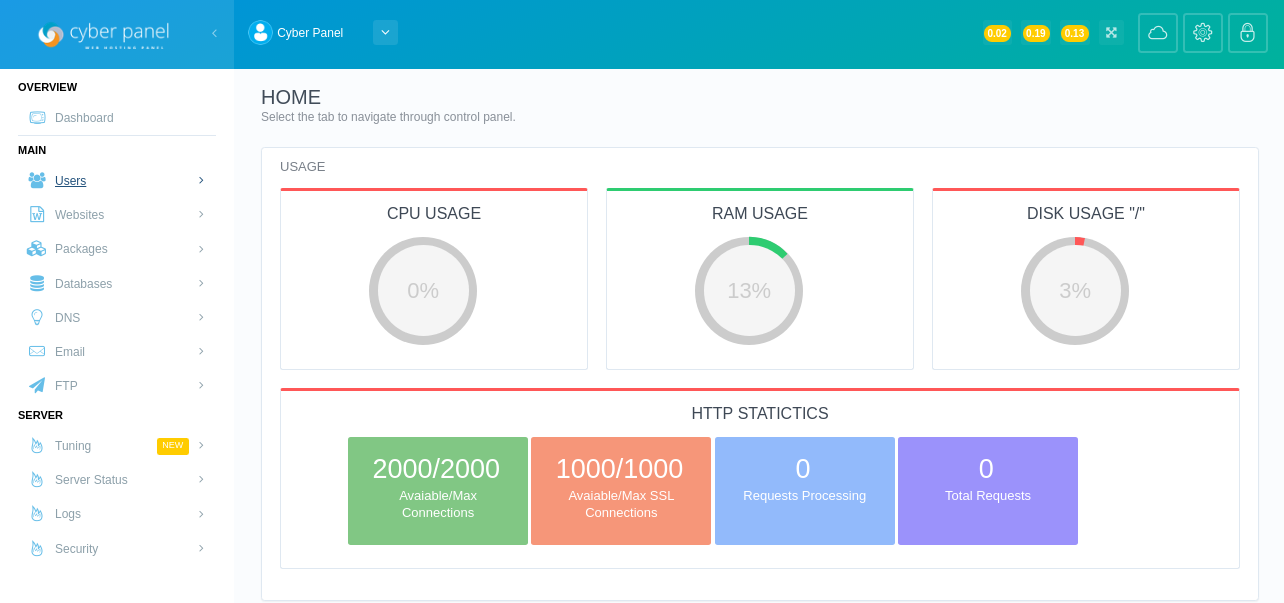
CyberPanel is GUI based control panel to control your hosting environment and start hosting your websites in easy to use manner. Built by keeping in mind the ease of use, and making sure things are not complex and easy to understand. Let see some of the features:

Users

CyberPanel comes with 3 level of users.

  • Administrator (Complete control, can create resellers and users).
  • Reseller (Can create users).
  • User (Only manage their websites).

Details regarding user management can be found here.

Packages

Packages define resources for a particular website, you can create a package from GUI panel easily. More details here.

Websites

Web sites are the main point of function for all other services in CyberPanel, a user needs to create a website before they can use its related services that include:

  • FTP.
  • Email.
  • Databases.

It also comes with Letsencrypt automatic SSL, user can also add their own SSL later manually.

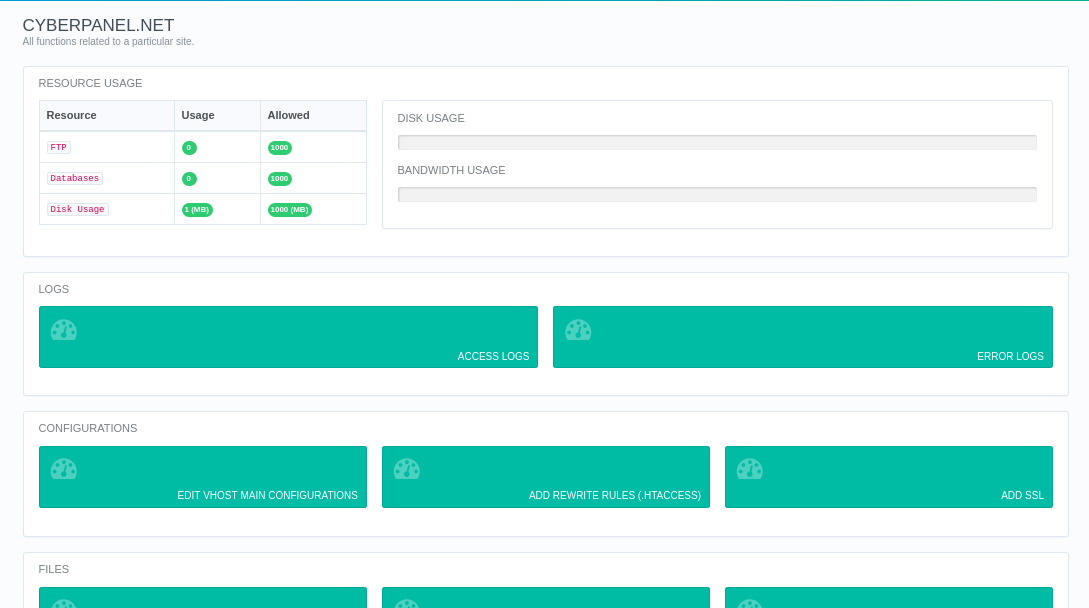
This is how an individual website control page looks like:
DNS

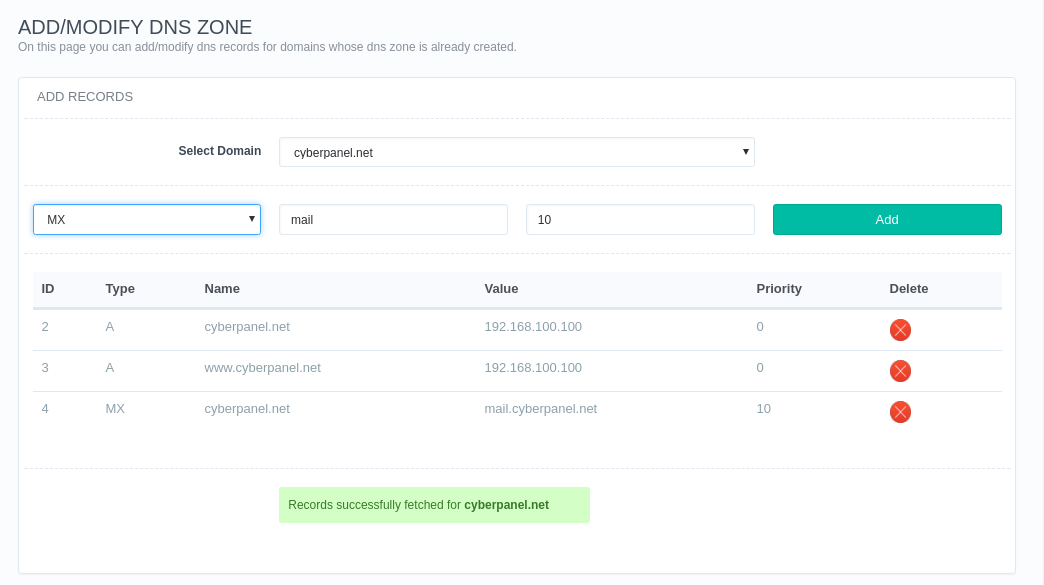
CyberPanel ships with PowerDNS as a high-performance DNS server, currently support following record types:

  • A
  • AAAA
  • MX
  • CNAME
  • TXT
  • SPF
  • NS

How to add/delete DNS records

Email

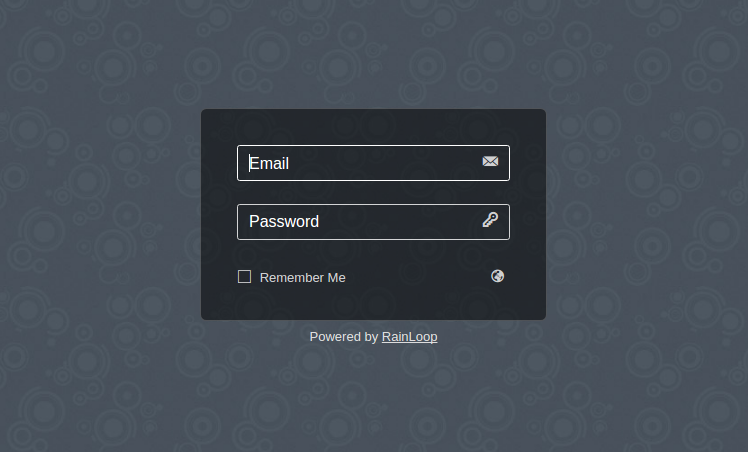
CyberPanel uses Rainloop as a WebMail client, you can easily create, delete email accounts.
File Manager

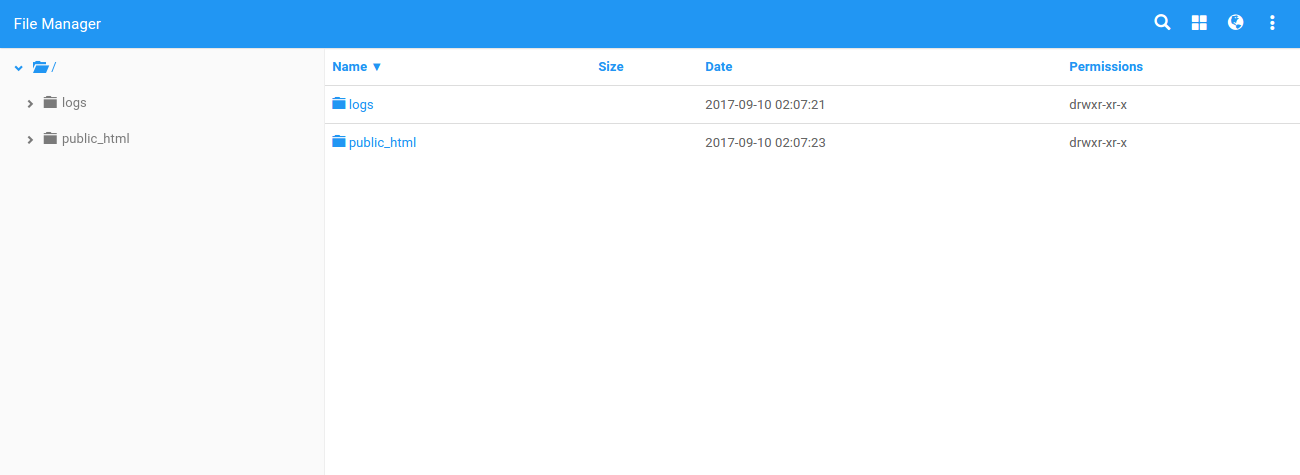
To manage your files you can either use FTP or our GUI based file manager.
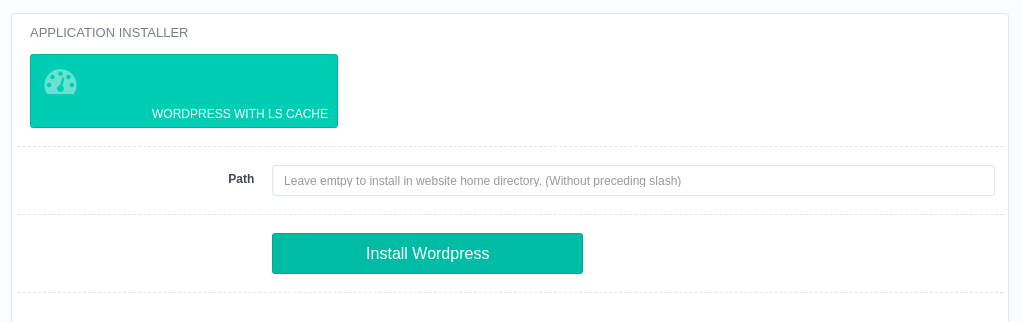
One Click Automatic WordPress Installation with LSCache

CyberPanel comes with one click installation for WordPress with lightspeed cache already configured.
Firewall

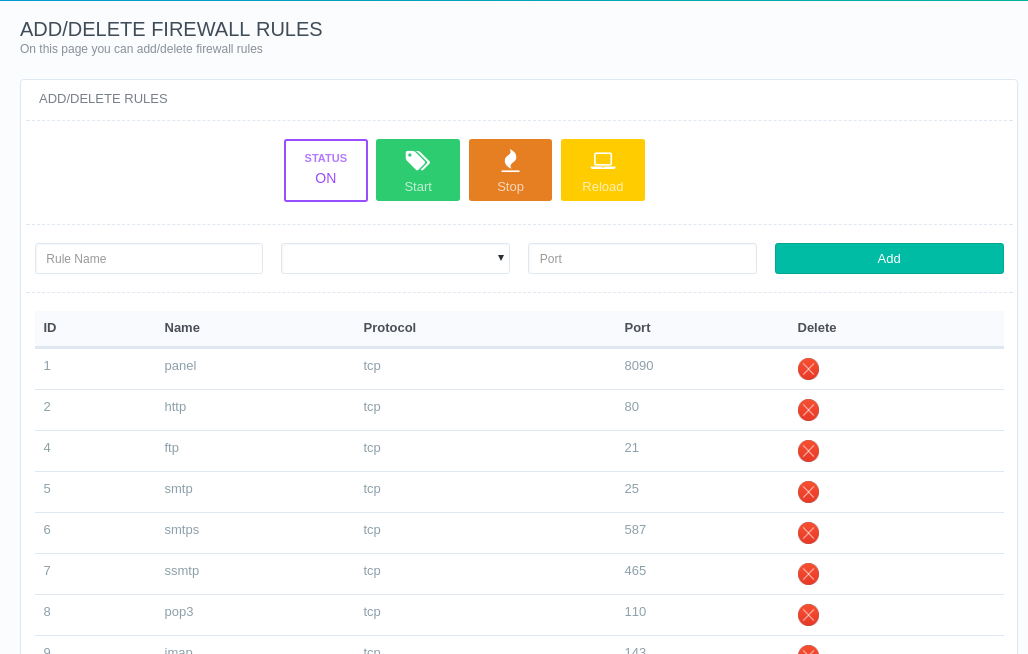
By defaul only HTTP, HTTPS, FTP, EMAIL and DNS ports are open you enable and disable ports from the control panel.
If you have any feature request you can post below this thread, and we will try to include in the future release.

Documentation

Kind Regards

55 replies
xe
xemorytr #2

I have restarted 8090 port connections :frowning:
This site can not be reached 8090 port collapse :frowning:

Ho
Hope #3

@xemorytr said:
I have restarted 8090 port connections :frowning:
This site can not be reached 8090 port collapse :frowning:

If some one have same problem they can use

/usr/local/lscp/bin/lscpd

On command line.

Ja
Jack #4

The best panel out there :slight_smile:

Dy
Dynamite #5

CyberPanel Demo is now available to be viewed from the following address

demo.cyberpanel.net:8090

Admin Login
User: demoadmin
Password: demo123

Reseller Login
User: demoreseller
Password: demo123

Client Login
User: democlient
Password: demo123

ba
baoang #6

Can these modules be optional when conducting the installation? I mean some users may only want a website, an ftp a/c, a database, and etc without email or DNS parts. With optional installation, there is no need to do the config jobs for, say email and DNS parts.

Ro
RoldanLT #8

How come its free by the way? :hushed:
Thanks a lot for the hard work.

Ne
Nencio #9

I found an OpenLiteSpeed conversion on LiteSpeed during translation.
Will Cyberpanel still be on OpenLiteSpeed or will it be changed to LiteSpeed?

Cy
CyberPanel #10
I found an OpenLiteSpeed conversion on LiteSpeed during translation. Will Cyberpanel still be on OpenLiteSpeed or will it be changed to LiteSpeed?

CyberPanel open source version continue to be on OpenLiteSpeed.

Ne
Nencio #11

Is there any plans to opt out of OpenLiteSpeed and change to LiteSpeed?

Cy
CyberPanel #12
Is there any plans to opt out of OpenLiteSpeed and change to LiteSpeed?

Not on open source CyberPanel.

Ne
Nencio #13

Thank you.

wu
wuethrich06 #14

any plans to allow admin to be disabled? or renamed would be even better (maybe update anything dependent to refer to an id key rather than name?) if i go digging in db will i break it if i do so? some orgs/validation criteria dont like/allow default admin accounts( so it would be a primo feature)!

how about more awareness of multiple network interfaces? I have a vps set up with 2 ips and openvpn configured. Ideally id like to throw cyberpanel onto the virtual interface only 10.8.0.x.

through playing around i can see there are a few diff ways to specify an ip (like /etc/cyberpanel/machineIP and inside vhost files ie “allow”) but not necessarily which best accomplishes this goal .

the OLSwebadmin was easy, I simply mapped the admin listener to the tap ip and now i have to be connected via vpn to get to it.

Could you perhaps break it out to its own listener in the next update?

thanks for the hard work so far!

Cy
CyberPanel #15
/etc/cyberpanel/machineIP

When CyberPanel creates DNS records it fetches IP from this file, so if you are confident and can configure through configurations files or web admin, you are good to go. Because CyberPanel will honor your custom configurations and not reset them to defaults.

However later, we will allow this via CyberPanel as you have suggested.

Se
Sergey #16

(Ru) Привет! Подскажите пожалуйста я установил cyberpanel ent , на ней из-за ограничения лицензии нельзя использовать больше 1 домена , возможно ли провести замену веб сервера на openlitespeed?

(En) Hi! Please tell me I installed cyberpanel ent, it is impossible to use more than 1 domain because of the license restriction, is it possible to replace the web server with openlitespeed?

Se
Sergey #17
(Ru) Привет! Подскажите пожалуйста я установил cyberpanel ent , на ней из-за ограничения лицензии нельзя использовать больше 1 домена , возможно ли провести замену веб сервера на openlitespeed?

(En) Hi! Please tell me I installed cyberpanel ent, it is impossible to use more than 1 domain because of the license restriction, is it possible to replace the web server with openlitespeed?

I managed to do everything on my own within 30 minutes. After the transition, the file manager stopped working. Not critical. Thank you for your hard work and for the opportunity to use cyberpanel for free.

Cy
CyberPanel #18
(Ru) Привет! Подскажите пожалуйста я установил cyberpanel ent , на ней из-за ограничения лицензии нельзя использовать больше 1 домена , возможно ли провести замену веб сервера на openlitespeed?

(En) Hi! Please tell me I installed cyberpanel ent, it is impossible to use more than 1 domain because of the license restriction, is it possible to replace the web server with openlitespeed?

I managed to do everything on my own within 30 minutes. After the transition, the file manager stopped working. Not critical. Thank you for your hard work and for the opportunity to use cyberpanel for free.

Let us know if we can be of any help on your File Manager issue.

Se
Sergey #19
Let us know if we can be of any help on your File Manager issue.

Thank you for help not required. I found the cause and fixed the problem.

va
valmount #20

hello sir,

Every time I install cyberpanel-ent, port 80, 7080 and some other ports cannot be accessed, I have inserted the firewall port into the firewall, and it cannot be opened.

but if I do install cyberpanel-free everything runs normally.

please help and thanks

Screenshoot :

  1. https://dei.id/zH78a CSF ( CONFIGSERVER SECURITY AND FIREWALL )!
  2. https://dei.id/oCDK0 ( Browser, open http://ip/ )
  3. https://dei.id/Nyk8c ( Allowed port 7080 at CSF )!
  4. https://dei.id/v1lSX ( Can’t start litespeed )
    5 https://dei.id/JQSsb ( My License ID )
  5. CYBERPANEL MAIN LOG FILE
    [09-49-21-Tue-Nov-2018] Command ‘[‘sudo’, ‘cat’, ‘/usr/local/lsws/conf/httpd_config.conf’]’ returned non-zero exit status 1 [fetchTuningDetails]
    [09-49-41-Tue-Nov-2018] Command ‘[u’/usr/local/lsws/bin/lshttpd’, u’-v’]’ returned non-zero exit status 1[litespeedStatus]
    [09-50-08-Tue-Nov-2018] Command ‘[‘sudo’, ‘cat’, ‘/etc/csf/csf.conf’]’ returned non-zero exit status 1[fetchCSFSettings]
    [09-50-15-Tue-Nov-2018] [Errno 2] No such file or directory: ‘csf.tgz’ [CSF.run]
    [09-58-38-Tue-Nov-2018] Command ‘[u’/usr/local/lsws/bin/lshttpd’, u’-v’]’ returned non-zero exit status 1[litespeedStatus]
    [09-59-21-Tue-Nov-2018] Command ‘[u’/usr/local/lsws/bin/lshttpd’, u’-v’]’ returned non-zero exit status 1[litespeedStatus]
    [09-59-31-Tue-Nov-2018] No JSON object could be decoded
    [09-59-51-Tue-Nov-2018] No JSON object could be decoded
  6. https://dei.id/NSxQf ( Check Port 80 )
  7. https://dei.id/Fq10T ( Check Port 8090 )
  8. https://dei.id/xWHFl ( Check Port 7080 )
Cy
CyberPanel #21

CyberPanel by default does not use CSF, so I recommend to not enable CSF until your issue is resolved.

The second thing is you have a normal starter license, CyberPanel requires starter license with CyberPanel bundle, that you can get from CyberPanel Enterprise - CyberPanel

va
valmount #22
CyberPanel by default does not use CSF, so I recommend to not enable CSF until your issue is resolved.

The second thing is you have a normal starter license, CyberPanel requires starter license with CyberPanel bundle, that you can get from CyberPanel Enterprise - CyberPanel

do not use CSF the same results … Can not open all ports that I reported.

I use this tutorial :

To install CyberPanel Ent, you first need to obtain a license key (it is free for 1 domain, but you still need to obtain the key). Visit the pricing table to decide your desired plan.

Obtain a License!

Before running the installation, you need to obtain a license. A license key will be asked for during installation.

Installation

On you’re on the command line terminal run the installation script as a single command:

sh <(curl https://cyberpanel.net/install-ent.sh || wget -O - https://cyberpanel.net/install-ent.sh)

and my
License ID : 142098
License ID : 142944

==================

  1. https://dei.id/Hy9cJ [ Not Use CSF again ]
  2. https://dei.id/0LAvp [ Port Close 80, 7080, 443… ]
Cy
CyberPanel #23

Your license comes with CyberPanel bundle?

va
valmount #24
Your license comes with CyberPanel bundle?

Yes Sir…

Free Starter with CyberPanel
LiteSpeed Web Server (CyberPanel Bundle)

License ID 142944
Serial No. CQ/r-DXuF-dHNd-****
Server IP Address 107.161.91.31
Locked IP 107.161.91.31

va
valmount #26
Please submit ticket https://cyberpanel.net/support

Ok sir.

Note :
i can’t add server… ( https://dei.id/BApsu )

Error
‘userName’

Please help

va
valmount #28
It is not mandatory now to add the server before creating a ticket. Plus you did not add a server name.

And upgrade to the latest version before connecting your server to the platform 02 - Upgrading CyberPanel - 01 - Install/Upgrade - CyberPanel Community

everything is complete. error in username

For Upgrade :

#################

[09-08-23-Thu-Nov-2018] Old File Manager files successfully removed!

[09-08-23-Thu-Nov-2018] ######################################################## #################

mv: cannot move ‘/usr/local/CyberCP/install/FileManager’ to ‘/usr/local/lsws/Exa mple/html’: No such file or directory

[09-08-23-Thu-Nov-2018] ######################################################## #################

[09-08-23-Thu-Nov-2018] Trying to upgrade File manager, try number: 2

[09-08-23-Thu-Nov-2018] ######################################################## #################

mv: cannot move ‘/usr/local/CyberCP/install/FileManager’ to ‘/usr/local/lsws/Exa mple/html’: No such file or directory

[09-08-23-Thu-Nov-2018] ######################################################## #################

[09-08-23-Thu-Nov-2018] Trying to upgrade File manager, try number: 3

[09-08-23-Thu-Nov-2018] ######################################################## #################

[09-08-23-Thu-Nov-2018] ######################################################## #################

[09-08-23-Thu-Nov-2018] Failed to upgrade File manager! [upgrade]

[09-08-23-Thu-Nov-2018] ######################################################## #################

[root@server ~]#

ia
iamkingsleyf #29

does it come with litespeed enterprise?

Cy
CyberPanel #30

It comes with both, you can choose during installation.

sf
sfenky #31

[06-24-04-Mon-Apr-2019] #########################################################################

[06-24-04-Mon-Apr-2019] CyberPanel Make Migrations failed, trying again, try number: 3

[06-24-04-Mon-Apr-2019] #########################################################################

[06-24-04-Mon-Apr-2019] #########################################################################

[06-24-04-Mon-Apr-2019] [ERROR] We are not able to CyberPanel Make Migrations return code: 1. Fatal error, see /var/log/installLogs.txt for full details [download_install_CyberPanel]

[06-24-04-Mon-Apr-2019] #########################################################################

[03-19-19-Mon-Apr-2019] CyberPanel Download successful
[03-19-19-Mon-Apr-2019] Extract CyberPanel [download_install_CyberPanel]
[03-19-21-Mon-Apr-2019] Extract CyberPanel successful
[03-19-21-Mon-Apr-2019] Updating settings.py!
[03-19-21-Mon-Apr-2019] settings.py updated!
[03-19-21-Mon-Apr-2019] CyberPanel Make Migrations [download_install_CyberPanel]
[03-19-22-Mon-Apr-2019] [ERROR] We are not able to CyberPanel Make Migrations r$

ubuntu 18.10

ma
matthewgregoryepic #33

Any chance anyone can provide us with a working demo? I would love to see it in action.

If I could use CyberPanel instead of cPanel, and Open Litespeed instead of Enterprise, that would be a $50/mo savings. So a demo would be most welcome. (the “unofficial” demo doesn’t work.)

fe
fearles1453 #36

mail calişmiyor :frowning:

onun haricinde iyi bir panel elinize saglık tesekkurler :smile:

em
emoticonizer #37

Does its latest version already support Apache as backend? Better integration with Apache rewrite rules would be better :smiley:

w3
w3services #38

How to set plan for the user like 1 domain + unlimited subdomain can be hosted?

Wa
Waqass #39

Oh My God! I am falling in love with this panel. Surely going to install on my next server. After CPanel raised their price I finally found a real alternate! Fast, Secure and Simple.

ve
veicular #40

No meu caso, o CyberPanel só permite instalar script pré instalados como: Wordpress, magentto, prestashop que ja vem com cyberpanel.

ao instalar pela forma manual seguindo os passos: Criar banco de dados, subir arquivos para ficheiro e instalação apresenta erros: Failed to load resource: the server responded with a status of 500 (Internal Server Error)

so
soliman18eg #41

does anyone know how big the fresh installation cuber panel and the wordpress. I installed the cyber panel multiple time and setup wordpress al up and running. and the disk usage is about 6G. does really take like this much ?

bs
bsanz16 #42

While I used to use Cyberpanel a year ago I discontinued due to having to use 2 panels (CP and OLS) to do basic things like add ip’s and edit configs.

Is there any roadmap for integrating OLS items into Cyberpanel so don’t have to switch between 2 admin panels?

Sh
Sheba #43

Greetings, I am new here. How do I post a new topic?

My issue is:

How do I create a Cpanel equivalent in Cyberpanel? Thanks for your attention.

ev
evgsav1 #44

The new version of cyberpanel (2.1.1) looks (and is) a fake of underdeveloped schoolchildren. Full of bugs and errors. the feeling that the developers were very hacky and did not even test their creation

ka
kaiquebarreto #45

I can’t send emails, just receive, there is no apparent error, the email even goes to the “sent” ones, but it doesn’t reach the destination!

li
lisliz #46

Alguien que me ayude mi pagina web en lugar de cargar descarga un archivo. Ayudenme por favor!

ay
aybekdes #47

Ssl problems on all servers, what is going on?!

da
dampel #48

No www → without www, http to https redirects in the settings of web domain, no the button for disable LE for a domain, bugs in the languages system, except to English

da
dampel #49

a little confused
I figured out the redirects and language files.

ve
veicular #51

Type your commentCan anyone help me, site just doesn’t run.
4GB 2 core VPS with 7 cent.

I installed cloud.cyberpanel and wordpress, the site with a native theme just doesn’t run.

PC
PCx3.com #52

Hi @veicular
Is any error message displayed at all? anything in the error log?

As standard WP troubleshooting: enable debug and PHP error reporting, and go through the messages - depending on them check PHP version, db connection, etc.

ve
veicular #53

Digite seu comentário> @stefanepejcic said:

Hi @veicular
Is any error message displayed at all? anything in the error log?

As standard WP troubleshooting: enable debug and PHP error reporting, and go through the messages - depending on them check PHP version, db connection, etc.

No log reporting

define(‘WP_DEBUG’,true);

define(‘WP_DEBUG_DISPLAY’,true);

openlitespeed simply locked

Now test on ServerS Hosting Now Vultr The result is the same every time.

The installation is clean and does not run.

all hosting (VPS) with cents 7 4GB and 2 Core

kh
khanhaseeb #54

I created a website but the file is not creating the file manager as well as folder

br
brewmaxwell649 #55

Thank you for help not required. I found the cause and fixed the problem.

or
oreana #56

[10.11.2021_16-44-44] [ERROR] We are not able to run apt-get -y install openlitespeed return code: 100. Fatal error, see /var/log/installLogs.txt for full details.

Sign in to reply