
CyberPanel Community

5 - Change Upload Limit for Filemanager

RM
Rana Muhammad Usman Nasir #1

Note: After 2020 and above this documentation below is obsolete. For earlier version you was able to update upload size of CyberPanel file manager using this guide. However CyberPanel file manager now have default limit of 2GB.

If you want to update upload size at WordPress (or your application). Find the PHP version of that site and update its upload_max_filesize and post_max_size.


v1.7.0 and above

v1.7.0 and above default upload limit is 200MB, regardless of upload limit of your Global PHP. To increase this limit go to:

https://<IP Addres>:8090/websites/domain.com

Then scroll down and click vhost Conf
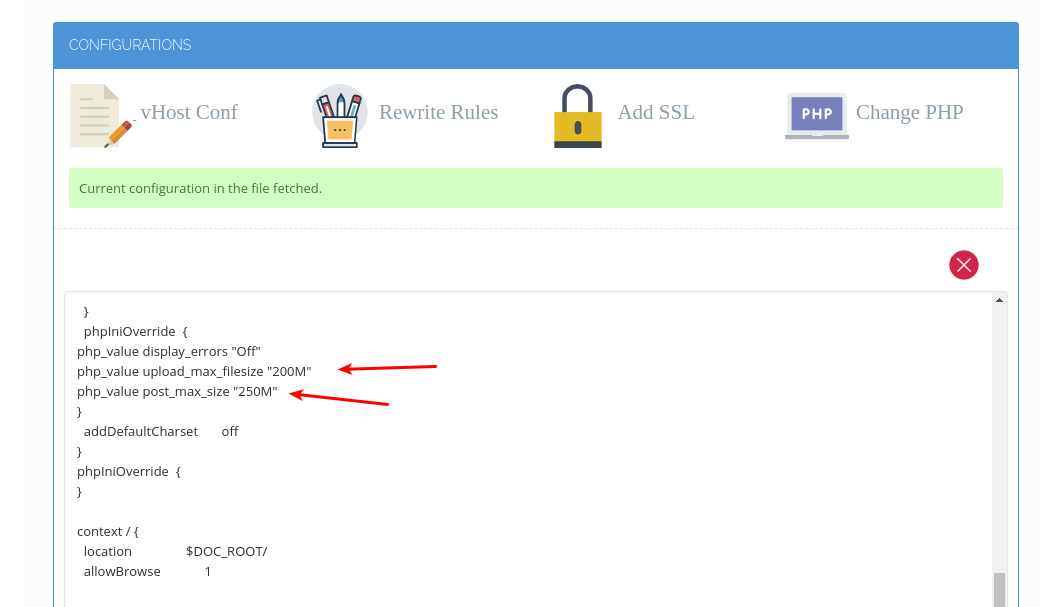
Then change the upload limit by editing following two parameters:

  1. php_value upload_max_filesize “200M”

  2. php_value post_max_size “250M”

post_max_size should be greater than or equal to upload_max_filesize.


Before v1.7.0

After 1.6, filemanager uses your website PHP to upload data. To change upload limit you need to change two parameters of your PHP.

  • upload_max_filesize

  • post_max_size

Make sure post_max_size is greater than upload_max_filesize. Read this guide on how to change your PHP settings.

You need to change these settings for the PHP version your website is using. You can also change your PHP version through Modify Website.

21 replies
MK
Mirza Khadnezar S [sick] #3

dear @usmannasir
i have already change the vhost conf

phpIniOverride  {
php_admin_value open_basedir "/tmp:$VH_ROOT"
php_admin_value upload_max_filesize "20M"
php_admin_value post_max_size "80M"
}

why it not change ? default still 2MB
i want to change by user not via admin panel

NK
Nitesh Kunnath #6

For Filemanager or in PhpMyadmin?

For rest of the server side, you will need to change upload_max_filesize in php. Login to cyberpanel, under PHP you will see option edit php config, select php 7.3 and change the value of upload_max_filesize and post_max_size

NK
Nitesh Kunnath #8

Just change the things mentioned in my above post and it should be fine. Please check and confirm if it solves your issue.

MK
Mirza Khadnezar S [sick] #9

sorry for late reply, i was not at home :frowning:
i mean to change per user , website/domain ?

NK
Nitesh Kunnath #10

The limits are set universally. If you need to set at user level, then you can use php.ini file.

MK
Mirza Khadnezar S [sick] #11

sry to bump

is that no problem to create php.ini ?
whichone is server will read ? the vhost config or php ini ?

NK
Nitesh Kunnath #12

vhost for openlitespeed

Litespeed enterprise will read everything without issue.

NK
Nitesh Kunnath #14

Try it and restart server, i think it doesnt read but haven’t tried myself.

MK
Mirza Khadnezar S [sick] #15

yeah i just deploy new cyberpanel… nice color on new installer lol

i will test it asap

FB
Franklyn Benjamin #16

did you able to upload I want to upload a 7GB file, how can I do this to the file manager?

FB
Franklyn Benjamin #17

can not be uploaded, Error message: wp840.sql 6,663.19 MB help anyone…

NK
Nitesh Kunnath #18

Login to cyberpanel and on left Menu bar panel, you will find option named PHP. Under that, click on edit PHP configuration and then select PHP version 7.3

Then change the values of upload_max_filesize and post_max_size to your required size. Then click on restart PHP button there.

MK
Mirza Khadnezar S [sick] #19

i just use wget oldserver
then i dum the sql via CLI

De
Den #20

Dear @usmannasir

I am using cyberpanel 2.3.2 ubuntu 20.04. How to change the upload limit in the file manager?
Files smaller than ~600MB are loaded normally. Files larger than ~600MB give an error in the file manager, but in the /tmp/lscpd/swap/ folder, you can see that the files are loaded completely up to 1.5GB (when installing cyberpanel, the /tmp 1.5GB partition is created).

In the log /home/cyberpanel/error-logs.txt there are messages “Request body exceeded settings.DATA_UPLOAD_MAX_MEMORY_SIZE.”

cat /usr/local/CyberCP/CyberCP/settings.py | grep DATA_UPLOAD_MAX_MEMORY_SIZE
DATA_UPLOAD_MAX_MEMORY_SIZE = 52428800 (This value has no effect)

tb
tbaldur #21

Regarding the file manager, is this an implementation of open-source software, or was built by the cyberpanel team?

I ask this because one could either adapt or replace the file manager to upload using chunks, bypassing any upload_max_filesize restriction. That would also allow resuming uploads in case the network fails.

If it’s open-source software, could you throw the link here, please?

Ze
Zer01ne #22

in my case I am getting this error

image

Sign in to reply